Silvershadow's eye candy 1: The river runs thru it
-
@solo said:
I cannot seem to locate it but I once remember talk about a 'Greeble' script, my thinking was that this too could be a solution.
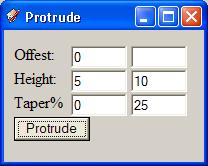
However Silver you certainly used SP in a very creative way.It's not well documemented, but protrude can offset, protrude, and taper faces. Leave the second column blank unless you want a random number btween the range.
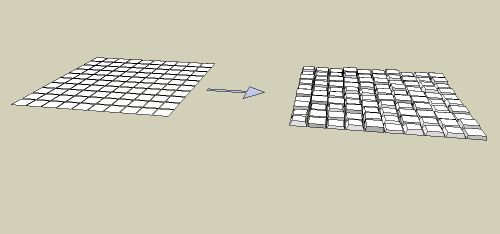
This model was produced using these inputs:
-
%(#BF0000)[STAGE 2
 LIGHTING
Hi guys. Im moving now into stage 2 of my model.
but before i start i want to know, because we are having this discussion.
What is better for setting up light. Using sketchup's sun angles,or using multiple lights
omnis and rectangulars. I am not sure what the professional line prefer to use,
skylights stand alone, omni and rectangular lights. Im just asking in general, not specific sketchup only but in the modelling industry, what will be the best results you will get ]
] -
Wow, this is amazing! Thank you silvershadow for the generosity of your time in putting these together. I can't wait to try some of these out. You are very talented!
-
yea im also a big fan of only using sky alone.. but i kind of like the omni and rec light also. The thing is.. but thats just me.. ive seen most professional people uses sometimes just this, omnis and rec lights. But then again, using sky, makes the model looks more realistic and not like its sitting on a set.
-
@silver_shadow said:
What is better for setting up light. Using sketchup's sun angles,or using multiple lights
omnis and rectangulars. I am not sure what the professional line prefer to use,
skylights stand alone, omni and rectangular lights. Im just asking in general, not specific sketchup only but in the modelling industry, what will be the best results you will getThe professional ones using the dinosaur packages (Max, Maya, etc...) would prefer a combo with additional directional/fill lights, as that would give full control over light setup.
Sometimes they need exactly 'that' ray of sun light hitting that exact spot of the model.Personally I love to use Sky only and to see how far that brings me,because it would be closest to seeing reality. But that's from an architects standpoint.
Ask a graphical (3D) designer, and he will want to fine tune additional light sources to obtain exactly the effect he wants. -
True. It's 'the eye of the Beholder'.
You can pick the images that were created by an architect from the ones created by a graphical artist.Different approach. -
Hey silver_shadow, you've got some amazing SU models.
Keep up the good work!
-
Might make a fine "community project". People run this one through the renderer of their choice, we bundle the renders, and send them to Google HQ. Message: we need high poly support. Of course, they could go: no, you don't, you're doing great without it.

-
thanx, i have build a lot of nice stuff but never finished it, kinda lost interest or don't have the time to finish it...its actually amazing i finished building this model lol
-
lovely
-
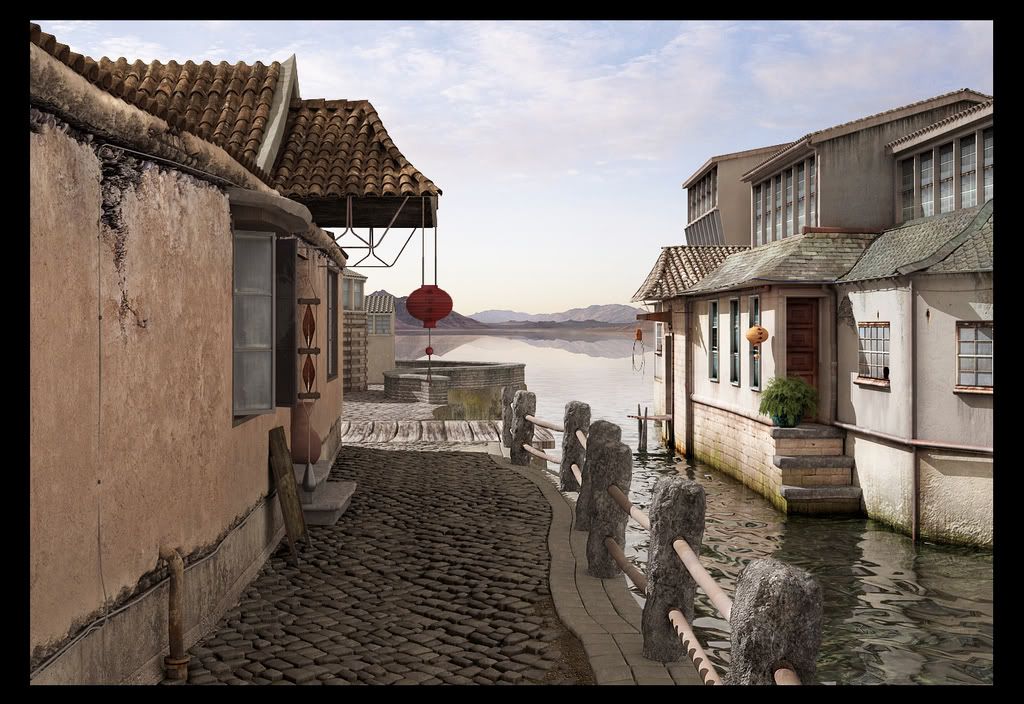
[color=#BF0000]here you go guys. Hope you like it
The only photoshop work that went into it was a colour correction and a bit of burning and lighting..
-
Very, very nice.
-
this is truely amazing, silver_shadow
-
fabulous!
-
Gobsmacked
very nice! great eye for detail -
hee hee i have textured this just for you HFM hee hee
-
Jacques, that render is fantastic. What a great demonstration of what can be achieved with SketchUp and some good skills.
Which program did you use to render this?
I would love to know how you manage to texture parts of this like the building to the right with the green algae just above the water line. Also the left of the image, the damage stucco on the building. Do you find these textures then manipulate them in PS to fit?
-
thanx, how can one make a file that show a range of images moving from one side to the other kinda like flash like little thumbnails. If anyone knows, i really want to know because i really want to make something like this
-
Thanx guys for the comments so far.
Ok here are the nitty gritty stuff you requested and how things were done
(Rendered in Vray for sketchup)
I broke up the rendering process into 3 parts, the right side & water as one, the stone posts and its base as a second render, and the third is the cobbles and the left buildings
Called it part 1,2 and 3. So. Part one rendered quite fast25 to 30 min, part 2 rendered also in about 25 to 30 minutes...and part 3 rendered in about 80 hours. yea. It has to do with the displacement map and somehow it gave me uphill in the rendering time, so i just let it finished. Got all 3 parts, i photoshopped it together as if it was one complete render. Un textured, the file size was about 17mb, textured was around 82.1mb. Waaay more than i thought it would turn out to be.Texturing this thing was also a head scratcher, i know i am really good in photoshop and post process my models normally to death, so this time i wanted to build something that i can proudly say HEY, this is all textured and not photoshopped. It took longer but this is how i did it. It was kinda like other applications work doing UV mapping, so i made my own plates. I took a face, rotated faces so that all of that specific face is flat, and use that as a guide to put textures on via photoshop.So a lot of baking and textures are overlayed ect to create one single texture. Once im happy, i took them into sketchup, scaled it till the face match exactly, and then projected it onto it.
( and i think i will texture all my future models like this )Below is what I used mainly to build this model.
Note that all of them are resized so if you guys want a specific texture you like (which is very unlikely lol) i will post that one for you in a bigger resolution.
-
@silver_shadow said:
...a lot of baking and textures are overlayed ect to create one single texture. Once im happy, i took them into sketchup, scaled it till the face match exactly, and then projected it onto it.
( and i think i will texture all my future models like this )but only until Whaat finds an amazingly easy way to use his texture mapping with multiple UVs, with a workflow as easy as SketchUps push/pull tool
(of course you have to go back to indigo then (with a bit more than 80 hours of rendertime) - or wait for v-ray to copy indigo
 )
)Jakob
ps: let me say again, how impressed I am with your model, and especially your render! it is truely amazing and makes me proud of SketchUp (even if I could never have done this...)
pps: the only thing that wasn't entirely convincing to me in your render was the water. but you can change that in 25 minutes...






Advertisement