sketchucation logo sketchucation
    • 登入
    Oops, your profile's looking a bit empty! To help us tailor your experience, please fill in key details like your SketchUp version, skill level, operating system, and more. Update and save your info on your profile page today!
    ⚠️ Important | Libfredo 15.6b introduces important bugfixes for Fredo's Extensions Update

    [Plugin] UVTools v0.1

    已排程 已置頂 已鎖定 已移動 Plugins
    180 貼文 71 Posters 128.5k 瀏覽 71 Watching
    正在載入更多貼文
    • 從舊到新
    • 從新到舊
    • 最多點贊
    回覆
    • 在新貼文中回覆
    登入後回覆
    此主題已被刪除。只有擁有主題管理權限的使用者可以查看。
    • W 離線
      watkins
      最後由 編輯

      Dear Dale,

      I have very little experience of rendering and I tend not to texture my models, so I am not too sure how to use a UV tool. By the way, what does UV stand for? If I understand your post correctly, the tool 'wraps' a texture around a curved object by projecting the texture from a plane positioned over and/or under the object. Further, the plane should be positioned so that its normal is along the centreline of the curved object which is itself aligned with the z-axis. Is this correct?

      Can one project/wrap textures from a plane over and a plane under an object by dividing the surface area of the object into two along an x-y plane? I imagine a vase with different designs on the upper and lower halves.

      Sorry for being so dense.

      Kind regards,
      Bob

      1 條回覆 最後回覆 回覆 引用 0
      • R 離線
        remus
        最後由 編輯

        Link Preview Image
        UV mapping - Wikipedia

        favicon

        (en.wikipedia.org)

        Theres a good illustration of spherical UV mapping there.

        And i tihnk UV is just he coordinaet system thats used when applying textures in this way, so thats where the name comes from.

        http://remusrendering.wordpress.com/

        1 條回覆 最後回覆 回覆 引用 0
        • urgenU 離線
          urgen
          最後由 編輯

          ...co-o-o-ol!thanks! 😍

          --pupil forever...------

          1 條回覆 最後回覆 回覆 引用 0
          • W 離線
            watkins
            最後由 編輯

            Thanks Remus!

            1 條回覆 最後回覆 回覆 引用 0
            • StinkieS 離線
              Stinkie
              最後由 編輯

              The use is simple. Texture your object, right-click it's surface, and choose either "spherical" or "cylindrical". The size of the maps you set in SU's mat editor.

              And you can in fact apply different textures on an object that's been divided in half.

              1 條回覆 最後回覆 回覆 引用 0
              • plot-parisP 離線
                plot-paris
                最後由 編輯

                what a wonderful plugin - works really good.

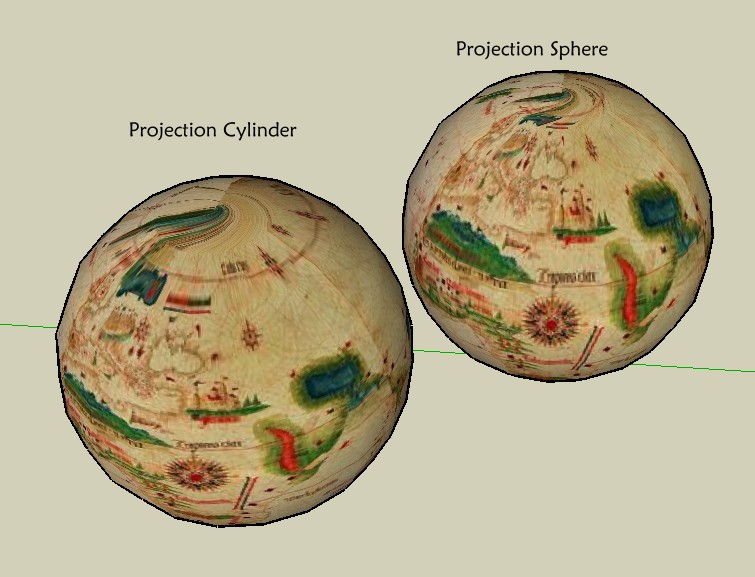
                cylindrical mapping is even exportet in Indigo (spherical is screwed up a bit) 😉

                spherical_zylindrical.jpg
                this is a start of a new world in SketchUp...

                thank you so much Whaat!

                1 條回覆 最後回覆 回覆 引用 0
                • pilouP 離線
                  pilou
                  最後由 編輯

                  @unknownuser said:

                  on an untextured object causes the fastest splat you've ever seen. Zappp - and SU's gone.

                  I confirm 😆


                  sphere.jpg

                  Frenchy Pilou
                  Is beautiful that please without concept!
                  My Little site :)

                  1 條回覆 最後回覆 回覆 引用 0
                  • W 離線
                    Whaat
                    最後由 編輯

                    @plot-paris said:

                    what a wonderful plugin - works really good.

                    cylindrical mapping is even exportet in Indigo (spherical is screwed up a bit) 😉
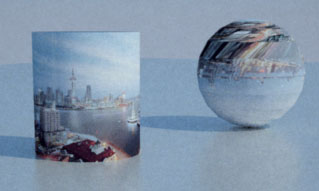
                    [attachment=0:2hx0fdop]<!-- ia0 -->spherical_zylindrical.jpg<!-- ia0 -->[/attachment:2hx0fdop]
                    this is a start of a new world in SketchUp...

                    thank you so much Whaat!

                    Your sphere might have reversed faces. I have seen this type of behavior before in the case of reveresed faces.

                    SketchUp Plugins for Professionals

                    1 條回覆 最後回覆 回覆 引用 0
                    • plot-parisP 離線
                      plot-paris
                      最後由 編輯

                      doesn't work with right face orientation either - I just checked to be sure... still the same messy texture.

                      indigo would have ignored a reversed face anyway.

                      but this is the first beta release, and it works perfect in SU! 😍
                      it is such a wonderful thing (just imagine how easy it is for fred to texture his sculptures now 😄 )

                      1 條回覆 最後回覆 回覆 引用 0
                      • D 離線
                        dtrarch
                        最後由 編輯

                        Stinkie is right.

                        Lightning BugSplat!!! on non-textured surfaces.

                        Otherwise works like a charm.

                        Thanks for such a fun tool too.

                        dtr

                        1 條回覆 最後回覆 回覆 引用 0
                        • PixeroP 離線
                          Pixero
                          最後由 編輯

                          Whaat, here is a link that might be of interest to you.
                          http://ozviz.wasp.uwa.edu.au/~pbourke/texture_colour/spheremap/

                          1 條回覆 最後回覆 回覆 引用 0
                          • J 離線
                            Jon
                            最後由 編輯

                            I have to agree with plot-paris. It doesn't kep it's genuine texture in Kerkythea, either.
                            But other than that, it works like a charm! Thank you!!! 😍

                            Jon
                            KT Team member

                            1 條回覆 最後回覆 回覆 引用 0
                            • W 離線
                              Whaat
                              最後由 編輯

                              @jon said:

                              I have to agree with plot-paris. It doesn't kep it's genuine texture in Kerkythea, either.

                              I find this very hard to believe! 😮 Please post your SKP file for me to test. Thanks!

                              SketchUp Plugins for Professionals

                              1 條回覆 最後回覆 回覆 引用 0
                              • J 離線
                                Jon
                                最後由 編輯

                                Well, it fails with every model I've exported so far, but here's the most recent one. 😉
                                With some models, there seems to be the change of the actual texture when exporting.
                                The other spheres surrounding the model are the atmosphere and cloud layer. 😉
                                Thanks again, Whaat! 😄


                                earth.skp

                                Jon
                                KT Team member

                                1 條回覆 最後回覆 回覆 引用 0
                                • W 離線
                                  Whaat
                                  最後由 編輯

                                  @jon said:

                                  Well, it fails with every model I've exported so far, but here's the most recent one. 😉
                                  With some models, there seems to be the change of the actual texture when exporting.
                                  The other spheres surrounding the model are the atmosphere and cloud layer. 😉
                                  Thanks again, Whaat! 😄

                                  Thanks, Jon.

                                  This seems to be an issue with non-triangular faces. If you can somehow triangulate the geometry prior to exporting, then the UVs should still be correct.

                                  My 'Polyreducer' script triangulates all of the faces of a mesh. However, it will also reduce some polys. (The minimum is 10%). Once I triangulated your spheres, I reapplied the spherical mapping and then exported to Indigo. It worked perfect! I expect it to work with other rendering engines as well.

                                  Another script that will triangulate faces is my 'SubD and Smooth' script (but it's not free)

                                  Thanks for posting the scene!

                                  SketchUp Plugins for Professionals

                                  1 條回覆 最後回覆 回覆 引用 0
                                  • J 離線
                                    Jon
                                    最後由 編輯

                                    Thank for the info, Whaat. 😄

                                    Jon
                                    KT Team member

                                    1 條回覆 最後回覆 回覆 引用 0
                                    • plot-parisP 離線
                                      plot-paris
                                      最後由 編輯

                                      and here we go - with a perfect spherical mapping in Indigo!

                                      triangulated faces. thanks whaat, that really did the trick 😄

                                      1 條回覆 最後回覆 回覆 引用 0
                                      • S 離線
                                        sepo
                                        最後由 編輯

                                        Thanks for the plugin. 👍 It works. You might encounter problem of reversed faces in SU and it will look kind of crazy. Reverse faces and it works. Tried quick render in Podium and it works no problem.

                                        1 條回覆 最後回覆 回覆 引用 0
                                        • Alan FraserA 離線
                                          Alan Fraser
                                          最後由 編輯

                                          Excellent work, Dale. The key to decent spherical mapping lies in a combination of triangular faces (no real surprise there) plus enough of them to do the job. Attached is the standard SU sphere which has been given 2 iterations of Subdivide and Smooth to produce much smaller triangles, then a spherical map of the Earth applied. The result is about as good as it gets.
                                          My sincere compliments.

                                          I haven't tried it yet, but it may be possible to raise the resolution of the mesh in just the polar regions and achieve pretty much the same result but with far fewer faces.
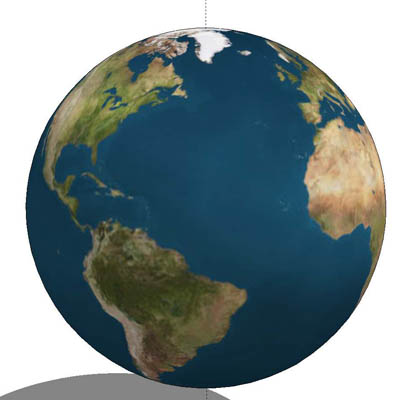

                                          globe.skp


                                          globe.jpg

                                          3D Figures
                                          Were you required to walk 500 miles? Were you advised to walk 500 more?
                                          You could be entitled to compensation. Call the Pro Claimers now!

                                          1 條回覆 最後回覆 回覆 引用 0
                                          • K 離線
                                            kwistenbiebel
                                            最後由 編輯

                                            Nice results Alan!

                                            I wil give the plugin a spin this weekend. Another cool Whaat piece of work.

                                            1 條回覆 最後回覆 回覆 引用 0
                                            • 1
                                            • 2
                                            • 3
                                            • 4
                                            • 5
                                            • 6
                                            • 7
                                            • 8
                                            • 9
                                            • 5 / 9
                                            • 第一個貼文
                                              最後的貼文
                                            Buy SketchPlus
                                            Buy SUbD
                                            Buy WrapR
                                            Buy eBook
                                            Buy Modelur
                                            Buy Vertex Tools
                                            Buy SketchCuisine
                                            Buy FormFonts

                                            Advertisement