sketchucation logo sketchucation
    • Login
    Oops, your profile's looking a bit empty! To help us tailor your experience, please fill in key details like your SketchUp version, skill level, operating system, and more. Update and save your info on your profile page today!
    Mac User? | Join the Rayscaper Beta for Mac Learn More

    [Plugin] Custom Toolbars Plugin

    Scheduled Pinned Locked Moved Plugins
    121 Posts 43 Posters 80.8k Views 43 Watching
    Loading More Posts
    • Oldest to Newest
    • Newest to Oldest
    • Most Votes
    Reply
    • Reply as topic
    Log in to reply
    This topic has been deleted. Only users with topic management privileges can see it.
    • J
      Jim
      last edited by

      To create a custom toolbar, you create a plain text file in the jf_custom_toolbars folder.

      The name of the text file becomes the name of the Toolbar.

      The contents of the text file is a list of commands taken from the commands in the image.

      Look for the "Edge Style Example.txt" file in your Plugins/jf_custom_toolbars folder for an example toolbars.
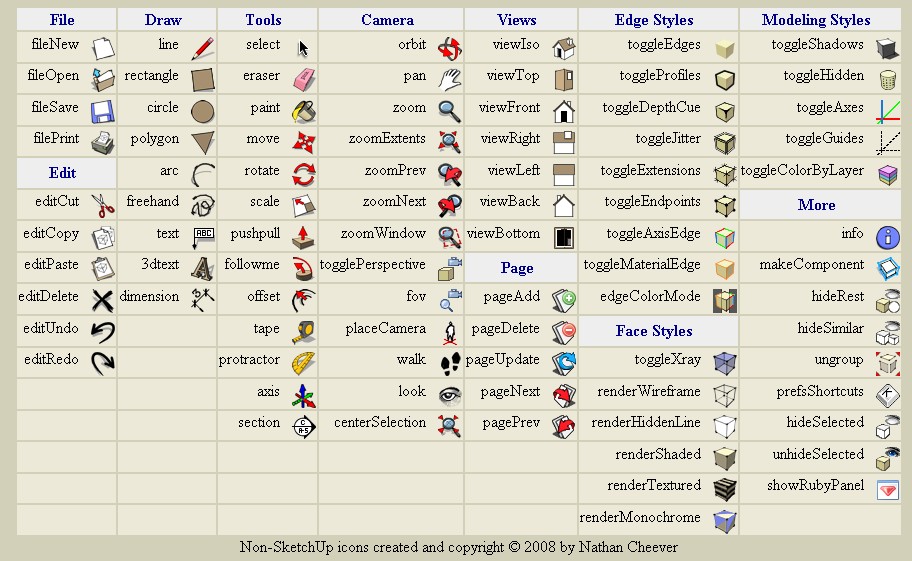
      http://bp1.blogger.com/_ogonR-k5OoM/SFQzmxh8aeI/AAAAAAAAHXQ/pifUCnbkhf8/s1600/toolbar_commands.jpg

      Hi

      1 Reply Last reply
      Reply Quote 0
      • ibonI
        ibon
        last edited by

        This is Awesome! keep on with the project, please. Do you need help with the icons? i have changed a little my sketchup, so maybe i could help. Thanks again!


        http://img377.imageshack.us/img377/1050/pantallaum2.th.jpg

        1 Reply Last reply
        Reply Quote 0
        • W
          watkins
          last edited by

          Dear Jim,

          I'm sure that it is obvious to everyone else, but how do you go about installing the scripts. A little explanation of what the plugin does and how one might use it effectively. I am loathe to change what I have without an understanding of the benefits. I know that you are very busy, but if you could write a simple 'how to install and use' document, with perhaps a few examples then, that would be most helpful.

          Many thanks,
          Bob

          1 Reply Last reply
          Reply Quote 0
          • D
            Daniel S
            last edited by

            @ibon said:

            This is Awesome! keep on with the project, please. Do you need help with the icons? i have changed a little my sketchup, so maybe i could help. Thanks again!


            http://img377.imageshack.us/img377/1050/pantallaum2.th.jpg

            Ibon.. can you share the icons of the bezier tool and the ones for the tools on surfaces (offset and line on surface)? They look really great!!!

            Daniel S

            1 Reply Last reply
            Reply Quote 0
            • R
              rsw
              last edited by

              @jim said:

              I've posted a beta release of custom toolbars on my blog (see my sig.)

              thought I would find this quite useful as I tend to use icons rather than shortcuts most of the time, but I can't seem to download it from your blog, I just get to a page which says I don't have permission to view this page - could you post it here on scf instead?

              Thanks

              Richard

              http://img.userbars.pl/98/19554.png

              http://i158.photobucket.com/albums/t106/671GUAMDUDE/Animated---User-Green.gif

              1 Reply Last reply
              Reply Quote 0
              • J
                Jim
                last edited by

                I had some security settings set wrong, it should work now. Sorry.

                Hi

                1 Reply Last reply
                Reply Quote 0
                • Dave RD
                  Dave R
                  last edited by

                  Jim, thank you for this. I was able to download it yesterday and I think I installed it correctly--all into the Plugins folder and otherwise the paths shown in the Zip file were left alone. I haven't figured out how to activate the toolbars though. Any ideas of how to teach an idiot how to work this? 😉

                  Etaoin Shrdlu

                  %

                  (THERE'S NO PLACE LIKE)

                  G28 X0.0 Y0.0 Z0.0

                  M30

                  %

                  1 Reply Last reply
                  Reply Quote 0
                  • J
                    Jim
                    last edited by

                    They should all be under View > Toolbars menu.

                    A toolbar file is just a text file in the Plugins/Toolbars folder. You can see some example in there already.

                    Hi

                    1 Reply Last reply
                    Reply Quote 0
                    • Dave RD
                      Dave R
                      last edited by

                      That's kind of what I thought. Maybe I need new glasses.

                      Etaoin Shrdlu

                      %

                      (THERE'S NO PLACE LIKE)

                      G28 X0.0 Y0.0 Z0.0

                      M30

                      %

                      1 Reply Last reply
                      Reply Quote 0
                      • J
                        Jim
                        last edited by

                        Uh, this is a dumb question, but you did restart SketchUp, right?

                        There should be a toolbars.rb file in Plugins also.

                        Hi

                        1 Reply Last reply
                        Reply Quote 0
                        • Dave RD
                          Dave R
                          last edited by

                          Not such a dumb question but yes, I did restart SU several times since installing the files. The computer has even been restarted a couple of times since I installed the files.

                          Etaoin Shrdlu

                          %

                          (THERE'S NO PLACE LIKE)

                          G28 X0.0 Y0.0 Z0.0

                          M30

                          %

                          1 Reply Last reply
                          Reply Quote 0
                          • J
                            Jim
                            last edited by

                            OK, did you check the Extensions tab of the Preferences dialog?

                            I thought I had done away with the extensions interface, which is why I didn't suggest it first. I can't keep track of my own plugins.

                            Hi

                            1 Reply Last reply
                            Reply Quote 0
                            • Dave RD
                              Dave R
                              last edited by

                              Holy buckets! That did it. I don't think I've had to go in and check a box under Extensions since I first loaded the V6 a long time ago. It didn't occur to me that there'd be a new box to check.

                              Thanks Jim. That was the fix.

                              Etaoin Shrdlu

                              %

                              (THERE'S NO PLACE LIKE)

                              G28 X0.0 Y0.0 Z0.0

                              M30

                              %

                              1 Reply Last reply
                              Reply Quote 0
                              • R
                                rsw
                                last edited by

                                @jim said:

                                I had some security settings set wrong, it should work now. Sorry.

                                works fine now, thanks

                                Richard

                                http://img.userbars.pl/98/19554.png

                                http://i158.photobucket.com/albums/t106/671GUAMDUDE/Animated---User-Green.gif

                                1 Reply Last reply
                                Reply Quote 0
                                • D
                                  dudekracked
                                  last edited by

                                  hi jim thanks for this useful plugin 👍

                                  im just wondering if it will be something like the one on your site after you finish it?

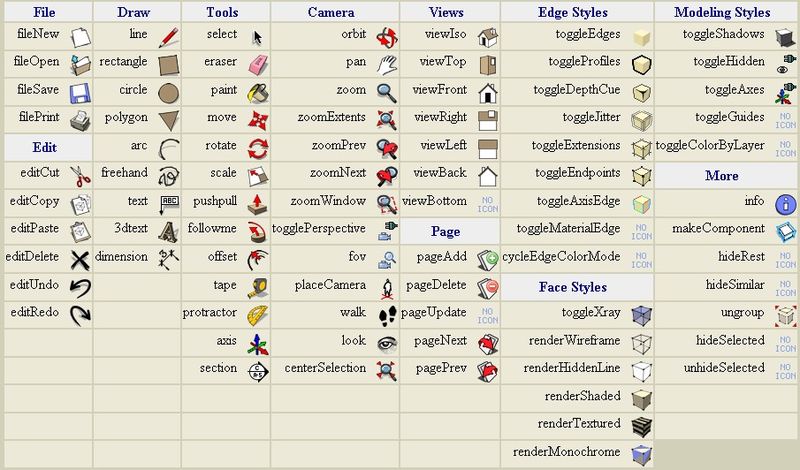
                                  i copied the picture on your site, 😳 will it end up something like this? i kinda like this actually, is it possible to do this? thanks

                                  ct.jpg

                                  1 Reply Last reply
                                  Reply Quote 0
                                  • H
                                    HFM
                                    last edited by

                                    @dudekracked said:

                                    hi jim thanks for this useful plugin 👍

                                    im just wondering if it will be something like the one on your site after you finish it?

                                    i copied the picture on your site, 😳 will it end up something like this? i kinda like this actually, is it possible to do this? thanks

                                    Eh seriously, it is exactly like that! Every button on that page you can use in a custom toolbar... or create new icons
                                    RTFM or in this case RTFRBFILES that are included 😄

                                    and again Jim thanx for this one [it's keeping me up at night creating icons 😲 ]

                                    1 Reply Last reply
                                    Reply Quote 0
                                    • D
                                      dudekracked
                                      last edited by

                                      @HFM

                                      no, no, no, your not reading me clearly, 👎 i absolutely like the idea of a kind of floating toolbar that has all the tools inside it with the name beside it and if all possible can be customized, exactly like the picture that ive attached earlier.

                                      1 Reply Last reply
                                      Reply Quote 0
                                      • I
                                        ilay7k
                                        last edited by

                                        also need shortcut(command) to hide/show all of them...like at most sculpting tool - for clear sketchup desktop(slide away)

                                        1 Reply Last reply
                                        Reply Quote 0
                                        • H
                                          HFM
                                          last edited by

                                          @dudekracked said:

                                          @HFM

                                          no, no, no, your not reading me clearly, 👎 i absolutely like the idea of a kind of floating toolbar that has all the tools inside it with the name beside it and if all possible can be customized, exactly like the picture that ive attached earlier.

                                          Ooooh,...

                                          Why? If you hover over the icons you get the name too. Anyways, sorry for the misunderstanding.

                                          Hugo

                                          1 Reply Last reply
                                          Reply Quote 0
                                          • Dave RD
                                            Dave R
                                            last edited by

                                            Jim, this is pretty slick. I made a replacement for the Camera toolbar that includes centerSelection. So now there's eight tools in that bar instead of 7. I include the TXT file for anyone who might want to do the same thing.



                                            Zoom1.txt

                                            Etaoin Shrdlu

                                            %

                                            (THERE'S NO PLACE LIKE)

                                            G28 X0.0 Y0.0 Z0.0

                                            M30

                                            %

                                            1 Reply Last reply
                                            Reply Quote 0

                                            Hello! It looks like you're interested in this conversation, but you don't have an account yet.

                                            Getting fed up of having to scroll through the same posts each visit? When you register for an account, you'll always come back to exactly where you were before, and choose to be notified of new replies (either via email, or push notification). You'll also be able to save bookmarks and upvote posts to show your appreciation to other community members.

                                            With your input, this post could be even better 💗

                                            Register Login
                                            • 1
                                            • 2
                                            • 3
                                            • 4
                                            • 5
                                            • 6
                                            • 7
                                            • 2 / 7
                                            • First post
                                              Last post
                                            Buy SketchPlus
                                            Buy SUbD
                                            Buy WrapR
                                            Buy eBook
                                            Buy Modelur
                                            Buy Vertex Tools
                                            Buy SketchCuisine
                                            Buy FormFonts

                                            Advertisement
