sketchucation logo sketchucation
    • 登入
    Oops, your profile's looking a bit empty! To help us tailor your experience, please fill in key details like your SketchUp version, skill level, operating system, and more. Update and save your info on your profile page today!
    🔌 Smart Spline | Fluid way to handle splines for furniture design and complex structures. Download

    [Obsolete] Tools On Surface - v1.1

    已排程 已置頂 已鎖定 已移動 Plugins
    92 貼文 49 Posters 30.0k 瀏覽 49 Watching
    正在載入更多貼文
    • 從舊到新
    • 從新到舊
    • 最多點贊
    回覆
    • 在新貼文中回覆
    登入後回覆
    此主題已被刪除。只有擁有主題管理權限的使用者可以查看。
    • S 離線
      Stu
      最後由 編輯

      WOW Fredo!!!

      Just amazing!!!

      Thank you very much!!

      Stu

      http://www.landesign.com.au

      1 條回覆 最後回覆 回覆 引用 0
      • D 離線
        Daniel S
        最後由 編輯

        I have a request...

        The Line on Surface has Point inferences. Can it have linear inferences too?

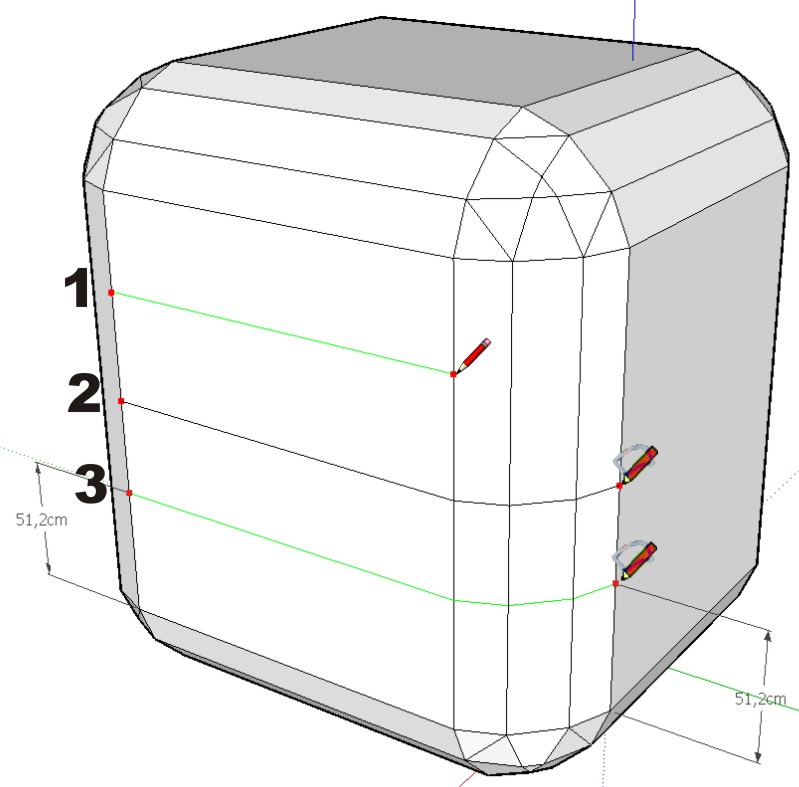
        I don´t know how to explain it well so i try to make a understable image. If you color the line by axis this can´t be done so it´s very strange what i´m requesting.

        In the image in "1" is what i try to say about linear inference.
        In "2" how draw line on surfaces works and is difficult to get the result of "3".
        In "3" the request 😒 😒

        Daniel S


        request.jpg

        1 條回覆 最後回覆 回覆 引用 0
        • fredo6F 離線
          fredo6
          最後由 編輯

          Daniel,

          If there is one area where I still have to learn is the Inference mechanism in Sketchup.

          However, if you wish to draw contours parallel to others (as in your example), then I suggest you use the Offset tool (possibly with Construction line mode). Select the edges and also faces they border and offset by a distance. This is described in the Tutorial, on pages 3-4.

          I plan to build a Tape Measure tool to ease this operation, but it is still not written.

          Fredo

          PS: by the way, thanks for the icons. I'll see how to integrate in a next release (and there is another proposal from CadFather which I need to look at).

          1 條回覆 最後回覆 回覆 引用 0
          • R 離線
            rzadwg
            最後由 編輯

            amazing! thank you so much for this!

            1 條回覆 最後回覆 回覆 引用 0
            • dazzaD 離線
              dazza
              最後由 編輯

              Fredo, you are a life saver!
              Thanks for making all our lives so much easier! 😄

              All people have the right to stupidity but some abuse the privilege.

              1 條回覆 最後回覆 回覆 引用 0
              • A 離線
                a4chitect
                最後由 編輯

                Fredo6 please consider adding a multiline on surface functionality to your already bursting list of todo's. The idea is to draw with 2 parallel lines at once (by clicking on the centre/inside/outside) and auto closing of the start and end gaps. And offset variable by typing in the vcb. Usage: more flexible than rectangle on surface. With JPP: quick massing of roads, fences, walls..

                Thanks to you leaving the code exposed such feature could be added by anyone, or once my schedule clears up a little-will wait 4 me, if you allow.

                1 條回覆 最後回覆 回覆 引用 0
                • JClementsJ 離線
                  JClements
                  最後由 編輯

                  Majid:

                  Nice work.

                  Your example shows what a good, basic approach and the right use of tools can produce.

                  Thank you, John

                  John | Illustrator | Beaverton, Oregon

                  1 條回覆 最後回覆 回覆 引用 0
                  • majidM 離線
                    majid
                    最後由 編輯

                    JClements :
                    thanx .. at this :http://www.sketchucation.com/forums/scf/viewtopic.php?f=40&t=9383
                    i also added a toolip that is made same way.. I know that also it was possible before , but not so easy that is now....whitought any confusing intersections ...and so ..on .
                    and also my special thanx goes to Fredo! for his good job!

                    My inspiring A, B, Sketches book: https://sketchucation.com/shop/books/intermediate/2612-alphabet-inspired-sketches--inspiring-drills-for-architects--3d-artists-and-designers-

                    1 條回覆 最後回覆 回覆 引用 0
                    • plot-parisP 離線
                      plot-paris
                      最後由 編輯

                      fredo6 - you are a hero to me! 😍

                      another idea:

                      all the "on surface" tools are already existing tools of SketchUp applied to a surface, right?
                      and when you succeed in creating all the other tools (tape measure, circle, polygon...) our toolbar gets quite large.

                      would it therefore be possible to just have one button in the tool bar (plus a shortcut key to toggle it on and off) that switches the use of SketchUp's native tools to your fabulous on surface tools? thus all my shortcuts would apply to your tools too - I only have to press the "fredo6 button"! 😲

                      1 條回覆 最後回覆 回覆 引用 0
                      • soloS 離線
                        solo
                        最後由 編輯

                        Not sure if it's been requested yet but how about circle tool and bezier curve to work on the same surfaces?

                        That would be great.

                        By the way I use this tool a heck of a lot these days, wondering how I worked without it.

                        http://www.solos-art.com

                        If you see a toilet in your dreams do not use it.

                        1 條回覆 最後回覆 回覆 引用 0
                        • I 離線
                          Iglesias
                          最後由 編輯

                          Thanks a lot, this is wonderful

                          1 條回覆 最後回覆 回覆 引用 0
                          • fredo6F 離線
                            fredo6
                            最後由 編輯

                            Circles and Polygons are coming!
                            Probably in a few days.

                            Actually, I am struggling to make the algorithm a little more robust, as Sketchup is not accurate enough with methods like Interesect_line_plane, which causes some problems in some situation.

                            By the way, I did not get bug reports about these tools, while myself, I can find several problems when playing with different surface topologies. Maybe it's good enough in a day-to-day work?

                            By the way, I am not sure Bezier is useful on surfaces (precisely because Bezier are much better when drawn in a plane), but I am working on Arcs and also on Polylines (useful in order to correct contours).

                            Just a matter to find some time!!

                            1 條回覆 最後回覆 回覆 引用 0
                            • ely862meE 離線
                              ely862me
                              最後由 編輯

                              i start to use the offset line,it*s great!the offset tool and the offset are just what i needed!good job and thank you a lot!!

                              i don t know if it can be usefull but some time i needed a follow me with a noncoplanar surfaces can this be done?

                              thx

                              elisei


                              Untitled.jpg

                              Elisei (sketchupper)


                              Before no life was done on Earth it was THE LIFE ITSELF...GOD
                              Come and See EliseiDesign

                              1 條回覆 最後回覆 回覆 引用 0
                              • S 離線
                                STRANGEZOND
                                最後由 編輯

                                Nice tools! Thanks!!!

                                1 條回覆 最後回覆 回覆 引用 0
                                • RayOchoaR 離線
                                  RayOchoa
                                  最後由 編輯

                                  this is awsome

                                  CaR DeSiGnS bY mE
                                  http://ray-ochoa.com

                                  1 條回覆 最後回覆 回覆 引用 0
                                  • plot-parisP 離線
                                    plot-paris
                                    最後由 編輯

                                    dear Fredo6,

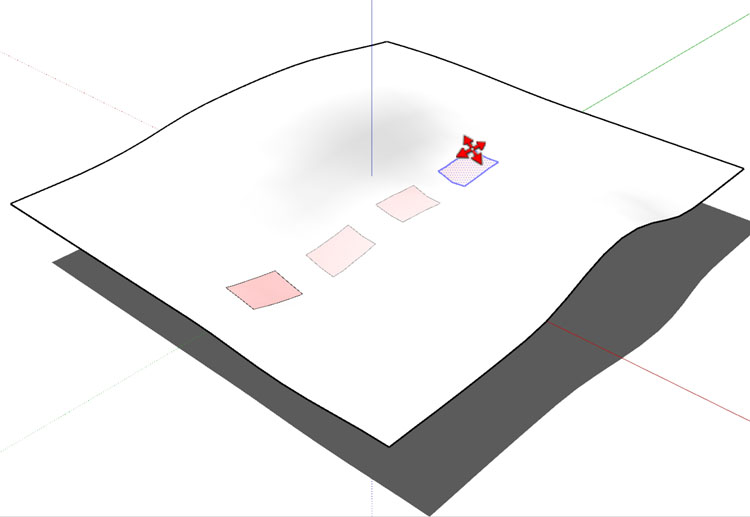
                                    when you succeed in adding inference functions (like infering to cordinate axes (or rather coordinate faces)), is it then possible to create a "move on surface" tool? then you could just copy a shape on a curved surface like you now do it on a planar one...move_on_surface.jpg

                                    then the idea of one "on surface" button that changes the use of all the standart tools to your on surface tools would become even more reasonable... 😄

                                    1 條回覆 最後回覆 回覆 引用 0
                                    • L 離線
                                      Loewenkatze
                                      最後由 編輯

                                      Fredo,

                                      thanks sooooo much for this. Everytime you bring a new tool to life, I get the feeling of using a brand new application or at least a new major release of SU. I fear that SU won't have the same progress regarding the core engine...... Anyone here to be in a position to write a multiprocessor-enabled SU-clone with all that plugins being built in...? 😒 😉

                                      Cheers,
                                      Franziska

                                      "I think play is the most important thing in the world." [Jacques-Yves Cousteau]

                                      1 條回覆 最後回覆 回覆 引用 0
                                      • D 離線
                                        Daniel S
                                        最後由 編輯

                                        I don´t know if it´s possible to make, but the "move on surface" tool is a great idea!!
                                        Thank you again for your plugins Fredo!!!

                                        Daniel S

                                        1 條回覆 最後回覆 回覆 引用 0
                                        • K 離線
                                          kwistenbiebel
                                          最後由 編輯

                                          Cool thinking Plot-Paris, that would be handy.

                                          By the way,
                                          Fredo, I love this plugin. I use it often in combo with JPP/FF and Subsmooth. (damn abbreviations 😄 )

                                          I can't wait for circles, rectangles and polygons to be added as it would allow us to make windows in curved surfaces easily.

                                          1 條回覆 最後回覆 回覆 引用 0
                                          • GaieusG 離線
                                            Gaieus
                                            最後由 編輯

                                            Well, then let's extend the wish list with my wishe: Rotate on surface as well 😉

                                            Gai...

                                            1 條回覆 最後回覆 回覆 引用 0
                                            • 1
                                            • 2
                                            • 3
                                            • 4
                                            • 5
                                            • 3 / 5
                                            • 第一個貼文
                                              最後的貼文
                                            Buy SketchPlus
                                            Buy SUbD
                                            Buy WrapR
                                            Buy eBook
                                            Buy Modelur
                                            Buy Vertex Tools
                                            Buy SketchCuisine
                                            Buy FormFonts

                                            Advertisement