sketchucation logo sketchucation
    • Login
    Oops, your profile's looking a bit empty! To help us tailor your experience, please fill in key details like your SketchUp version, skill level, operating system, and more. Update and save your info on your profile page today!
    โš ๏ธ Update | Sketchucation Tools 5.0.8 released with licensing improvements and bugfixes Download

    [Obsolete] Offset On Surface (v1.0)

    Scheduled Pinned Locked Moved Developers' Forum
    48 Posts 34 Posters 29.6k Views 34 Watching
    Loading More Posts
    • Oldest to Newest
    • Newest to Oldest
    • Most Votes
    Reply
    • Reply as topic
    Log in to reply
    This topic has been deleted. Only users with topic management privileges can see it.
    • fredo6F
      fredo6
      last edited by fredo6

      [Edit 15 Sep 09] new version 1.5 available with more shapes, Eraser and Contour Edition, see http://forums.sketchucation.com/viewtopic.php?f=323&t=11212&hilit=plugin#p76625.

      [EDIT 12 May 08]
      Offset on Surface is now part of a suite of tools to draw on Surface. See new thread at http://www.sketchucation.com/forums/scf/viewtopic.php?f=180&t=9637#p60512. So, the version below is now older.

      Here is the first version of this script that has been suggested by members of the forum.

      In short, it tries to mimic the native Sketchup Offset tool, but on surface, not just on a single face. Below is a sample which is self-explanatory.
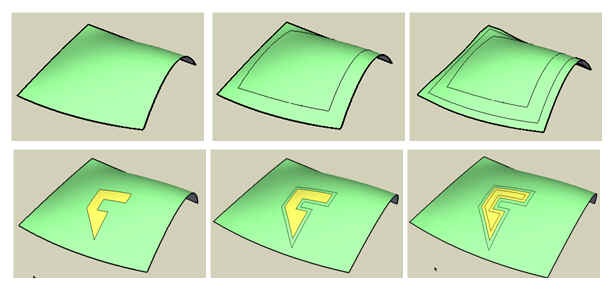
      OffsetOnSurface Sample.jpg
      Actually, the script was not so easy to design, as there is no real mathematical concept of distance and angle on surfaces and the number of possible topologies is rather huge. So there are many limitations and approximations in this version.

      Installation: Do an 'Extract All' in the Plugins folder, which should copy

      • OffsetOnSurface.rb, the main script

      • LibTraductor.rb, for language translation (same version as for JointPushPull and BezierSpline)

      • A subfolder OFS_Dircontaining the icons and cursors as well as the doc in PDF format
        The script works on a selection of edges and faces. It provides 2 modes of selection:

      • Explicit--> you select first and then start the tool

      • Implicit--> you start the tool with NO selection. Then by mouseover in the model, the script will select a surface
        There are several options, all explained in the doc, and some other details (like the question of inner and outer contours in selections). They are all available in the contextual menu or by toggle function keys (there is no dialog box):

      • F5 --> toggle between Outer, Inner and All contours of a surface

      • F6 --> generate as Group

      • F7 --> Treat surface as isolated from the rest of the model

      • F8 --> generate faces when offset is external

      • F9 --> generate contour as curves

      Finally there are numerous limitations, and surely many bugs. I have a list of things to improve, but I'll be grateful to the first users to give feedback.

      1 Reply Last reply
      Reply Quote 0
      • D
        dylan
        last edited by

        Thanks for putting the time and effort into creating this Fred ๐Ÿ‘

        I shall give it a try now

        Edit: This is looking fantastic! It will really help on the landscape side of things.

        http://dmdarchitecture.co.uk/

        1 Reply Last reply
        Reply Quote 0
        • J
          Jon
          last edited by

          Thank you SO much! ๐Ÿ˜ This is extremely helpful!!

          Jon
          KT Team member

          1 Reply Last reply
          Reply Quote 0
          • D
            Daniel S
            last edited by

            WOWWWW. I just tried it and i canยดt believe the results. Itยดs AMAZING!!!!! ๐Ÿ˜ ๐Ÿ˜

            Looks like it has a lot of options... so i will read the manual, but the first things that I tried and see exceeded everything what I could have imagined.

            The standard offset tool looks prehistoric compared with your version.

            My SketchUp should say at startup: "SketchUp. Powered by Fredo6"

            Thank you!!!
            Daniel S ๐Ÿ˜ ๐Ÿ˜

            1 Reply Last reply
            Reply Quote 0
            • fredo6F
              fredo6
              last edited by

              This is a feature actually.
              If you show hidden geometry, I found more useful to keep the behavior of the implicit selection by mouseover rather than to just select an individual face, which you can just do explictly by clicking on the face and launching the OOS tool (or use the native Sketchup Offset).

              1 Reply Last reply
              Reply Quote 0
              • urgenU
                urgen
                last edited by

                Superb! ๐Ÿ‘ ๐Ÿ˜„

                --pupil forever...------

                1 Reply Last reply
                Reply Quote 0
                • jujuJ
                  juju
                  last edited by

                  ๐ŸŽ‰ ๐Ÿ‘ ๐Ÿ˜ Thanks for creating this and making it publicly available.

                  Save the Earth, it's the only planet with chocolate.

                  1 Reply Last reply
                  Reply Quote 0
                  • PixeroP
                    Pixero
                    last edited by

                    Thanks, cant wait to try it...

                    1 Reply Last reply
                    Reply Quote 0
                    • G
                      Gjenio
                      last edited by

                      Many tanks.
                      Expecially for the time you spend to make Sketchup easiest for everyone!
                      We all appreciate that!

                      1 Reply Last reply
                      Reply Quote 0
                      • M
                        marne
                        last edited by

                        Fantastic! Thank you very, very much. So useful for me too... ๐Ÿ˜„

                        1 Reply Last reply
                        Reply Quote 0
                        • A
                          a4chitect
                          last edited by

                          works in most scenarios! THANKS

                          1 Reply Last reply
                          Reply Quote 0
                          • I
                            ilay7k
                            last edited by

                            i add some: Thank you! ๐Ÿ‘ ๐Ÿ˜

                            1 Reply Last reply
                            Reply Quote 0
                            • A
                              a4chitect
                              last edited by

                              just went through the documentation and tried few things myself - AMAZING!!!

                              i'm sure only releasing your scripts OOS and JPP implemented into sketchup would justify calling it a v7.0 ๐Ÿ˜„

                              1 Reply Last reply
                              Reply Quote 0
                              • jujuJ
                                juju
                                last edited by

                                @a4chitect said:

                                i'm sure only releasing your scripts OOS and JPP implemented into sketchup would justify calling it a v7.0 ๐Ÿ˜„

                                Now now, don't go and give Google any ideas about slacking off. ๐Ÿ˜‰

                                Save the Earth, it's the only planet with chocolate.

                                1 Reply Last reply
                                Reply Quote 0
                                • R
                                  remus
                                  last edited by

                                  Good stuff fred, i dont know what more i can add than to say that your plugins feel like fully fledged features in use. Thank you.

                                  http://remusrendering.wordpress.com/

                                  1 Reply Last reply
                                  Reply Quote 0
                                  • K
                                    kwistenbiebel
                                    last edited by

                                    This is cool.

                                    With all the 'organics' plugins being released lately (FFD,joint pushpull, catmull clark subd, etc...), isn't it time to combine all those plugins into one bigger plugin?

                                    Having just one dropdown menu or panel for all these jewels would be a big time saver and much easier to use.

                                    1 Reply Last reply
                                    Reply Quote 0
                                    • J
                                      Jorgensen
                                      last edited by

                                      catmull ?

                                      sketchup pro 2016 16.1.1449 64 bit | windows 10 pro | i7-3770k @3.5 GHz | 16gb ram | gtx 780 ti / gtx 980 ti | nvidia driver 368.39

                                      1 Reply Last reply
                                      Reply Quote 0
                                      • D
                                        dtrarch
                                        last edited by

                                        Hi Fred ๐Ÿ˜

                                        Many thanks again and again.
                                        Your scrips are simply the most important and useful
                                        produced to date without a doubt.

                                        Just what SU should have had in the first place. ๐Ÿ˜’
                                        Bread and butter tools.
                                        What else to say ??

                                        dtr

                                        1 Reply Last reply
                                        Reply Quote 0
                                        • K
                                          kwistenbiebel
                                          last edited by

                                          Yes Coen, that's a good trick to use short cut keys.
                                          But I meant 'time saver' as it would be easier for noob modelers to pick up one 'organics' plugin than to go browse forums to gather the separate scripts, find out what they do and install them.
                                          This is not a crit, just a call to get things streamlined.

                                          I can imagine that for a lot of people who don't visit SCF on a daily base like we do, it is easy to miss out on some of the nice scripts.Being able to download them as a package would be nice. Preferably with a shared interface and one tutorial doc ?

                                          1 Reply Last reply
                                          Reply Quote 0
                                          • Dave RD
                                            Dave R
                                            last edited by

                                            Thank you very much Fredo. This, along with JPP is very useful. Just for fun I did a little demo. Also used the Skin plugin, too. If you're interested, here it is. Sorry about the low resolution.


                                            Etaoin Shrdlu

                                            %

                                            (THERE'S NO PLACE LIKE)

                                            G28 X0.0 Y0.0 Z0.0

                                            M30

                                            %

                                            1 Reply Last reply
                                            Reply Quote 0

                                            Hello! It looks like you're interested in this conversation, but you don't have an account yet.

                                            Getting fed up of having to scroll through the same posts each visit? When you register for an account, you'll always come back to exactly where you were before, and choose to be notified of new replies (either via email, or push notification). You'll also be able to save bookmarks and upvote posts to show your appreciation to other community members.

                                            With your input, this post could be even better ๐Ÿ’—

                                            Register Login
                                            • 1
                                            • 2
                                            • 3
                                            • 3 / 3
                                            • First post
                                              Last post
                                            Buy SketchPlus
                                            Buy SUbD
                                            Buy WrapR
                                            Buy eBook
                                            Buy Modelur
                                            Buy Vertex Tools
                                            Buy SketchCuisine
                                            Buy FormFonts

                                            Advertisement


