sketchucation logo sketchucation
    • 登入
    Oops, your profile's looking a bit empty! To help us tailor your experience, please fill in key details like your SketchUp version, skill level, operating system, and more. Update and save your info on your profile page today!
    🔌 Smart Spline | Fluid way to handle splines for furniture design and complex structures. Download

    [Plugin] Zorro

    已排程 已置頂 已鎖定 已移動 Plugins
    53 貼文 34 Posters 65.5k 瀏覽 34 Watching
    正在載入更多貼文
    • 從舊到新
    • 從新到舊
    • 最多點贊
    回覆
    • 在新貼文中回覆
    登入後回覆
    此主題已被刪除。只有擁有主題管理權限的使用者可以查看。
    • K 離線
      kjc
      最後由 編輯

      I'm happy to find this tool, realy nice! I have no idea how you create such impressive things, respect.
      This tool could be even better if it could work in parallel projection. Are youstill working on it or not?

      1 條回覆 最後回覆 回覆 引用 0
      • W 離線
        Whaat
        最後由 編輯

        My commercial script 'Subdivide and Smooth' http://www.smustard.com/script/SubdivideAndSmooth
        has a tool identical to Zorro but it also works in parallel projection mode (and it snaps to axis)

        I hope to release an update to Zorro sometime in 2009 that works in parallel projection mode, but you might be waiting quite awhile.

        Dale

        SketchUp Plugins for Professionals

        1 條回覆 最後回覆 回覆 引用 0
        • CadFatherC 離線
          CadFather
          最後由 編輯

          Hi Dale - that would be great!

          1 條回覆 最後回覆 回覆 引用 0
          • W 離線
            Whaat
            最後由 編輯

            Be on the lookout for an update to Zorro coming very soon...
            It's gonna be good.... 😉 😄

            SketchUp Plugins for Professionals

            1 條回覆 最後回覆 回覆 引用 0
            • CadFatherC 離線
              CadFather
              最後由 編輯

              can't wait to see what diego de la vega has been up to...

              cheers Whaat!

              1 條回覆 最後回覆 回覆 引用 0
              • E 離線
                evrnaidu
                最後由 編輯

                It's great! It will be more useful if the divided parts are grouped so that unwanted portion could be deleted easily. Of course it is difficult to make it as two parts when components are nested. If that is the case, grouping may be done within the components.

                1 條回覆 最後回覆 回覆 引用 0
                • GaieusG 離線
                  Gaieus
                  最後由 編輯

                  Hi Evr (and welcome),

                  Check out Zorro 2 then:
                  http://forums.sketchucation.com/viewtopic.php?t=16038

                  • It "resides" in the context (right click) menu of a section plane (so easy to set up)
                  • It will actually cut through all nested groups/components
                  • Finally it actually deletes what is behind (invisibly) the section plane.
                    %(#BF0000)[So be extra careful to only use it
                    on a copy of your model!]

                  Gai...

                  1 條回覆 最後回覆 回覆 引用 0
                  • E 離線
                    evrnaidu
                    最後由 編輯

                    Thank you Mr. Gaius. It really works fantastically.

                    1 條回覆 最後回覆 回覆 引用 0
                    • GaieusG 離線
                      Gaieus
                      最後由 編輯

                      Now combine it with SectionCutFace and you can fill in those ugly holes.
                      http://forums.sketchucation.com/viewtopic.php?t=20564

                      Gai...

                      1 條回覆 最後回覆 回覆 引用 0
                      • pilouP 離線
                        pilou
                        最後由 編輯

                        How do you use the section Cut face with this sort of inclined cut face?
                        Cut first with Zorro2, then ?
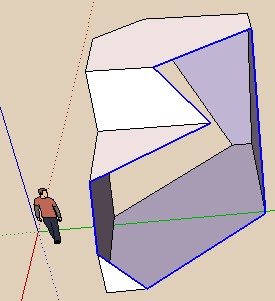
                        sectionface.jpg


                        Pilou.skp

                        Frenchy Pilou
                        Is beautiful that please without concept!
                        My Little site :)

                        1 條回覆 最後回覆 回覆 引用 0
                        • M 離線
                          magpie
                          最後由 編輯

                          Thanks Dale, really like the plugin and for simple geometry no problem, but on a more complex model I use zorro2 and it either bugsplats or sketchup simply disappears from my screen 😕

                          Any modelling errors I should be careful of? It's a model made in skp8 and exported to skp6...any help appreciated.

                          1 條回覆 最後回覆 回覆 引用 0
                          • M 離線
                            magpie
                            最後由 編輯

                            hey, grouping and locking has done the trick! thanks!(note to self: read ALL of the posts beforehand)

                            1 條回覆 最後回覆 回覆 引用 0
                            • Z 離線
                              zunkian
                              最後由 編輯

                              Hello everyone!
                              I'm trying to cut off the top section of this whole floor area (please see attached) Ground floorB.jpgbut zorro always crashes my sketchup. A bugsplat always comes up in the middle of the "cutting" process.
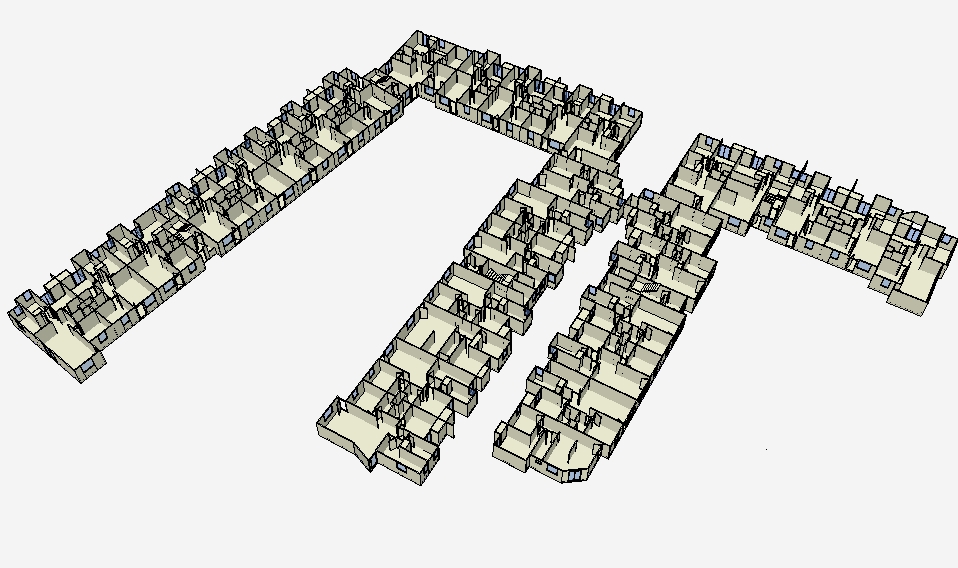
                              It seems it cannot cut complicated models or with models with several polygons.
                              Please advice me on what to do to solve this problem.
                              I have to meet a client deadline this week and zorro is no cooperating very well.
                              Please help!

                              zun kian

                              1 條回覆 最後回覆 回覆 引用 0
                              • mitcorbM 離線
                                mitcorb
                                最後由 編輯

                                Hi, zun kian:
                                If you are in a hurry, perhaps create a large rectangular plane group bigger than the foot print of your model. Position the plane at the vertical elevation at which you wish to cut. Intersect plane with model. Delete all above plane. Of course, some of this model may be components, and this would be another level of complexity to deal with. I would probably save the model as a new version and work on that one.

                                I take the slow, deliberate approach in my aimless wandering.

                                1 條回覆 最後回覆 回覆 引用 0
                                • Z 離線
                                  zunkian
                                  最後由 編輯

                                  @mitcorb said:

                                  Hi, zun kian:
                                  If you are in a hurry, perhaps create a large rectangular plane group bigger than the foot print of your model. Position the plane at the vertical elevation at which you wish to cut. Intersect plane with model. Delete all above plane. Of course, some of this model may be components, and this would be another level of complexity to deal with. I would probably save the model as a new version and work on that one.

                                  Thanks mitcorb will try that if that's the only way it would help!

                                  zunkian

                                  1 條回覆 最後回覆 回覆 引用 0
                                  • 1
                                  • 2
                                  • 3
                                  • 1 / 3
                                  • 第一個貼文
                                    最後的貼文
                                  Buy SketchPlus
                                  Buy SUbD
                                  Buy WrapR
                                  Buy eBook
                                  Buy Modelur
                                  Buy Vertex Tools
                                  Buy SketchCuisine
                                  Buy FormFonts

                                  Advertisement
