sketchucation logo sketchucation
    • 登入
    Oops, your profile's looking a bit empty! To help us tailor your experience, please fill in key details like your SketchUp version, skill level, operating system, and more. Update and save your info on your profile page today!
    🔌 Smart Spline | Fluid way to handle splines for furniture design and complex structures. Download

    [Plugin] Zorro

    已排程 已置頂 已鎖定 已移動 Plugins
    53 貼文 34 Posters 65.5k 瀏覽 34 Watching
    正在載入更多貼文
    • 從舊到新
    • 從新到舊
    • 最多點贊
    回覆
    • 在新貼文中回覆
    登入後回覆
    此主題已被刪除。只有擁有主題管理權限的使用者可以查看。
    • pilouP 離線
      pilou
      最後由 編輯

      Damned! That works! 😎
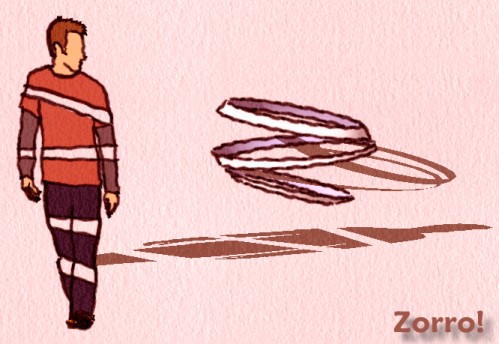
      Whaat you see is whaat you get 😉


      Zooro.jpg

      Frenchy Pilou
      Is beautiful that please without concept!
      My Little site :)

      1 條回覆 最後回覆 回覆 引用 0
      • K 離線
        kwistenbiebel
        最後由 編輯

        Really cool whaat !
        By the looks of it, you are making a whole 'organic modeling' module 😮 😲
        And knowing you, things will really be designed from the users viewpoint.

        Loving every bit of the things you are producing lately.
        Keep up the great work 😄

        1 條回覆 最後回覆 回覆 引用 0
        • W 離線
          wikii
          最後由 編輯

          Whaat,you are genius!!!

          1 條回覆 最後回覆 回覆 引用 0
          • J 離線
            Jon
            最後由 編輯

            Thank you soo much! 😄

            I was thinking the other day "hmm, with whaat's subdividing tool, to turn a cube into a smoothed cube rather than a sphere, it will require some extra geometry. That's going to be a bit of a hassle". Not anymore though! ☀
            you ROCK!!

            Jon
            KT Team member

            1 條回覆 最後回覆 回覆 引用 0
            • PixeroP 離線
              Pixero
              最後由 編輯

              Great, thanks!
              A question *(I havent tried it yet):*How "far" does the cutting go?
              Meaning, in the video you dont have a object selected, so If there were two or more overlapping geometry with some distance in between, how far would it cut?

              Edit: After a quick test it seem to cut "all the way" so my next question is: Whould it be possible to limit it to only cut on faces visible in the viewport or facing the camera?
              I can think of many cases when I would want it to work like that.

              1 條回覆 最後回覆 回覆 引用 0
              • urgenU 離線
                urgen
                最後由 編輯

                Fine "emotional" script... Thanks! 👍
                Some wishes and remarks:
                1.The script works only in "PERSPECTIVE" 😕
                2.The binding of the cursor (knife) to axis (Planes)is necessary ❗

                --pupil forever...------

                1 條回覆 最後回覆 回覆 引用 0
                • pilouP 離線
                  pilou
                  最後由 編輯

                  1. binding Red, Blue, Green works when you are in view Top, Front...

                  Funny script indeed ☀
                  Whaat you see is whaat you get 😉


                  zorro.jpg

                  Frenchy Pilou
                  Is beautiful that please without concept!
                  My Little site :)

                  1 條回覆 最後回覆 回覆 引用 0
                  • R 離線
                    rv1974
                    最後由 編輯

                    It shines Whaat!
                    But a few things MUST be repaired\added:

                    1. Work in ortho projection, axis following (mentioned above)
                    2. Problems with snapping.
                    1 條回覆 最後回覆 回覆 引用 0
                    • R 離線
                      remus
                      最後由 編輯

                      Another big thanks from me, and if it hasnt been said enough i cant wait for subdivide+smooth.

                      http://remusrendering.wordpress.com/

                      1 條回覆 最後回覆 回覆 引用 0
                      • K 離線
                        kwistenbiebel
                        最後由 編輯

                        I tried Zorro on a higher poly model (the naked man I posted earlier) but Sketchup crashes .
                        It's not the ruby's fault (great coding whaat !) ...it's just sketchup I guess 😢

                        1 條回覆 最後回覆 回覆 引用 0
                        • J 離線
                          Jim
                          最後由 編輯

                          I get this error:

                          
                          C;/Program Files/Google/Google SketchUp 6/Plugins/Zorro.rb;26;in `activate'
                          C;/Program Files/Google/Google SketchUp 6/Plugins/Zorro.rb;220;in `select_tool'
                          C;/Program Files/Google/Google SketchUp 6/Plugins/Zorro.rb;220;in `zorrotool'
                          C;/Program Files/Google/Google SketchUp 6/Plugins/Zorro.rb;226
                          C;/Program Files/Google/Google SketchUp 6/Plugins/Zorro.rb;226;in `call'
                          Error; #<NoMethodError; undefined method `GetString' for nil;NilClass>
                          C;/Program Files/Google/Google SketchUp 6/Plugins/Zorro.rb;74;in `onLButtonDown'


                          Hi

                          1 條回覆 最後回覆 回覆 引用 0
                          • W 離線
                            Whaat
                            最後由 編輯

                            @jim said:

                            I get this error:

                            
                            > C;/Program Files/Google/Google SketchUp 6/Plugins/Zorro.rb;26;in `activate'
                            > C;/Program Files/Google/Google SketchUp 6/Plugins/Zorro.rb;220;in `select_tool'
                            > C;/Program Files/Google/Google SketchUp 6/Plugins/Zorro.rb;220;in `zorrotool'
                            > C;/Program Files/Google/Google SketchUp 6/Plugins/Zorro.rb;226
                            > C;/Program Files/Google/Google SketchUp 6/Plugins/Zorro.rb;226;in `call'
                            > Error; #<NoMethodError; undefined method `GetString' for nil;NilClass>
                            > C;/Program Files/Google/Google SketchUp 6/Plugins/Zorro.rb;74;in `onLButtonDown'
                            > 
                            

                            That's what happens when you cut and paste from the example scripts! Try deleting '$exStrings.GetString' from the two offending lines of code (line 74 and 163)

                            Let me know if that does the trick.

                            SketchUp Plugins for Professionals

                            1 條回覆 最後回覆 回覆 引用 0
                            • K 離線
                              kwistenbiebel
                              最後由 編輯

                              @whaat said:

                              '$exStrings.GetString'

                              I don't know zip about coding....but I like this line for some reason 😄.
                              Freud is always around when you need him ...

                              1 條回覆 最後回覆 回覆 引用 0
                              • W 離線
                                Whaat
                                最後由 編輯

                                @pixero said:

                                Edit: After a quick test it seem to cut "all the way" so my next question is: Whould it be possible to limit it to only cut on faces visible in the viewport or facing the camera?
                                I can think of many cases when I would want it to work like that.

                                I think the best workaround for this, is to first group the geometry that you wish to cut, then use the tool. Only geometry within the active context will be cut. After you have done your cuts, you can explode the group if you wish to return to the previous condition.

                                SketchUp Plugins for Professionals

                                1 條回覆 最後回覆 回覆 引用 0
                                • L 離線
                                  linea
                                  最後由 編輯

                                  I love this tool! Thanks for improving my game!

                                  1 條回覆 最後回覆 回覆 引用 0
                                  • H 離線
                                    huyvuvn
                                    最後由 編輯

                                    when I install this script into my desktop (Pentium 4 2,4Ghz, 512Mb RAM, Radeon 9600) , it works good.
                                    but when I install into my laptop (Dell XPS M1710), it can not work and have bug. I've tried the simple rectangle and "zorro" it but it "booooom" and sketchup out ! 😕 😲

                                    help me resolve this problem ! I'm very interested in this script "zorro" but now I can not use it with my laptop. 😞

                                    many thanks 😛

                                    happiness on the way, not in the destination.

                                    1 條回覆 最後回覆 回覆 引用 0
                                    • N 離線
                                      NORTH_FROST
                                      最後由 編輯

                                      Amazing ❗
                                      This will come in use 👍

                                      http://www.northfrost.se

                                      1 條回覆 最後回覆 回覆 引用 0
                                      • Mike LuceyM 離線
                                        Mike Lucey
                                        最後由 編輯

                                        I'm 'telling' Bryce on you guys!!!!

                                        Great work Whaat, cheers 😉

                                        Mike

                                        Support us so we can support you! Upgrade to Premium Membership!

                                        1 條回覆 最後回覆 回覆 引用 0
                                        • david_hD 離線
                                          david_h
                                          最後由 編輯

                                          Gracias Senor Zorro. . .the people of my village will be forever Grateful.

                                          If I make it look easy...It is probably easy

                                          1 條回覆 最後回覆 回覆 引用 0
                                          • Y 離線
                                            yuwoang
                                            最後由 編輯

                                            thank you !!!!!

                                            1 條回覆 最後回覆 回覆 引用 0
                                            • 1
                                            • 2
                                            • 3
                                            • 1 / 3
                                            • 第一個貼文
                                              最後的貼文
                                            Buy SketchPlus
                                            Buy SUbD
                                            Buy WrapR
                                            Buy eBook
                                            Buy Modelur
                                            Buy Vertex Tools
                                            Buy SketchCuisine
                                            Buy FormFonts

                                            Advertisement