Joint Push Pull Classic (Old version) - v2.2a - 26 Apr 17
-
Tiny differences can cause issues with SketchUp/OpenGL that filter down through the API code.
Two points can end up appearing to the 'engine' as being coincident when they are not and thereby a face is missed off. In your case it looks like a creeping tolerance issue.To avoid this if you scale up what you are working on [temporarily] by say x10 chances are that the extrusion vertices will all play nicely and no faces will get omitted. Scale back down afterwards and the issue won't reappear - it's the creation involving small dimensions/edges/facets etc that's the issue, but they can exist, just not be 'made' at those values.
-
Ok TIG, I'll try to work like that.
Thanks -
Genius plugin
Thank you very much -
I'm another mac user experiencing some issues with this incredible plugin, (but I'm banking on user error). I thought it might be due to running SU 7.1 on a G4 mac, but after reading the previous posts I'm not so sure. JPP works for me 1 out of 20 times. The other 19 I have to hard reboot the computer. What I've tried:
- Verified the latest versions of plugins
- Scaled the model up (twice)
- Cut larger faces into much smaller segments, pulled one at a time
- Tried while grouped/ungrouped
- Removed all other plugins and reinstalled FredoLib and JPP only
- Many times I let the computer sit untouched for hours, just to make sure I wasn't causing the freezes by interrupting a process
I've attached a model of a simple curtain I'm looking to thicken by 1/16" (either direction). The model is cut into segments, and all segments would be JPP'd (verb?) out to the same thickness.
If someone could point out the error of my ways, or take a crack at thickening it yourself, I would be indebted indeed.
-
Hi wtrouser,
I tried to thicken your model on SU 8 Pro M2 and the last plugin and I got the same result as you.
Even scaling it up by 10, all push-pull tools end in an infinite loop....
-
Alainbo... thanks, that actually makes me feel better. I tried x10 and x100, and I segmented the big face into something like 15 segments. Frozen pizza. Perhaps it's too complex of a face for the plugin?
-
Perhaps. It's a pity anyway. 'J' tool could be a very powerfull feature!!!
-
Worked fine for me.
Scaled it up x100 first.
1/16" >>> 6.25"
JPP keeping original faces and no partitions.
It became unresponsive about 13% in, BUT that doesn't mean it's bust !
After 3mins it completed OK.
Scale down 0.01 to return to ~6' high...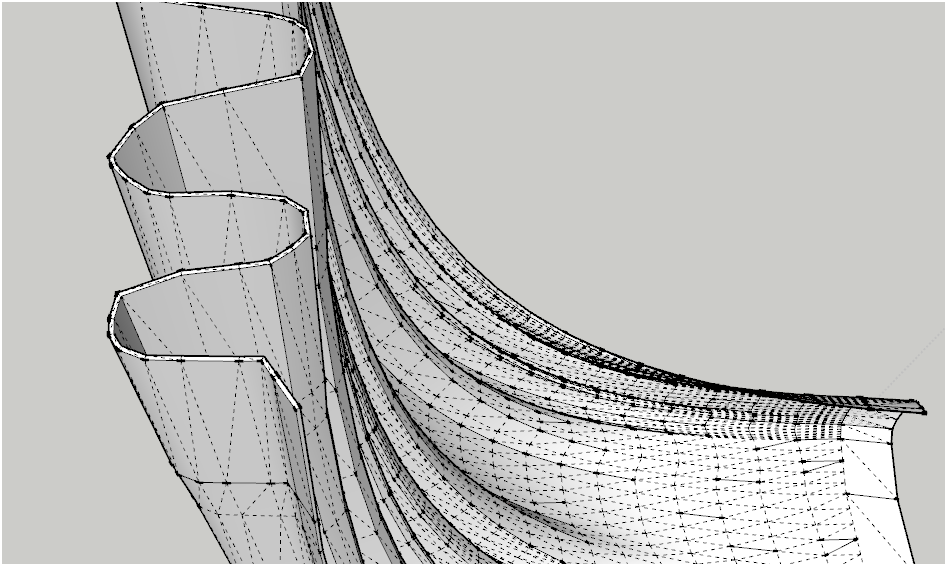 the proof...
 -
TIG... fantastic! I don't suppose I could talk you into uploading your result, could I? I tried scaling up x100, and I once even let my computer go overnight. It didn't seem to matter how long I left it, I couldn't even call up the mac equivalent of the Task Manager after running JPP, the computer was so solidly frozen.
-
I didn't bother to save it...
I'll redo it after my dinner... -
Here it is [v7]...
For some reason it stalled at 5% and took 9 mins this time
No problem! I did have other things running this time...
-
TIG - many thanks again for the extra help! It's greatly appreciated.
-
You are right, I didn't tried to scale it up by 100. It was the trick.
I got it in les than 2 mns. -
All Sketchup processes that create new edges/facets [pushpull, followme, intersect, scripted tools doing similar things], can fail if the resultant geometry is tiny.
Sketchup/OpenGL cannot cope with things < ~0.1mm.
There are tolerances built in to allow two points in space that are not exactly coincident to be regarded as 'equal', otherwise it'd be difficult to do many operations as calculations must always be somewhat approximated. This can mean that two very very close points might not form a line between them, as Sketchup expects two different points, the missing line then fails to split an existing face during an intersect or to complete a loop for a face, which is then missing...
Using a tool like JPP on a very complex mesh with small resultant parts [like this thin curtain] might end up with some tiny bits of geometry/faces missing - it can even splat given the right errors...
The trick of Scaling things up x10 or x100 etc, creating the facets etc, will avoid the tininess issues.
Any Scaling of the tiny parts back down afterwards isn't an issue - very tiny things can exist, it's just their creation that causes issues.Incidentally, there can be similar issues with very very large objects too, because the enormous numerical values get ever approximated too... In that case scale down, process then scale up.
Sketchup is really designed to model building and related objects.
So doing complex modeling on the innards of a swiss-wristwatch [or an entire city] at 'real size' can/will cause issues at some point... -
That makes sense to me... thanks for the explanation. My issue is that I had already tried scaling the model up x100, and it still froze. Additionally, I've only had JPP work for me a small percentage of the time in the past, with models of varying sizes/complexities. It may simply be that I've got the wrong computer/SU version/plugin version combo. Until I'm willing to pony up the money for upgraded hardware/software, I really can't complain too much.
[edit] This might help... after I hit 'go' on a JPP process, the computer will think for a bit, the plugin status bar at the bottom will progress left to right, and the faces I'm trying to pull will eventually appear. The cursor will change back to a pointer and all will seem well. After I then move the cursor, whether right after the process or even several hours later, the pointer will change into a spinning pinwheel and I'm frozen. It seems like my computer might be freezing after the process is done.
-
Hi wtrouser,
I don't know if that could be caused by SU7, but on SU8, if we take care to be in requested conditions as TIG explained, it seems to work fine. Annyway, if we make the same job on the same model several times, we can see that we cannot trust the progress bar. Sometimes it freezes at different percentages. but as the process seems to ends correctly, that's not a problem.
So, unfortunately, you may have to wait to upgrade to SU8 to get it working correctly..Regards,
Alain -
Totally agree, THE MOST USEFUL PLUGIN ALL OVER!!!
Thank you, thank you, thank you!!! -
Hi All
I had a problem with Joint Push Pull. I solved it as I was composing this post, and decided to post the solution in case anyone else is stuck.
I was trying to use Joint Push Pull to thicken a curved shell into a 3D object.
In the attached screenshot you can see I have selected all the faces in the shell and invoked the Joint Push Pull.
PROBLEM
Only some of the selected faces are being extruded. The rest are just being ignored.
Win XP Pro SP3, 32 bit machine 4.00GB RAM installed.
Sketchup 8.0.16846
JointPushPull v2.0bSOLUTION
In plugins\JPP_Dir_20\jointpushpull_main.rb
Change MAX_VISUAL_FACES = 1000
to MAX_VISUAL_FACES = 10000 (or whatever is a reasonable number for your model)Hope that helps someone

Cheers
Scott
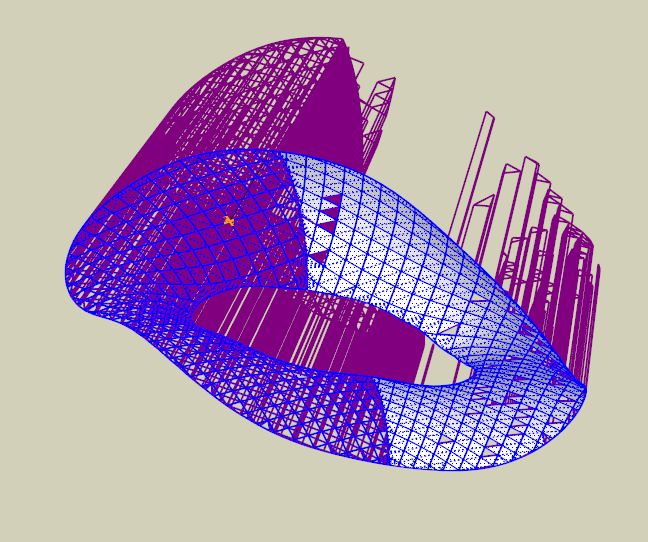
-
Hi Scott,
Some of us, and me, experienced such kind of problems but it was due to a "small" scale which causes the plugin to not be able to correctly compute the extruded faces.
We don't know how big your model is and its size and its edges size but your experience is interesting and could give us something else to think about in case of problems.
Thx,
Alain -
Tig
A suggestion if I may.

Sometimes JPP can take "forever" to complete, even seem like it's hung. Other times it zips along in a sprightly fashion. Seems no connection to complexity, I've had a 30 face push take about 3 minutes and a 150 face push take about 40 seconds.
However on more than one long push a very few seconds into the push I realized I was in feet and not inches, so the result would have been scrapped in any event. I normally push/pull the pre-surface well beyond the dimension I want and key in the actual dimension, then hit enter twice, so I don't get a visual clue to my error. Other times I just don't want to wait what will be a very long wait.
JPP needs a cancel or quit button.





Advertisement