sketchucation logo sketchucation
    • 登入
    Oops, your profile's looking a bit empty! To help us tailor your experience, please fill in key details like your SketchUp version, skill level, operating system, and more. Update and save your info on your profile page today!
    🔌 Smart Spline | Fluid way to handle splines for furniture design and complex structures. Download

    Joint Push Pull Classic (Old version) - v2.2a - 26 Apr 17

    已排程 已置頂 已鎖定 已移動 Plugins
    368 貼文 150 Posters 2.0m 瀏覽 150 Watching
    正在載入更多貼文
    • 從舊到新
    • 從新到舊
    • 最多點贊
    回覆
    • 在新貼文中回覆
    登入後回覆
    此主題已被刪除。只有擁有主題管理權限的使用者可以查看。
    • E 離線
      E21F1988
      最後由 編輯

      Hi everybody!
      I've got some problems about Joint Push Pull - v2.0b: I followed all the steps for the installation, but when I open the program a window appears and says "Error Loading File jointpushpull_main.rb undefined method `get_last_state' for nil:NilClass". 😕
      Fredo6, what does it mean?

      Thanks a lot! 😉

      Ps: I have Google Sketchup 8 pro...

      1 條回覆 最後回覆 回覆 引用 0
      • T 離線
        timetess
        最後由 編輯

        thank u for sharing,like it!

        1 條回覆 最後回覆 回覆 引用 0
        • charly2008C 離線
          charly2008
          最後由 編輯

          Hi,

          thanks for this wonderful plugin. I often work with it. I have now installed the latest version but I get no dialog box. What do I need to see the dialog box?

          Charly

          He who makes no mistakes, makes nothing

          1 條回覆 最後回覆 回覆 引用 0
          • fredo6F 離線
            fredo6
            最後由 編輯

            @charly2008 said:

            Hi,

            thanks for this wonderful plugin. I often work with it. I have now installed the latest version but I get no dialog box. What do I need to see the dialog box?

            Charly

            Charly,

            With the visual edition, you have a preview mode and you can type the offset in the VCB. The dialog box can be invoked by pressing TAB or via the contextual menu.

            Fredo

            1 條回覆 最後回覆 回覆 引用 0
            • charly2008C 離線
              charly2008
              最後由 編輯

              Hi Fredo,

              Thanks for the quick reply. It works.

              Charly

              He who makes no mistakes, makes nothing

              1 條回覆 最後回覆 回覆 引用 0
              • pilouP 離線
                pilou
                最後由 編輯

                What is exactly the option "Thickening" against the normal use ?
                Can you put a little image before/ after

                Frenchy Pilou
                Is beautiful that please without concept!
                My Little site :)

                1 條回覆 最後回覆 回覆 引用 0
                • S 離線
                  SUN288
                  最後由 編輯

                  cool, thanks for testing fellas

                  1 條回覆 最後回覆 回覆 引用 0
                  • K 離線
                    Kokorenromp
                    最後由 編輯

                    Hi all,

                    I try to use the plugin to create a skin within an angular 3D model.
                    It gives some trouble at a point where 6 edges intersect. The plugin creates a new point, after averaging all 6 normals to the faces, but keeps the edges together. I would like to see a result where new lines are created and previously horizontal or vertical edges stay hor/vert.

                    Is this plugin or another plugin/function in SketchUp able to do this in a single operation or do I have to adjust it all by hand?
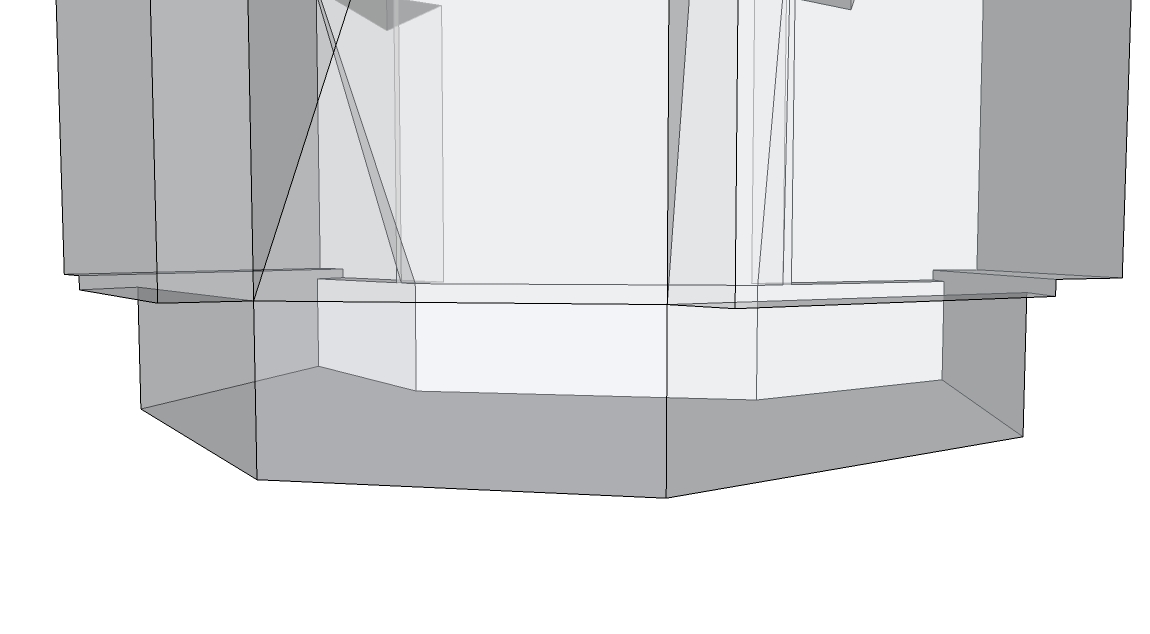
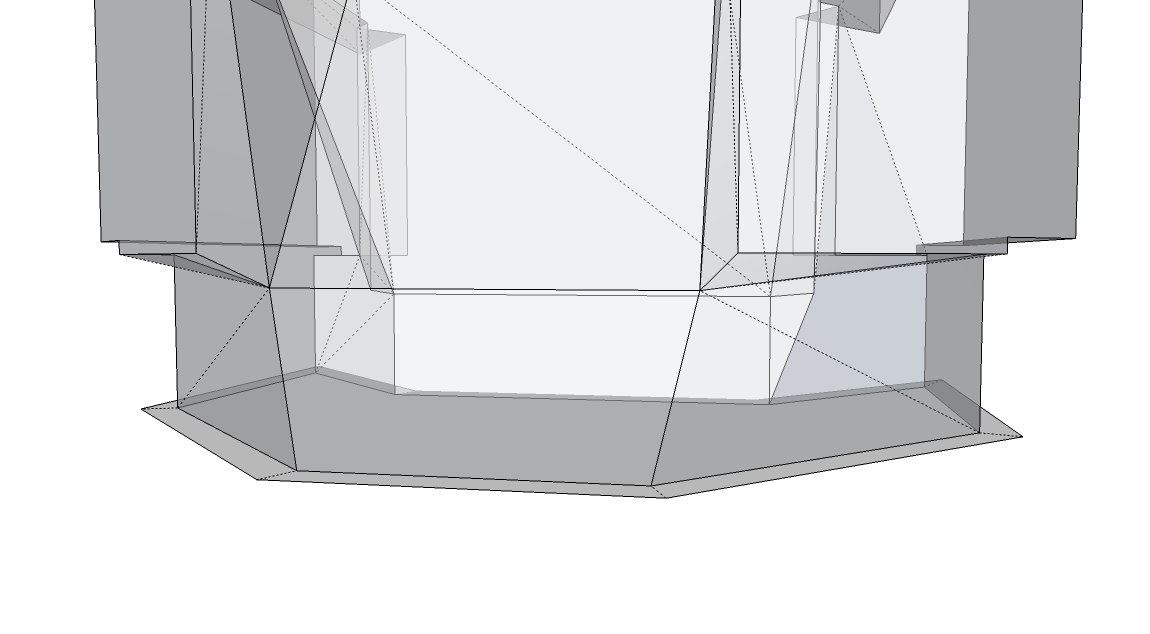
                    beforel.jpg


                    Using Joint Push Pull

                    1 條回覆 最後回覆 回覆 引用 0
                    • LanaL 離線
                      Lana
                      最後由 編輯

                      **[highlight=#ff40ff:s59i081v][/highlight:s59i081v]**thank you very much!

                      1 條回覆 最後回覆 回覆 引用 0
                      • engineericE 離線
                        engineeric
                        最後由 編輯

                        I installed this tool months ago, but only just realized what it does. Another great plugin from Fredo6. Thank you.
                        I read through the suport literature and cannot repeat something I'm seeing there: According to the support document, if my neighboring face normals are less than the angle of influince from the target face normal, the they will influince the targets offset. Correct? I tried to re-create what was shown on page 13 & 14 of the document, but my model seems unaffected by angle of influince. Did this functionality go away in later versions, or am I mis-interpreting something?
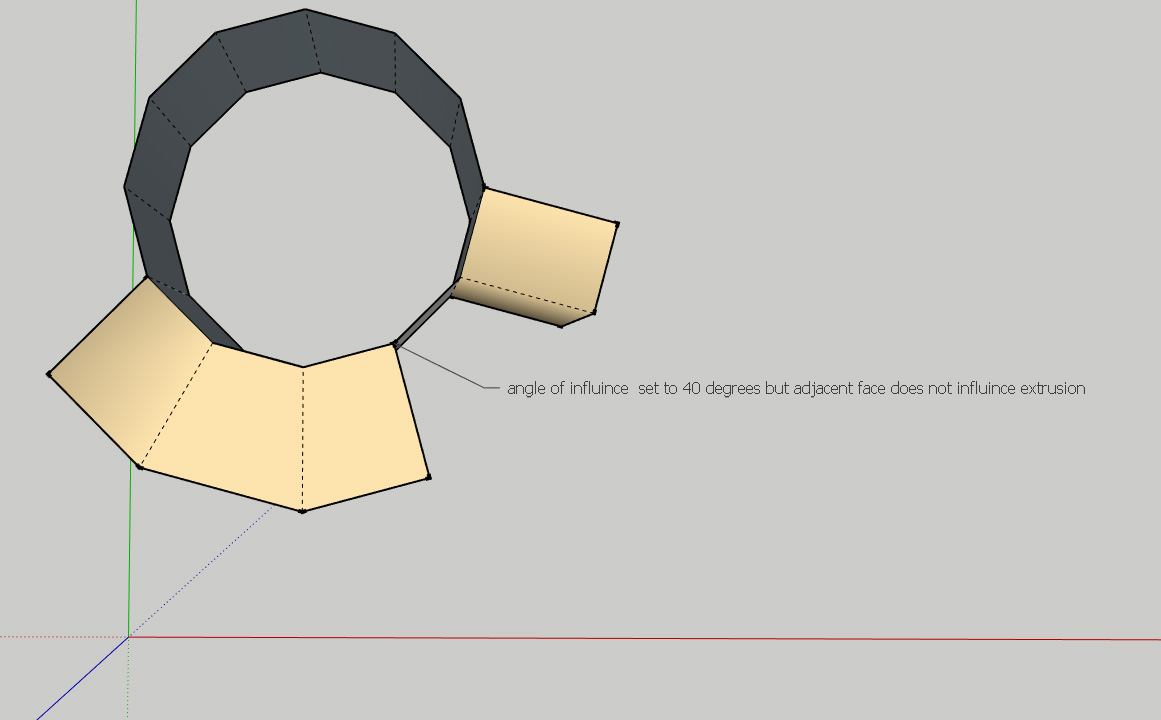

                        angle of influince

                        1 條回覆 最後回覆 回覆 引用 0
                        • mitcorbM 離線
                          mitcorb
                          最後由 編輯

                          Hi engineeric:
                          In your image, did that one face not extrude in a multiface selection and extrusion? Occasionally, this may happen, or it seems it has happened with me. Maybe the selection was made appropriately, but that face was spontaneously deselected?
                          In this simple example, you obviously could construct the missing portion by using JPP by normal or by vector, or even draw the completion with the pencil tool. In a more complex example, any of these corrections could get tedious.

                          I take the slow, deliberate approach in my aimless wandering.

                          1 條回覆 最後回覆 回覆 引用 0
                          • pbacotP 離線
                            pbacot
                            最後由 編輯

                            I think OP is looking at how the angle at the sides of the extrusions are normal to the extruded face and not influenced by the angle of the adjacent face.

                            It has been a while since I did this similar operation (the faces on the left). As I recall (and I probably have that file) the edge faces did angle outward and not come out square. I can't repeat this now myself...so, good question.

                            MacOSX MojaveSketchUp Pro v19 Twilight v2 Thea v3 PowerCADD

                            1 條回覆 最後回覆 回覆 引用 0
                            • engineericE 離線
                              engineeric
                              最後由 編輯

                              pbacot is correct. I've attached the relevant portion of Fredo6's support document to make the point clearer. In attempting to reproduce his example, I find that no matter what the angle of influence is, I only get the results of the Fredo's middle image. That is, extrusions next to deselected faces are normal. pbacot, you said this feature worked before. I wonder if your file was done with a previous version of JPP? I grant you the support doc is now 4 years old.
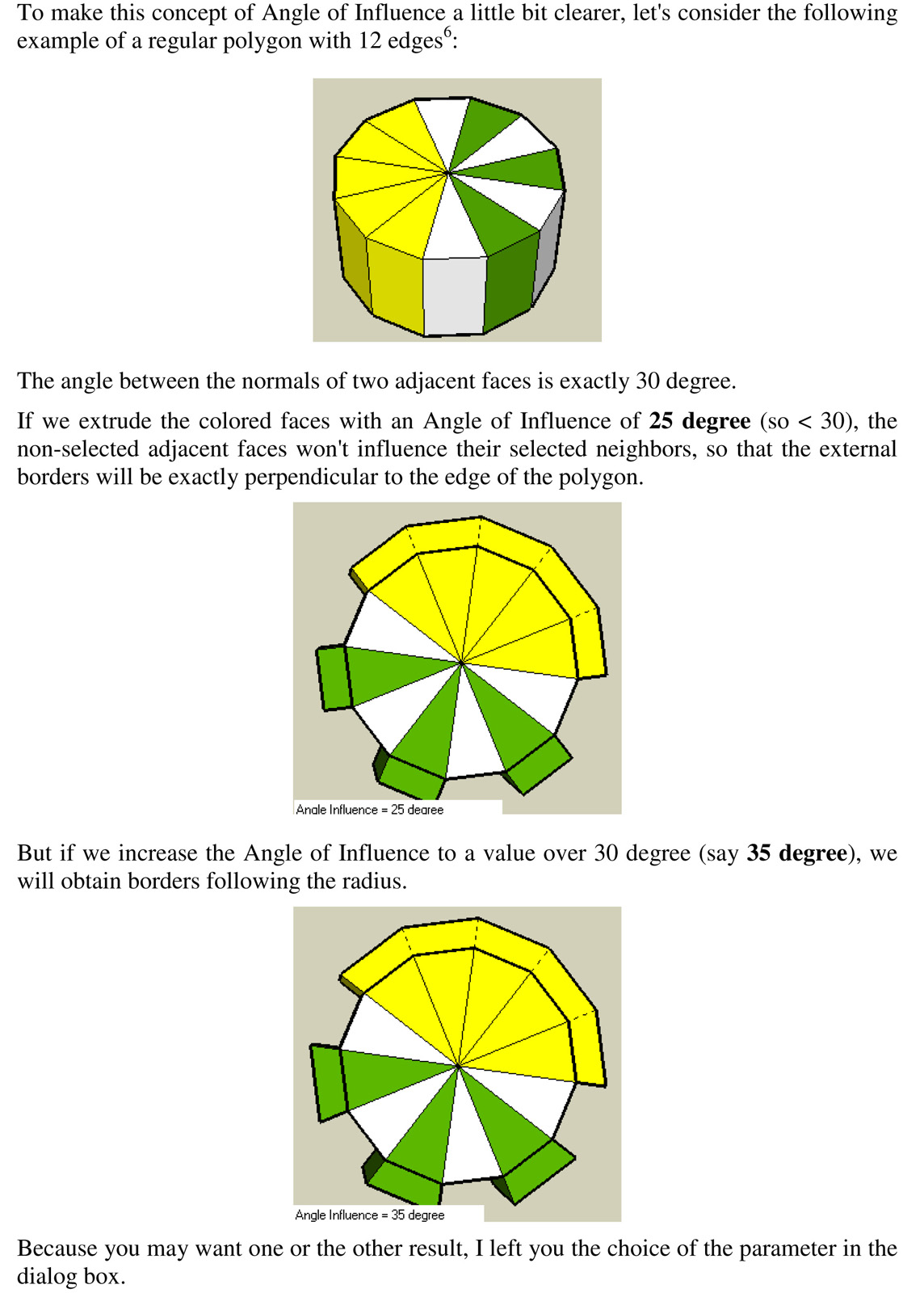

                              pg 14 of JPP support doc

                              1 條回覆 最後回覆 回覆 引用 0
                              • H 離線
                                Haven Design Workshop
                                最後由 編輯

                                Hi there,

                                This script is very close to doing exactly what I need, and I'm hoping somebody might help me figure out how to take it the rest of the way... I'm trying to take roof systems that are drawn as single-faces, and then vector push them vertically into their proper thickness. JPP works fine for this, but it ends up with vertical hidden lines between the upper and lower face, which make it messy to turn the final roof into a solid, which is necessary for further editing. Outside of going through the complex roof form and deleting or filling-in every hidden edge, is there a way that vector push pull can just make a standard solid geometry?

                                Thanks!

                                1 條回覆 最後回覆 回覆 引用 0
                                • TIGT 線上
                                  TIG Moderator
                                  最後由 編輯

                                  Look through the tools options [and help docs].
                                  You can set it to retain the original face, and also NOT to make 'internal partitions'...

                                  TIG

                                  1 條回覆 最後回覆 回覆 引用 0
                                  • fredo6F 離線
                                    fredo6
                                    最後由 編輯

                                    @engineeric said:

                                    pbacot is correct. I've attached the relevant portion of Fredo6's support document to make the point clearer. In attempting to reproduce his example, I find that no matter what the angle of influence is, I only get the results of the Fredo's middle image. That is, extrusions next to deselected faces are normal. pbacot, you said this feature worked before. I wonder if your file was done with a previous version of JPP? I grant you the support doc is now 4 years old.

                                    Since JPP 2.0, the angle of influence is not used any longer (see release note).
                                    I don't remember why I had to suppress this.
                                    I'll try to have a look at the code to see if I can re-stablish it

                                    Fred

                                    1 條回覆 最後回覆 回覆 引用 0
                                    • W 離線
                                      wodur
                                      最後由 編輯

                                      incredible, thanks.

                                      1 條回覆 最後回覆 回覆 引用 0
                                      • A 離線
                                        AlainBo
                                        最後由 編輯

                                        Hello,

                                        I discovered and tried your tool with the last Catchup edition 15 to create the Hans Wegner chair.

                                        Following this tutorial, I discovered that 2 of the 3 extrusion possibilities cause problems; the J and N where the result pulled face creates unclosed faces. The problem doesnt occur when we use the V tool.

                                        The attachments illustrate the problem.

                                        Regards,
                                        Alain
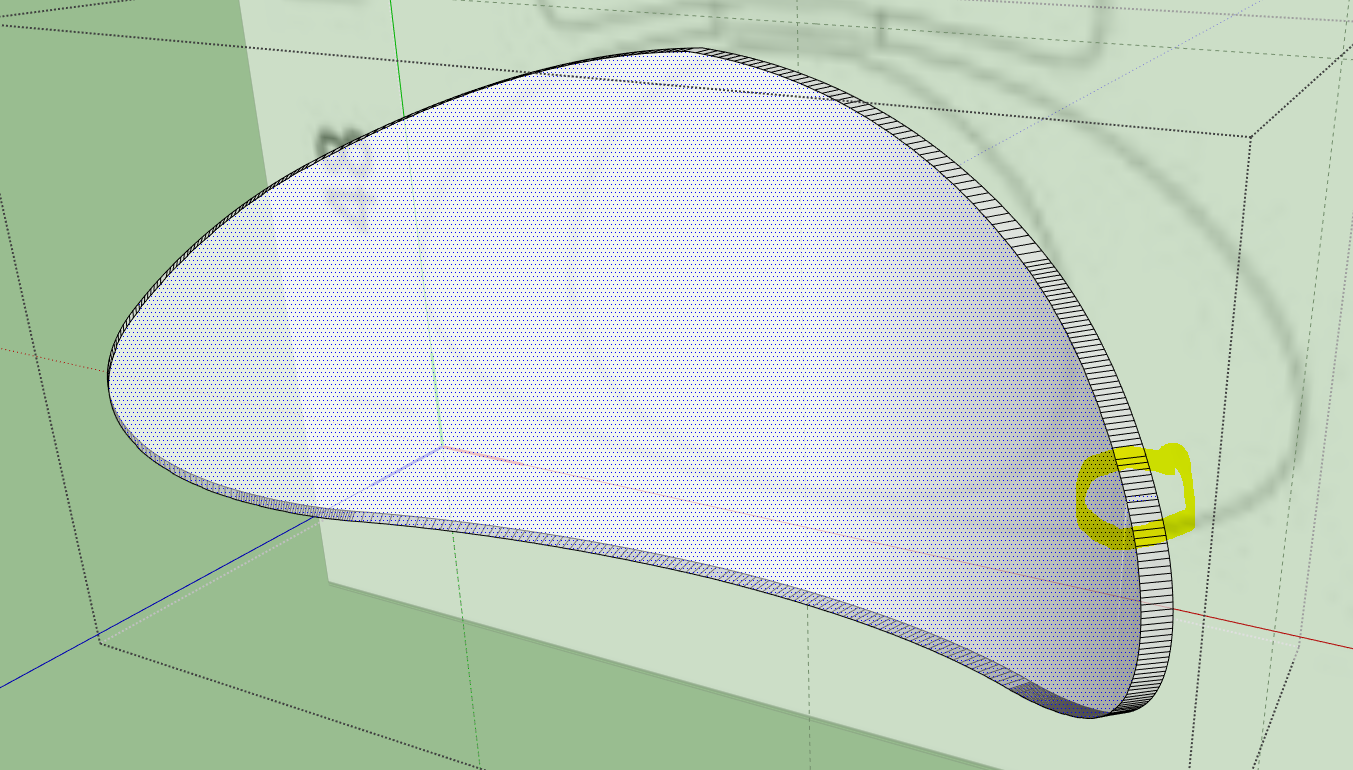
                                        surface pulled.PNG
                                        pb joint pushpull.PNG

                                        1 條回覆 最後回覆 回覆 引用 0
                                        • TIGT 線上
                                          TIG Moderator
                                          最後由 編輯

                                          @Alainbo

                                          Tiny differences can cause issues with SketchUp/OpenGL that filter down through the API code.
                                          Two points can end up appearing to the 'engine' as being coincident when they are not and thereby a face is missed off. In your case it looks like a creeping tolerance issue.

                                          To avoid this if you scale up what you are working on [temporarily] by say x10 chances are that the extrusion vertices will all play nicely and no faces will get omitted. Scale back down afterwards and the issue won't reappear - it's the creation involving small dimensions/edges/facets etc that's the issue, but they can exist, just not be 'made' at those values.

                                          TIG

                                          1 條回覆 最後回覆 回覆 引用 0
                                          • A 離線
                                            AlainBo
                                            最後由 編輯

                                            Ok TIG, I'll try to work like that.
                                            Thanks

                                            1 條回覆 最後回覆 回覆 引用 0
                                            • 1
                                            • 2
                                            • 11
                                            • 12
                                            • 13
                                            • 14
                                            • 15
                                            • 18
                                            • 19
                                            • 13 / 19
                                            • 第一個貼文
                                              最後的貼文
                                            Buy SketchPlus
                                            Buy SUbD
                                            Buy WrapR
                                            Buy eBook
                                            Buy Modelur
                                            Buy Vertex Tools
                                            Buy SketchCuisine
                                            Buy FormFonts

                                            Advertisement