sketchucation logo sketchucation
    • 登入
    Oops, your profile's looking a bit empty! To help us tailor your experience, please fill in key details like your SketchUp version, skill level, operating system, and more. Update and save your info on your profile page today!
    🔌 Easy Offset | Offset selected faces in SketchUp in positive and negative offsets. Download

    [Plugin] SketchyFFD (Classic)

    已排程 已置頂 已鎖定 已移動 Plugins
    412 貼文 153 Posters 440.0k 瀏覽 153 Watching
    正在載入更多貼文
    • 從舊到新
    • 從新到舊
    • 最多點贊
    回覆
    • 在新貼文中回覆
    登入後回覆
    此主題已被刪除。只有擁有主題管理權限的使用者可以查看。
    • guanjinG 離線
      guanjin
      最後由 編輯

      @tig said:

      Here's my update http://sketchucation.com/forums/viewtopic.php?p=36127#p36127
      The recently reported NxN issues with NaN [0.0/0.0] & Infinity [1.0/0.0] fixed, these occurred when the selected group was 2d & NxN height=1...
      Also the NxN dialog now remembers the last used values that session for the NxN lattice [width, depth, height, subdivide]...

      New version, can not be achieved on the sphere deformation

      I come from China, is to learn

      1 條回覆 最後回覆 回覆 引用 0
      • TIGT 離線
        TIG Moderator
        最後由 編輯

        @guanjin said:

        @tig said:

        Here's my update http://sketchucation.com/forums/viewtopic.php?p=36127#p36127
        The recently reported NxN issues with NaN [0.0/0.0] & Infinity [1.0/0.0] fixed, these occurred when the selected group was 2d & NxN height=1...
        Also the NxN dialog now remembers the last used values that session for the NxN lattice [width, depth, height, subdivide]...

        New version, can not be achieved on the sphere deformation
        But did the old version ?
        There is little difference with this update !
        How are you trying to deform a sphere ??

        TIG

        1 條回覆 最後回覆 回覆 引用 0
        • guanjinG 離線
          guanjin
          最後由 編輯

          @tig said:

          @guanjin said:

          @tig said:

          Here's my update http://sketchucation.com/forums/viewtopic.php?p=36127#p36127
          The recently reported NxN issues with NaN [0.0/0.0] & Infinity [1.0/0.0] fixed, these occurred when the selected group was 2d & NxN height=1...
          Also the NxN dialog now remembers the last used values that session for the NxN lattice [width, depth, height, subdivide]...

          New version, can not be achieved on the sphere deformation
          But did the old version ?
          There is little difference with this update !
          How are you trying to deform a sphere ??

          Sorry, operational errors, thank TIG

          I come from China, is to learn

          1 條回覆 最後回覆 回覆 引用 0
          • E 離線
            eshertoding
            最後由 編輯

            i can't find the "update ffd" after i move the point and close grup
            can't anyone explain me?

            1 條回覆 最後回覆 回覆 引用 0
            • L 離線
              libinhui
              最後由 編輯

              thank you!

              1 條回覆 最後回覆 回覆 引用 0
              • T 離線
                tootsiejo
                最後由 編輯

                Hi i can't see the SketchyFFD in my SKP8. it doesnt appear. how do you really install it? is there a tool? it doesnt install when i put it in the plugins folder

                1 條回覆 最後回覆 回覆 引用 0
                • TIGT 離線
                  TIG Moderator
                  最後由 編輯

                  @tootsiejo said:

                  Hi i can't see the SketchyFFD in my SKP8. it doesnt appear. how do you really install it? is there a tool? it doesnt install when i put it in the plugins folder

                  Assuming you have indeed installed the .rb file into the Plugins folder and restarted SketchUp the tool runs from items in the right-click context-menu 'FFD...' if you have a suitable selection [group etc]...
                  Please read the tool's instructions in the first page...

                  TIG

                  1 條回覆 最後回覆 回覆 引用 0
                  • D 離線
                    DaddyDDesign
                    最後由 編輯

                    Hello I am somewhat new to sketchup and am having a bit of trouble with the "open control points group " step of the process. After the object has the control points around it I cant seem to snap to any of them, when I click the cursor just starts to create a selection box. I'm sure I'm missing something trivial, any help would be appreciated.

                    Thanks,
                    Dave

                    1 條回覆 最後回覆 回覆 引用 0
                    • TIGT 離線
                      TIG Moderator
                      最後由 編輯

                      You need to open the group to move the guide-points [aka cpoints] etc.
                      You should be able to double lick on one of them to open the group.
                      Failing that, use the Outliner to find it and double-click on the named entry in the Outliner dialog, it will then open to edit.
                      To close an edit of a group [or component] click away from it in empty space, or use the right-click context-menu item to close it [or the equivalent Edit menu item]...

                      TIG

                      1 條回覆 最後回覆 回覆 引用 0
                      • N 離線
                        nguyenanhducarc
                        最後由 編輯

                        THank you!
                        i love you.! ♥

                        1 條回覆 最後回覆 回覆 引用 0
                        • J 離線
                          jemoto
                          最後由 編輯

                          Hi all,

                          I struggle a bit with this plugin; after manipulating the control points and closing the group, I cannot see an "Update FFD" menu item. I believe an earlier poster had the same issue. Can anyone help? Thanks.

                          1 條回覆 最後回覆 回覆 引用 0
                          • john2J 離線
                            john2
                            最後由 編輯

                            @jemoto said:

                            Hi all,

                            I struggle a bit with this plugin; after manipulating the control points and closing the group, I cannot see an "Update FFD" menu item. I believe an earlier poster had the same issue. Can anyone help? Thanks.

                            Ditto ❗ ❗ I am also facing the same problem. I just installed and tried to use this plugin.

                            Sketchup Make 2017 (64-bit), Vray 4.0 , Windows 10 – 64 bit, corei7-8750H, 16GB RAM, Nvidia GeForce GTX 1050Ti 4GB

                            1 條回覆 最後回覆 回覆 引用 0
                            • P 離線
                              PeterF
                              最後由 編輯

                              I am having the same problem. I have tried installing every version of the script and there is no 'Update FFD' menu button. The other FFD submenu is there though. I'm using Sketchup Make 2015. Has anyone solved this problem?

                              1 條回覆 最後回覆 回覆 引用 0
                              • TIGT 離線
                                TIG Moderator
                                最後由 編輯

                                Install the latest version.
                                Then, at the risk of déjà vu read: http://sketchucation.com/forums/viewtopic.php?p=485421#p485421
                                It all works from the context-menu - given a suitable selection...

                                But remember that it is an old creaky plugin, from way back yore...

                                TIG

                                1 條回覆 最後回覆 回覆 引用 0
                                • P 離線
                                  PeterF
                                  最後由 編輯

                                  Thanks for the reply. I have tried installing every version and none of them have that button. The rest of the submenu is there like I said, but when you adjust the control points, nothing happens and there is no update button.
                                  Is there a newer plugin that works better than this then? I haven't found another that can twist and warp organic shapes like this one is supposed to.

                                  1 條回覆 最後回覆 回覆 引用 0
                                  • pilouP 離線
                                    pilou
                                    最後由 編輯

                                    Works perfectly in the 2015! 😄

                                    Else you have FredoScale by Fredo6 who makes the same! 😉

                                    Frenchy Pilou
                                    Is beautiful that please without concept!
                                    My Little site :)

                                    1 條回覆 最後回覆 回覆 引用 0
                                    • P 離線
                                      PeterF
                                      最後由 編輯

                                      Ok never mind. I installed it again for the 5th time and it works for some reason!

                                      1 條回覆 最後回覆 回覆 引用 0
                                      • F 離線
                                        Fabtins
                                        最後由 編輯

                                        Fantastic tool sir!
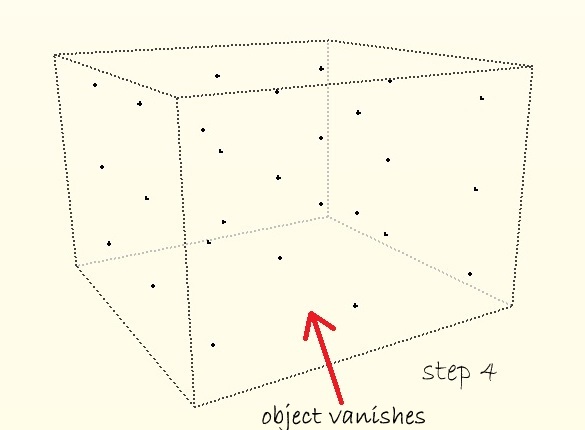
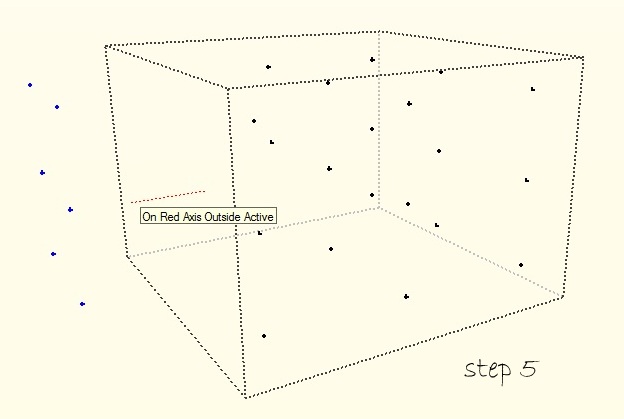
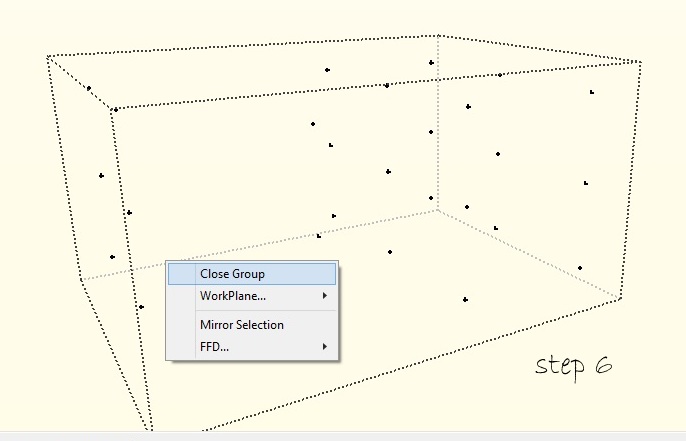
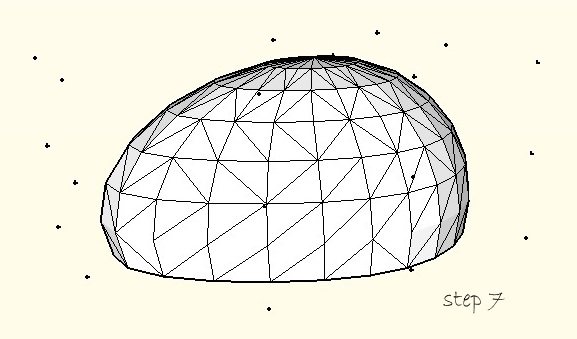
                                        I've just started using it. Its working amazingly well but when i open(double click) the control point group to alter control point locations for deformation, the object i'm working on vanishes leaving only the control points behind. The transformation done is taking place but I only see it on the object after i click close group. Can you help me figure what i'm doing wrong? I've attached the screenshots for reference.
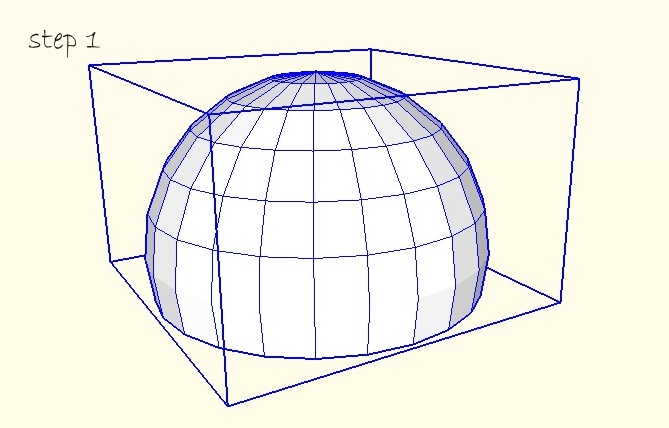
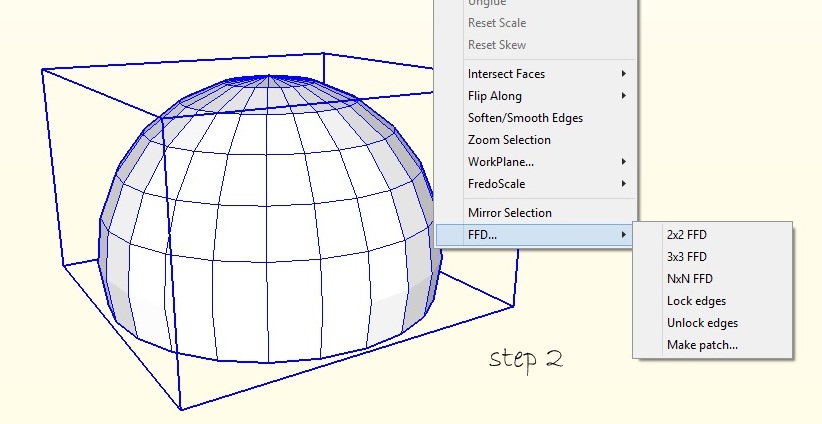
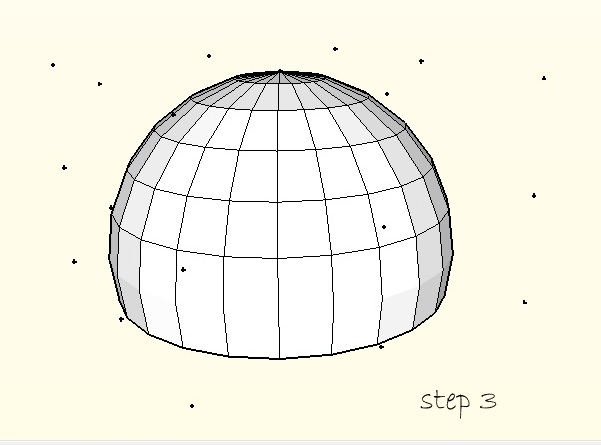
                                        step 1


                                        step 2


                                        step 3


                                        step 4


                                        step 5


                                        step 6


                                        step 7

                                        1 條回覆 最後回覆 回覆 引用 0
                                        • TIGT 離線
                                          TIG Moderator
                                          最後由 編輯

                                          When you edit a Group or Component you can set the rest of the model to be 'hidden', OR not.
                                          See:- View > Component Edit > Hide Rest of Model - toggle it ON/OFF
                                          Sometimes hiding the rest of the model is useful, but sometimes you want to see it - as in this case !

                                          TIG

                                          1 條回覆 最後回覆 回覆 引用 0
                                          • pilouP 離線
                                            pilou
                                            最後由 編輯

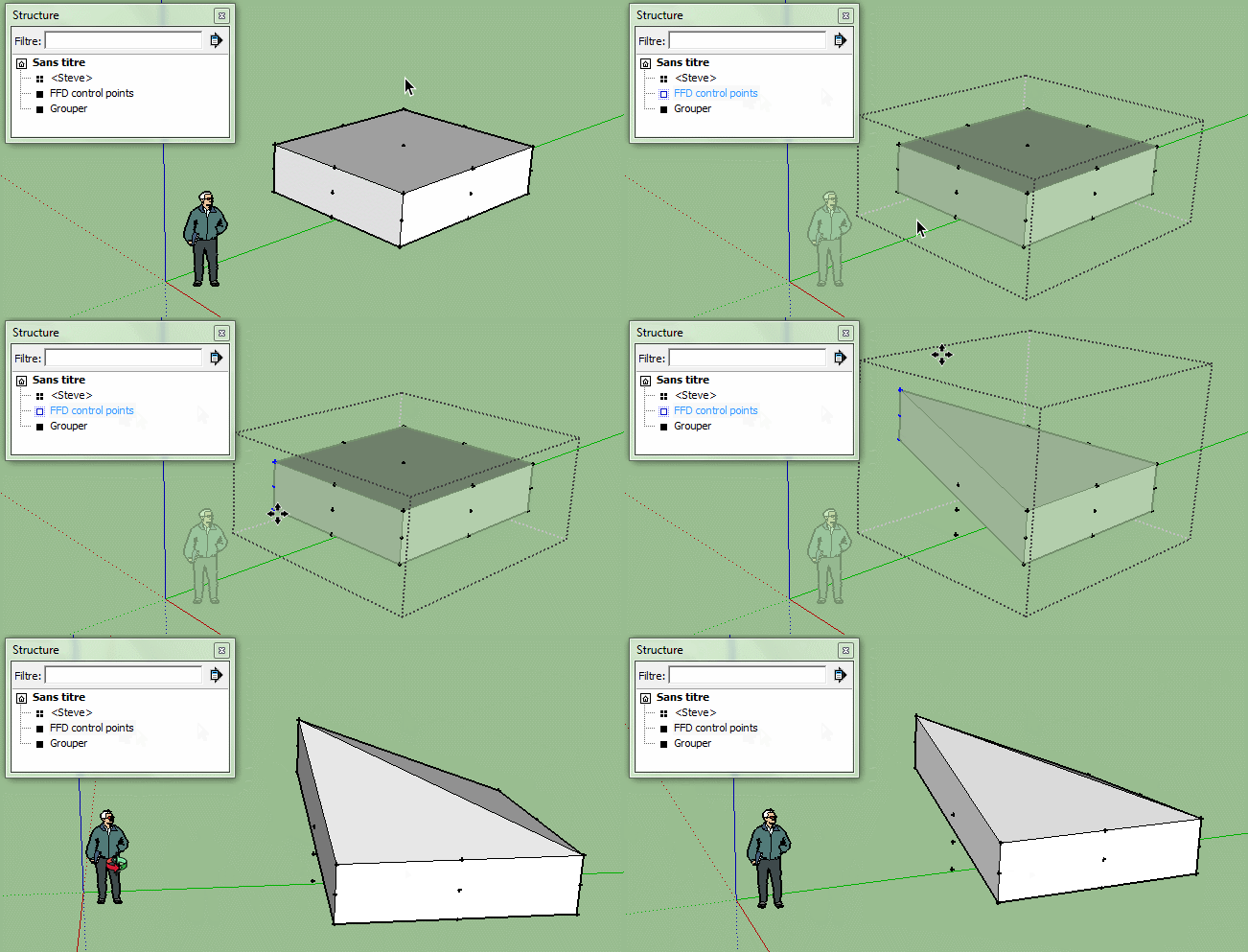
                                            You can also use the Structure function for easy use of this plugin! 😉
                                            Click on the image for see animation!
                                            ffd.gif

                                            Frenchy Pilou
                                            Is beautiful that please without concept!
                                            My Little site :)

                                            1 條回覆 最後回覆 回覆 引用 0
                                            • 1
                                            • 2
                                            • 3
                                            • 4
                                            • 5
                                            • 20
                                            • 21
                                            • 3 / 21
                                            • 第一個貼文
                                              最後的貼文
                                            Buy SketchPlus
                                            Buy SUbD
                                            Buy WrapR
                                            Buy eBook
                                            Buy Modelur
                                            Buy Vertex Tools
                                            Buy SketchCuisine
                                            Buy FormFonts

                                            Advertisement