[Plugin] SketchyFFD (Classic)
-
You make a series of grouped 'control-points' [guide-points] in a 3d grid around the selected group's bounding box, these are given special attributes so they can be 'observed' later.
Now later on when you change any of them [e.g. you might edit the group that contains them and 'move' some] an 'observer' kicks in, and it runs code that adjusts the geometry within the group by distorting all of the vertices relative to the 'control-points' current locations. Thus you can distort a grouped form by changing the 3d grid of 'control-points'.
The rules for determining the amount of the adjustment for each vertex is done by finding the changes in the vectors between the vertices and the 'control-points' and transforming each of the vertices accordingly... -
@tig said:
The rules for determining the amount of the adjustment for each vertex is done by finding the changes in the vectors between the vertices and the 'control-points' and transforming each of the vertices accordingly...
That part is the most important for what I need. Now I have a better idea, thanks. If you have any link to other resources about the algorithm, it would be great.
-
Hi,
I installed the latest Ruby in the plugins folder in Sketchup 8. I do not get it to work. In the context menu the functions are all grayed out.
Charly
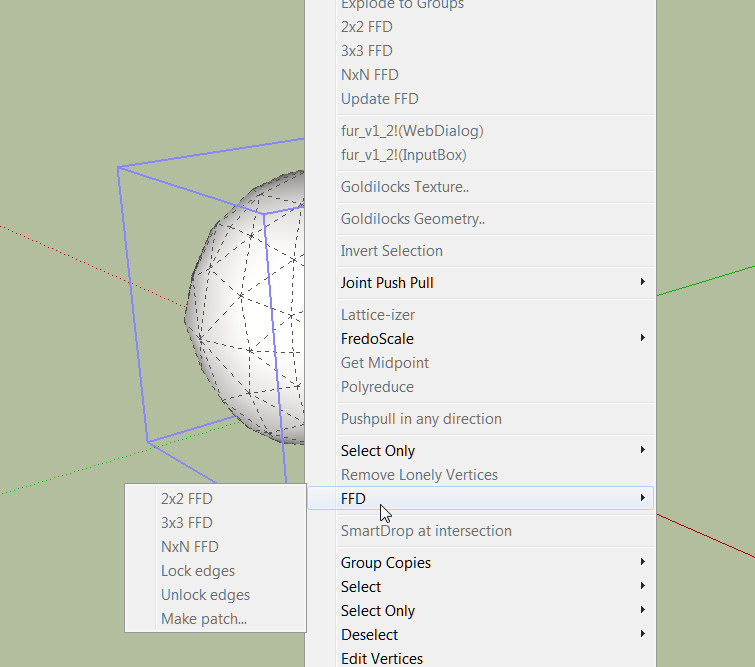
-
Charly
Not a tool specific issue...
The context-menu gray-out is a known Sketchup issue.
There is a finite number of 'commands' that can be added to the context-menu/toolbars.
If you exceed this some items become 'disabled'.
This was discovered a while ago as more and more scripts were added.
Some scripts were found to add multiple entries, these were quickly found and fixed [e.g. all Fredo's tools latest versions are no longer implicated].
I didn't write the original version of this tool but I can't see it makes more that it has too...
However, having a lot of scripts loading - even if they are optimized - you can still eventually reach the limit in any case... and get the 'graying'.
I suggest you decide which scripts you don't often need and disable them by renaming the with .TXT on the end. They won't then auto-load and you should thereby avoid the 'graying' issue. If you want to change them to auto-load again simply remove the .TXT from the tool's name so the .rb file auto-loads. If you want to occasionally load a .TXT file just load it from the Ruby Console withload "xxxx.rb.TXT"- where 'xxxx' is the original scripts name... it's then loaded for that session only.
There is also an 'optimizer' you could try [ http://forums.sketchucation.com/viewtopic.php?p=252413#p252413 ] - but it will still fail if you clog up the 'auto-loading set' too much... It also has further reading on this whole issue
-
@TIG That's explain why this arrives with my numerous collections of plugins

Thx for for this enlighting explanation
-
Dear TIG,
You have given me and many others, again very helpful tips with your expert explanations.
That was a good time to cleanup my plugin directory. I had so many plugins that I have never used or very rarely. With many more I knew not what function they have. I've promised myself that from now I install plugins only when I need it really.
In my context menu, all functions are now active again and SketchyFFD works fine now and Sketchup boots faster.
Many Thanks again TIG.
Charly
-
Charly
Please be aware that there are some helper files that are 'required' by other files - e.g. 'progressbar.rb' is needed by Chris Fullmer's 'ShapeBender' and others, and 'deBabelizer.rb' by several of my own 'toolsets'.
So if you remove/rename_with_.TXT any of those and there are other files that need them, then you will get error messages, either at startup or more rarely when the tool activates.
If that happens the error-message is usually quite clear - telling you the missing file's name so it can readily find it and it can be reverted to as it was...However, so far it sounds like your 'tidy-up' has been problem free... but just in case of future oddities please bear in mind what I've just said above...

-
Great tool, CPhillips!
It has amazing results. I shall definitely try it.
Thanks for sharing this.
-
THX!!
 ...good job!
 -
Thanks for the help TIG, but I have got the sketchy FFD on my right click but it still doesn't work, move the control points nothing happens and no update in the menu. If it's so simple how come there are pages and pages of conflicts on this web site. I know how to do the root installation but the Fredo set with the lib for instance, version compatibility and the folder set up is a bit cryptic. I'm sure there great tools but this is open programing without quality control.
Also, you can read updates and instal instructions for outdated versions, PC versions etc ad nauseum or just ask someone to help which I'm sure is frustrating. -
OK... you have now got the tool loading, and it's in the right-click context-menu...
If you run it with the Ruby Console open what error message [if any] do you get ?
What doesn't 'work' exactly ??There were many issues with early the versions... but I took it upon myself to [try to] fix the original author's code [with his permission!]... so that these were then hopefully resolved... [Q: You did download/install the most recent version, didn't you ??] - so if you are now saying that there are new issues we need to know about them... so, whatever details you have [beyond, 'It doesn't work!'], would be very useful
-
as I said move the control points and nothing happens
it took 20 minutes to 'weigh' a panel
can you point me to the latest one maybe it's that -
Did you get it from http://forums.sketchucation.com/viewtopic.php?p=36127#p36127 - the 20110810 version by me [TIG] downloaded 1385 times, and with few issues reported over the intervening five months [note that the two more flaky earlier versions were downloaded over 9000 times in total and even they had relatively few issues, when used as intended !]
Do you get anything in the [all ready opened] Ruby Console when you are using it ?
Are you following the usage notes carefully ?
Screen-shot [or even post] your 'panel' SKP - is it incredibly complex ??

Can I also suggest that as this is no longer a unzip/install issue you post in the tool's own thread [as linked above]... I'll think about splitting the last few posts off into it too... MERGED!
-
Worked instantly from that link, I must of downloaded it from somewhere else ???
Exactly what I needed, Thanks -
I can't get this plugin to work and I need to use it desperately for some artificial snow I'm making for a building roof top.
I put it into plugins folder and then I tried tools but no luck.
An Install guide would be helpful.
Thank you -
@hogwarts said:
I can't get this plugin to work and I need to use it desperately for some artificial snow I'm making for a building roof top.
I put it into plugins folder and then I tried tools but no luck.
An Install guide would be helpful.
Thank youInstall by putting the script in your plugins directory.
As it says on the first post
-
@hogwarts said:
I put it into plugins folder and then I tried tools but no luck.
The plugin description only mentions a right-click menu .. no Tools menu.
-
No, it should appear when you right click a group.
-
@unknownuser said:
@hogwarts said:
I can't get this plugin to work and I need to use it desperately for some artificial snow I'm making for a building roof top.
I put it into plugins folder and then I tried tools but no luck.
An Install guide would be helpful.
Thank youInstall by putting the script in your plugins directory.
As it says on the first post
Edit, I see it's on right click menu FFD now but I only have 3 commands?
Lock, unlock and make patch. None of them seem to do anything?Could someone direct me to a guide to using this plugin. Thank you.
-
FFD won't allow you to create a N x N cage if it's raw geometry or a component







Advertisement