Shortcuts Plugin Possible?
-
As I'm sure all are aware, in version 6 there are some user set shortcuts that won't stick. It's been a problem since the first beta release and must be low on Google's repair list since it still hasn't been fixed.
So, with that in mind, I'm wondering if it would be possible to write a script that runs on startup that would set the shortcuts based on a previously exported shortcut list. My thought is that one would go through and set the shortcuts as desired, click Export and save the file to some location that the script would look for when SketchUp is started the next time.
What do you think? Is it possible? Difficult?
-
Nice thought. Maybe I miss something, but I only see Sketchup.get_shortcuts, no method to set them.
azuby
-
hi Dave
maybe it can help, take a look at the post su settings forever
dead linkall the shortcuts are also saved - tried it - it works (@Last)
sure it's not from a ruby - but i only need to click the registry file..
-
There are already some threads about this...
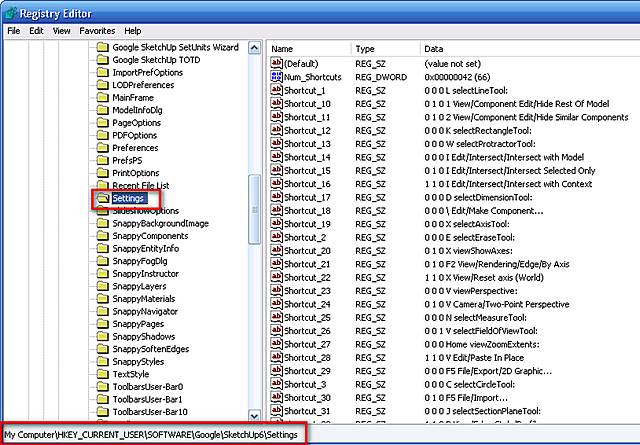
Dead linkOn a PC there is a Registry entry for the shortcuts - run Regedit to see it.
MyComputer...
HKEY_CURRENT_USER\Software\Google\SketchUp6\SettingsNum_Shortcuts >>> contains number of short-cuts as a 'number' e.g. '999' (not sure if it's in decimal or hex ?)
named thus:
Shortcut_1 to Shortcut_999 etc...each contains the shortcut entered thus:
"0 0 0 A selectArcTool:"
where the first three are the three modifier keys Ctrl:Alt:Shift [on:off=1:0], the next is the key itself [ABC etc] and then the action...If it's not a built in SUp action then the path to the Menu item shows thus:
"1 0 1 S Plugins/Steel Sections"With some ingenuity you could script something that'd re-write this using the built in:
Sketchup.write_defaults("section","variable","value")
(there is also a read_defaults method to find what's already set)...
-
TIG,
I'm very glad you are here! - you guys are amazing. I get so tired of not having "a" as my add scene shortcut, and having to re-do the prefs or re-load my shortcut file.. Arrrgghhh. I don't know how many times i asked Google to fix this... Thanks for the tips on the registry though kindly appreciated![Shaun Tennant]
-
Thanks. I saw cadfather's post just before leaving work. I copied the registry file after I had made the shortcut for adding scenes. It appears in the registry but I haven't found the secret to getting the shortcut activated from that saved file. I get messages asking me if I want to add that info to the correct registry but there's no change in SU. I've tried it before opening SU and after. So what am I doing wrong?
Edited to add: the shortcut shows in the registry but doesn't show as set when I go to Window>Preferences>Shortcuts
By the way, it's that Scene Add thing I'm after.
-
on my computer it was quite simple - everything worked, toolbars layouts and keyboard shortcuts.
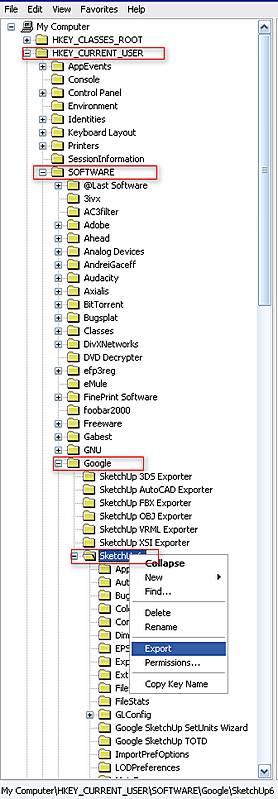
(which differ much from google)i'm attaching 2 files cleaner and master. first back up the key (has to be this key and all inside) [HKEY_CURRENT_USER\SOFTWARE\Google\SketchUp6] on your pc. (ex. dave.reg)
you can keep regedit open at the key > run cleaner.reg and you will see the key disappear.
if you open SU now you will see the interface go back to default..and...there is a new key in the registry called.. guess what? [Sketchup6]
now close SU and run cleaner.reg again > double click on the dave.reg key you saved before
and start SU.......
-
The two files in the zip file are SU_Clearer and SU_Training. Is that right?
For some reason, after looking at the registry and attempting the moves from your other thread I am now getting Bug Splats upon closing SU. I was going to uninstall it all and reinstall but now I wonder if your cleaner should be run instead.
-
Actually, I ran your cleaner and then went back and reset SU manually. that got rid of the bug splat.
-
..fantastic - i just went and tried it on a 'new' pc - it all worked..
and on my daughter's laptop! all my settings, cuts, rubys... everything........my sketchup portable

-
So, let me see if I understand this. If I open SU and set the shortcut I want to add scenes and then export the entire SketchUp registry [HKEY_CURRENT_USER\SOFTWARE\Google\SketchUp6] and save it as dave.reg, I should be able to double click on dave.reg and then open SU to find that shortcut is still active?
What confuses me is that with SU closed the the Registry, under Settings shows there is a shorcut set for Pageadd: but when I open SU the shortcut doesn't work.
-
that's strange because it does on mine...i mean all the others..let me try with add scenes..
who knows maybe a bug
wow, just tried (twice) the add scene doen't work

mine is F12 i will try a different key -
The SketchUp folks acknowledged awhile ago that there were a few user set shorcuts that don't stick after setting. Add scenes was one.
That is why I was hoping for a Ruby script that would run at SU startup (like the one that calls the Select tool instead of the Pencil) and set the shortcuts by reading the preferences.dat file that is generated when you click Export in the Shortcuts setting dialog box.
I use Alt+A to add a scene but it won't stick ether.
-
got it - the problem is that it saves the key as 'add page'
instead we need it under 'View/Animation/Add Scene'i have added it to the registry manually (saved the key) now it works
what key do you normally use?
-
Hmm. So how does that look in the Registry. In other words, what would I type to add that to mine?
The curious thing is that I have U set to updatescenes and it shows in the Registry as pageUpdate: and no reference to scene.
-
Ha! I got it! I edited the entry changing it from pageAdd: to View/Animation/Add Scene and now I have a shortcut.
Woo hoo! Thank you sir. Now we need to tell the world.
-
that's right, @last folks must have forgotten to let google people know..
here's a ruby script that will tell you the proper name, you just have to write that over the unusable one.

-
I think I have that one. I need to look.
Thanks again.
-
the CadFather strikes again!
EDIT: one more bug, if you go and enter a new (or the same) key for 'add scenes', 'update scenes' etc
it will overwrite your tweak - however it will work as long as once you have set it you leave it alone.and that is the end for tonight



Hello! It looks like you're interested in this conversation, but you don't have an account yet.
Getting fed up of having to scroll through the same posts each visit? When you register for an account, you'll always come back to exactly where you were before, and choose to be notified of new replies (either via email, or push notification). You'll also be able to save bookmarks and upvote posts to show your appreciation to other community members.
With your input, this post could be even better 💗
Register Login


Advertisement