sketchucation logo sketchucation
    • Login
    Oops, your profile's looking a bit empty! To help us tailor your experience, please fill in key details like your SketchUp version, skill level, operating system, and more. Update and save your info on your profile page today!
    Urasik Extensions | Lots of new extensions to check out Learn More

    MOVEMENT THROUGH MACHINE

    Scheduled Pinned Locked Moved Animator Beta
    8 Posts 2 Posters 90 Views 2 Watching
    Loading More Posts
    • Oldest to Newest
    • Newest to Oldest
    • Most Votes
    Reply
    • Reply as topic
    Log in to reply
    This topic has been deleted. Only users with topic management privileges can see it.
    • E Offline
      ericdjohn
      last edited by Rich O Brien

      Re: [Tutorial] Animator Quick Start
      Subject: Animator (Fredo6) – Simple Beam Movement Through Machine Animation
      Hello everyone,
      I'm new to Animator by Fredo6 and am trying to create a very simple industrial animation for sales training purposes.
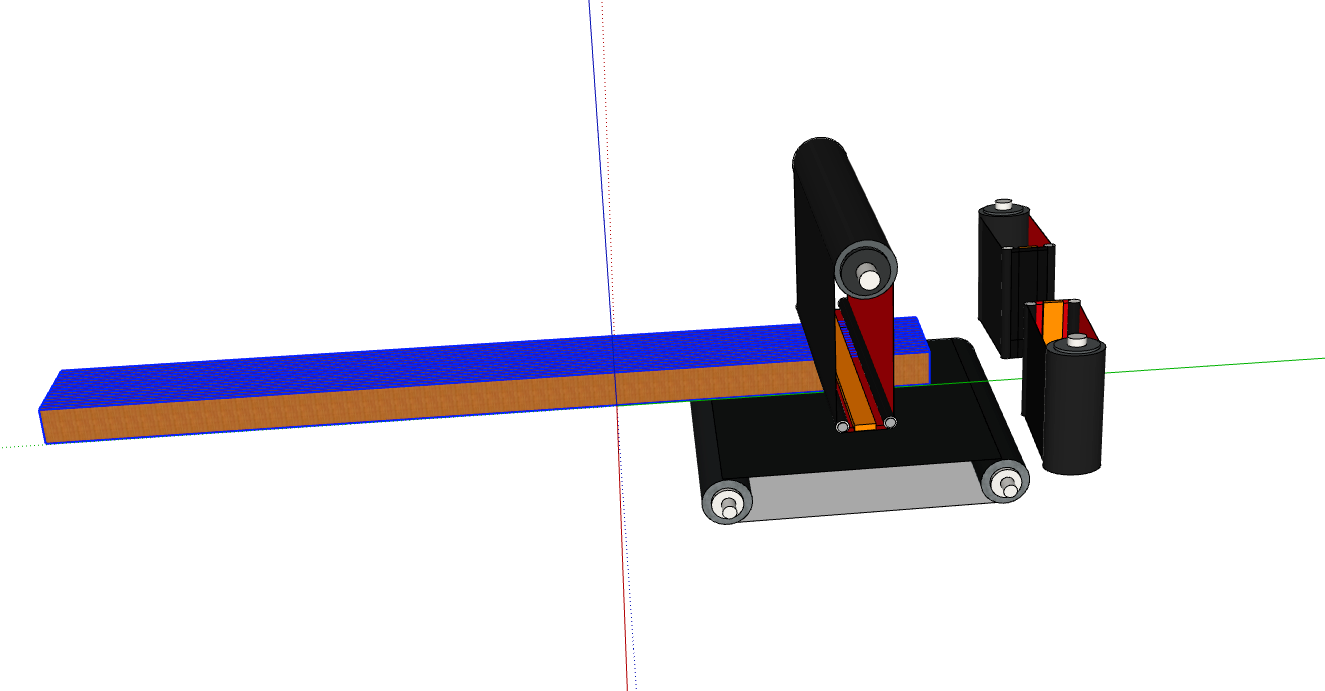
      I have a SketchUp model of a glulam beam sanding machine. The machine itself remains stationary, and I simply want to animate a glulam beam moving through the machine.
      My objective is:
      Beam starts at the machine entrance.
      Beam moves through the machine.
      Beam exits the machine.
      Eventually I would like to rotate the beam 90° or 180° and run it through again to demonstrate different sanding processes.
      The beam is a separate SketchUp Group and can be selected independently from the machine.
      So far I have:

      • Installed LibFredo6
      • Installed Animator v4.6a
      • Created a new film
      • Opened the Clip Editor and Positioner tools
      • Selected the beam group

      However, I cannot determine the correct workflow to create the first movement animation.
      When I open Positioner → Manage Positioners and click "Save current position as...", nothing appears to happen. No position is created and no prompt appears.
      What is the correct sequence of steps to:

      • Register the beam as an animated object (actor?)
      • Create a starting position
      • Create an ending position
      • Animate the beam moving from Point A to Point B
      • Preview and export the animation

      I am not trying to animate machinery, cameras, or complex assemblies. I simply need a beam to travel through a stationary machine.
      If anyone has a step-by-step example for moving a single group/component through a model using Animator v4.6a, I would greatly appreciate the help.
      Thank you.

      1 Reply Last reply Reply Quote 1
      • E Offline
        ericdjohn
        last edited by

        Screenshot 2026-06-02 at 9.33.20 AM.png

        1 Reply Last reply Reply Quote 1
        • Rich O BrienR Offline
          Rich O Brien Moderator
          last edited by Rich O Brien

          You need to use the Clip Editor (first icon on toolbar) to use the GUI to add a Movement

          2f860fb8-514f-4224-b175-ee1dcad0d80b-image.jpeg

          Download the free D'oh Book for SketchUp 📖

          1 Reply Last reply Reply Quote 0
          • E Offline
            ericdjohn
            last edited by

            Thank you, but how do you select the object to move

            1 Reply Last reply Reply Quote 1
            • Rich O BrienR Offline
              Rich O Brien Moderator
              last edited by

              Did you click New Movement?

              It will refactor the GUI to a dedicated Movement panel.

              The order of operation would be pick your transformation choice then select the object to apply that transformation to.

              You don't pre-select objects. Pick type then object to apply type.

              Download the free D'oh Book for SketchUp 📖

              1 Reply Last reply Reply Quote 0
              • E Offline
                ericdjohn
                last edited by

                got it thanks

                1 Reply Last reply Reply Quote 0
                • E Offline
                  ericdjohn
                  last edited by

                  I seem to be having problems making a MP4... probably doing something wrong. Is there an easy process?

                  Rich O BrienR 1 Reply Last reply Reply Quote 0
                  • Rich O BrienR Offline
                    Rich O Brien Moderator @ericdjohn
                    last edited by

                    @ericdjohn said:

                    Is there an easy process?

                    Did you install FFmpeg?

                    Download the free D'oh Book for SketchUp 📖

                    1 Reply Last reply Reply Quote 0

                    Hello! It looks like you're interested in this conversation, but you don't have an account yet.

                    Getting fed up of having to scroll through the same posts each visit? When you register for an account, you'll always come back to exactly where you were before, and choose to be notified of new replies (either via email, or push notification). You'll also be able to save bookmarks and upvote posts to show your appreciation to other community members.

                    With your input, this post could be even better 💗

                    Register Login
                    • 1 / 1
                    • First post
                      Last post
                    Buy SketchPlus
                    Buy SUbD
                    Buy WrapR
                    Buy eBook
                    Buy Modelur
                    Buy Vertex Tools
                    Buy SketchCuisine
                    Buy FormFonts

                    Advertisement