[Plugin] Fix Reversed Face Materials
-
Sorry about that annoying model, it was a small part of a larger project that I grabbed because it would be of a size that I could transmit. I understand now why I wasn't having any success. The materials were all attached to the "front" faces though facing in the wrong direction in many cases. That is due to the export/import process - many faces get "confused" as to which way they should face. There still appears to be no quick way to process faces that have been reversed in a large imported model. I have several other face reverser plugins, the one that seems to work best though not perfect is a view-based tool that utilizes a screen area selection. I'll try Didier's plugin. Oops, I think the one I just described IS Didier's plugin! Thanks for the help.
-
Here it is in Monochrome Mode with a Blue Back-face Style...

Use the context-menu 'Reverse...' - or one of the several available script tools that assist with fixing this kind of sloppy modeling...Also as Dave said - having skewed axes is really annoying !
-
Thanks for the tips. Exporting out of my CADD software where I actually build the model is what is causing the "sloppiness" of the reversed faces. That little pigeonierre was an ancillary building on a large homesite and was at a skewed angle on the property in relation to the home. I am trying to up my game in SU because I'm being asked to submit models in that format more frequently and having to deal with the faces seems to take more time than it would to actually build the model from scratch.
That being said, I can now see the point of view behind TIG's fix reversed faces tool - that of having the model being created 100% in SU and the sloppiness coming from users not making sure the correct faces face outward before painting them with a texture. My situation is different insofar as my faces come in already textured but in the import process, many get turned around. The correct face is still painted - just reversed - and they often number in the tens of thousands! Looks like it's time to get serious about SketchUp!
-
It does seem to me to be a good idea to leave the CAD program behind and just work in SketchUp. I would expect you'd reduce the time spent because you can prevent the sloppiness as you go.
Another thing that shows in your model that could be avoided is different components that are identical. For example, the corner pieces on the roof in your model are each a component. They could be instances of the same component instead. then when you apply the material to the faces in the component, it would apply to all of them at once. It's a good thing to have them as components but you gain in efficiency when they are instances of the same component.
-
Hi TIG. I have not enough time to say thank you for this plugin. You save my design project with this excellent app. You save a lot of my time changing faces in a 56.000 polygons project. Thank you!!!
-
Hi there TIG,
amazing plugin. Am I right in thinking that this will not return the textures on the 'back' of faces to default grey/white colour? I have a model here where a lot of the textures were applied in a blanket manner to the components and their interiors now have textures.
what would you recommend, this seems like the right tool, but perhaps im misusing it.
Thank you,
-
Delete Back=materials not working if same materials are applied on both side ( front and back face ). Update the plugin accordingly.
-
@bmpatel1441 said:
Delete Back=materials not working if same materials are applied on both side ( front and back face ).
I just tested this in SketchUp 2023 and it works fine for me. What version of SketchUp are you using? Your profile indicates SketchUp Free/Make 2020 which does not and never has existed.
-
I just installed this plugin in the 2026 version but it doesn't do anything? Does anyone has the same problem? Am I doing something wrong?
-
Have you read the instructions ?
There are several tools to reverse faces and change their materials/textures.
Decide what it is you want to do...
What are you trying to do, explain simple steps and issues [keep the Ruby Console open to see any error messages]
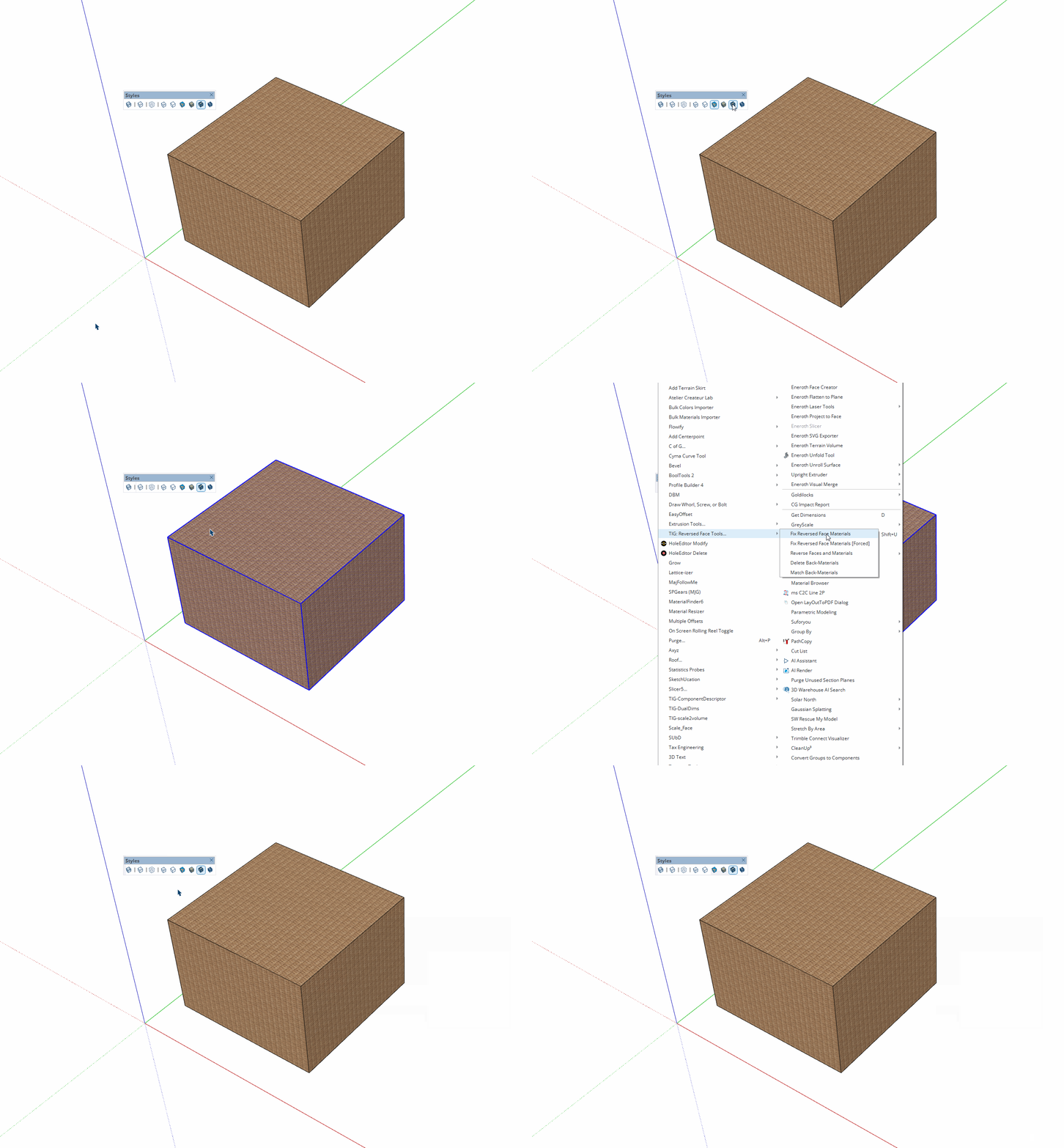
Toggle between default face-view and textured-face view to see changes...
It works fine for me with v2026. -
@pep75 I just installed it in SU2026 and gave it a try. It seems to do what it says on the tin. The back face color is green.
-

R Rich O Brien marked this topic as a question
-
R Rich O Brien has marked this topic as solved
Hello! It looks like you're interested in this conversation, but you don't have an account yet.
Getting fed up of having to scroll through the same posts each visit? When you register for an account, you'll always come back to exactly where you were before, and choose to be notified of new replies (either via email, or push notification). You'll also be able to save bookmarks and upvote posts to show your appreciation to other community members.
With your input, this post could be even better π
Register LoginAdvertisement

