SketchUcation Tools v5.0 Error in SketchUp 2025 – NoMethodError split for nil:NilClass
-
Hello,
I was trying to download and install the new SketchUcation Tools update (v5.0) for SketchUp 2025. Before installing, I deleted and uninstalled all older SketchUcation files to make it a clean install. I followed instructions and ran the installer/repair as Administrator, and I also performed a full cold boot of my PC.
Unfortunately, the issue persists—I’m still getting the same extension errors with SketchUcation. Now, whenever I install, open, or refresh the plugin, I encounter the following error:
Extension Errors Report
SketchUp: 25.0.660
OS: Windows 11
Ruby: 3.2.2Extension: SketchUcation (5.0.0)
Error: NoMethodError (undefined methodsplit' for nil:NilClass) c:/users/daydr/appdata/roaming/sketchup/sketchup 2025/sketchup/plugins/sketchucation/scf_dialog.rbe:770:in block (2 levels) in getMyPlugins’ c:/users/daydr/appdata/roaming/sketchup/sketchup 2025/sketchup/plugins/sketchucation/scf_dialog.rbe:753:ineach'
c:/users/daydr/appdata/roaming/sketchup/sketchup 2025/sketchup/plugins/sketchucation/scf_dialog.rbe:753:in block in getMyPlugins’
c:/users/daydr/appdata/roaming/sketchup/sketchup 2025/sketchup/plugins/sketchucation/scf_dialog.rbe:751:in `each'
c:/users/daydr/appdata/roaming/sketchup/sketchup 2025/sketchup/plugins/sketchucation/scf_dialog.rbe:751:in getMyPlugins’
c:/users/daydr/appdata/roaming/sketchup/sketchup 2025/sketchup/plugins/sketchucation/scf_loader.rbe:99:in module:SCFI’m not sure what to try next. Has anyone else encountered this issue, or is there a recommended fix? Any guidance would be greatly appreciated.
Thank you!
... -
Something is going adrift with the code being able to get an extension's versions.
This then causes the error.
Can you do the following and copy/paste the results in a reply.
Open the Ruby Console [Extensions > Developer submenu item].
Copy paste this code and press enter...puts SCF_Dialog.getMyPluginsFolders; puts "\n___\n\n#{Sketchup.read_default("SCF", "DefaultPlugins", "?")}\n\n"; Sketchup.extensions.each{|ex| puts "#{ex.name} = #{ex.version}\n" }; puts "\n___\n";It might show up some unexpected errors...
-
Here is the results:
Planar Lock = 1.0
=> nil
-
Sorry, but that is not the message ! Or if it is it's not the whole thing.
Please follow the instructions again and post the resultant output.
This should consist of:
- a number of possible Plugins folders paths/names, inside []
- the default Plugins folder path/name
- a list of several lines - 'extension_name = version'
-
I didn’t scroll up! I’m sorry, here are the correct results:
puts SCF_Dialog.getMyPluginsFolders;
puts "\n___\n\n#{Sketchup.read_default("SCF", "DefaultPlugins", "?")}\n\n";
Sketchup.extensions.each{|ex| puts "#{ex.name} = #{ex.version}\n" };
puts "\n___\n";C:/Users/daydr/AppData/Roaming/SketchUp/SketchUp 2025/SketchUp/Plugins
C:/ProgramData/SketchUp/SketchUp 2025/SketchUp/Plugins
C:/Users/daydr/AppData/Roaming/SketchUp/SketchUp 2025/SketchUp/Plugins
3DxSketchUp = 5.7.1
1001bit tools = freeware_1.0.5
2Dtools = 7.7
3D Bazaar = 1.0.1
Architextures = 1.1.2254
Convert to Conststruction Line = 1.0.1
PlaceMaker = 3.3.3
Profile Builder 4 = 4.0.4
Quantifier Pro = 1.2.4
SketchPlus = 1.3.0
SketchUV = 1.0.2
Artisan 2 = 2.1.2
ExtrudeTools = 5.0
Fredo6 LibFredo6 = 15.3a - 02 Apr 25
Fredo6 Animator = 4.3d - 17 Mar 25
Fredo6 Curviloft = 2.0a - 31 Mar 24
Fredo6 Curvizard = 2.5a - 01 Apr 24
Fredo6 Fredo Corner = 2.7a - 31 Mar 24
Fredo6 FredoPortrait = 2.9a - 01 Apr 24
Fredo6 FredoScale = 3.6a - 01 Apr 24
Fredo6 FredoSpline = 2.6a - 01 Apr 24
Fredo6 Fredo Tools = 4.5c - 24 Jun 24
Fredo6 JointPushPull = 4.8a - 30 Mar 24
Fredo6 ThruPaint = 2.8b - 20 Dec 24
Fredo6 Tools on Surface = 2.6a - 01 Apr 24
Fredo6 TopoShaper = 2.7a - 01 Apr 24
Fredo6 VisuHole = 1.5a - 01 Apr 24
InstantArchitecture =
Material Resizer = 1.0
SketchUcation = 5.0.0
Soap Skin & Bubble = 1.0.35
TT_Lib² = 2.15.1
QuadFace Tools = 1.0.0
Voronoi + Conic = 2.2
JHS_Powerbar = Feb 2018b
Ruby Console+ = 3.2.0
Unwrap and Flatten Faces = 2.6
Random Tools = 1.4
BezierSpline = 2.2a - 22 Apr 21
Dialog = 1.0
CLF Component Stringer = 1.3.1
Point Gadget v2.5 = 2.5
Curic Face Array = 0.7.1-yagi
Curic Mirror = 1.4.0
Curic Zoom Through = 1.0.0
Eneroth Face Creator = 1.0.0
Eneroth Flatten to Plane = 1.1.0
Eneroth Fractal Terrain Eroder = 1.1.0
Eneroth Solid Tools = 3.0.1
Eneroth Terrain Volume = 1.0.0
Engineering ToolBox = 1.0.5
Estimator = 2.0
FlexTools = 2.17.0
Add Location = 1.7.8
Lightbeans Textures Library = 1.1.6
RubysketchScaleTool = v1.0.0
s4u-Slice = 5.2.2
s4u-Components = 7.2.1
3skeng Engineering 2025 = 2025.3.x.xxx
ShootPlantPlanner = 2.0.4
Skatter = 2.2.1
STL Import & Export = 2.2.0
DropGC = 1.0.3
PathCopy = 2.2.0
Weld = 3.0.1
SketchUp Diffusion = 1.2025.09.10
Dynamic Components = 1.8.3
Migrate Extensions = 1.0.0
Sandbox Tools = 2.3.5
Simplify Contours Tool = 1.1.2
AIM for SketchUp = 1.0.0
Architect Tools = 2.1.2
CleanUp³ = 3.4.6
Edge Tools² = 2.2.0
Groups to Components = 1.1.0
Material Replacer = 1.2.0
Material Tools = 2.7.2
Component Replacer = 1.1.0
Selection Toys = 2.4.0
Vertex Tools² = 2.0.13
Universal Importer = 1.2.6
Bulge = 1.0
Push = 1.0
Smooth = 1.0
Smudge = 1.0
Grab = 1.0
Planar Lock = 1.0
=> nil
-
If you follow the file address you can see I have the 5.0 file in the file for SketchUcation.
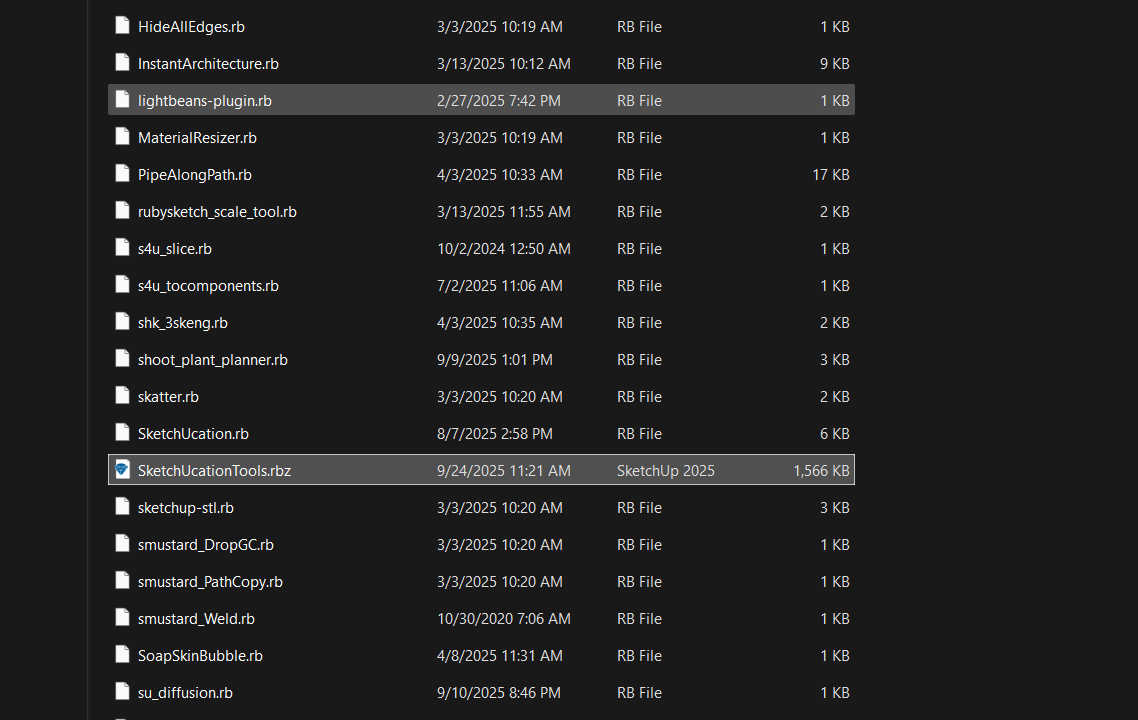
-
The culprit is
"InstantArchitecture = "which does not have a version set up properly!
Our code assumes some version for every extension, even if it's blank "" - but yours is 'nil'.
We can add code to trap for this rare anomaly.
After exhaustive pre-release testing this is the first report like this.
This update might not be published for a while, so in the meanwhile try these fixes.
Disable'InstantArchitecture'in the Extension Manager [or our Plugins Manager] and restart SketchUp -
our ExtensionStore should then work OK.
Alternatively, get an update from the author which has a proper version set and install that and restart SketchUp.
Or edit its register file in the Plugins folder [InstantArchitecture.rb] with Notepad++ or another plain-text editor - add a line sayingVERSION = '0'
Save and restart SketchUp, as it's version is now set to '0' the ExtensionStore error will stop.
Where did you get this extension from ? It's not listed in our PluginStore. In the Extension Warehouse 'Instant Architecture' by Chuck Vali has no version listed so I guess that's the one... As its subscription only from his site I don't know the exact code structure, theVERSION = '0'fix won't break anything in the code provided that you have your Extension Manager's Loading Policy set to Unrestricted [if it's signed] - after checking it that extension is ignored anyway as it's not in our Store so is not checked for an update, which is impossible with the versioning it has anyway... -
v5.0.1 is now available in our ExtensionStore.
It traps for the earlier error, which resulted from your loading-extension not having a valid version set up.
https://sketchucation.com/pluginstore?pln=SketchUcationTools -
@TIG Yes sir, I will try this.
-
It worked! I had to uninstall the Vali Architects Instant Architects plugin, and boom, everything started working! Wow, for you to spot that is a blessing.
-
Our v5.0.1 is now published in the ExtensionStore.
This traps for sloppy extension creation without a version being set.
After you install that you can restart SketchUp, and then restart using InstantArchitecture without any clashes...

Hello! It looks like you're interested in this conversation, but you don't have an account yet.
Getting fed up of having to scroll through the same posts each visit? When you register for an account, you'll always come back to exactly where you were before, and choose to be notified of new replies (either via email, or push notification). You'll also be able to save bookmarks and upvote posts to show your appreciation to other community members.
With your input, this post could be even better 💗
Register Login


Advertisement