Draw an octagon an a Swiss keyboard
-
Hello,
how can I draw an octagon on a Swiss keyboard where the + is only accessible via Option & Shift?
When I draw a hexagon and then click on Option & Shift & + nothing happensKind regards
Alohaa -
Pick the Circle tool
Press 8 and hit Enter to set the segment count of the circle
Draw your 8 segment circle

No need to perform any finger yoga
-
Or pick the Polygon tool, type 8, press Enter and draw the octagon.
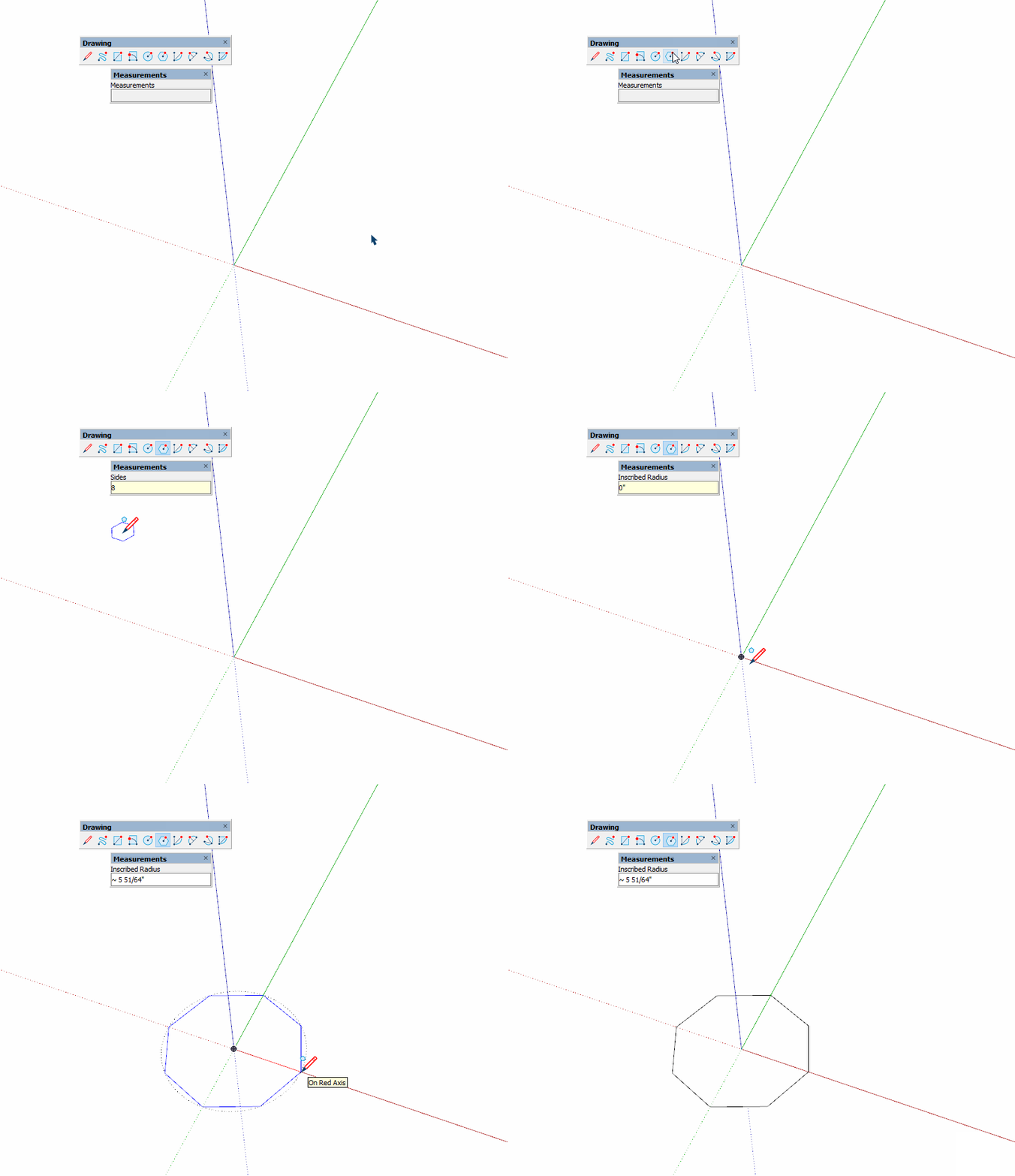
-
@dave r said:
Or pick the Polygon tool
I never knew it existed

I've not had native toolbars enabled in years....
-
Thank you!
The method with the polygone tool works, that with the circle doesn't. I may change the number of segments from 24 to 8, but nevertheless the circle is drawn with 24 segments.
I have always the instruction in the bar beneath to press Option and + to change the number of segments. -
It does work with both circle and polygon the same way, make sure you are doing as instructed.
Select the tool and before doing anything type 8 and hit enter to confirm, then draw your circle or polygon and it will have 8 segments/sides.
Note: this method will set the default for that tool to 8, so each circle or polygon will have 8 segments until you change it or start a new instance of Sketchup.The other option if you want to retain the default 24 or 6 and just draw one C/P with a different number, Select the tool and draw your shape, then type 8s and hit enter to confirm and the shape will change to 8 segments.
-
type s for segments number: 8s
might be your case - many shortcuts are broken in the latest su build -
@rv1974 said:
type s for segments number: 8s
might be your case - many shortcuts are broken in the latest su build
p.s. never saw the need in this tool - circle is universalIf you push or pull a polygon, you get a polygonal prism.
If you push or pull a circle, the longitudinal edges are smoothed so you get a cylinder.
Of course, you can soften the edges of a polygonal prism to get a cylinder or unsmooth the edges of a cylinder to get a polygonal prism but this is extra work.
-
Haha with this approach Trimble could make a smooth/unsmooth variant for each tool




Hello! It looks like you're interested in this conversation, but you don't have an account yet.
Getting fed up of having to scroll through the same posts each visit? When you register for an account, you'll always come back to exactly where you were before, and choose to be notified of new replies (either via email, or push notification). You'll also be able to save bookmarks and upvote posts to show your appreciation to other community members.
With your input, this post could be even better 💗
Register Login


Advertisement