2023 Tray Issue
-
I installed 2023 as administrator yesterday then installed a few plugins. After setting them up I am getting this with the trays. And trying to turn on and off layers, unresponsive.
I ran as administrator and just did a repair and still...
Any ideas?
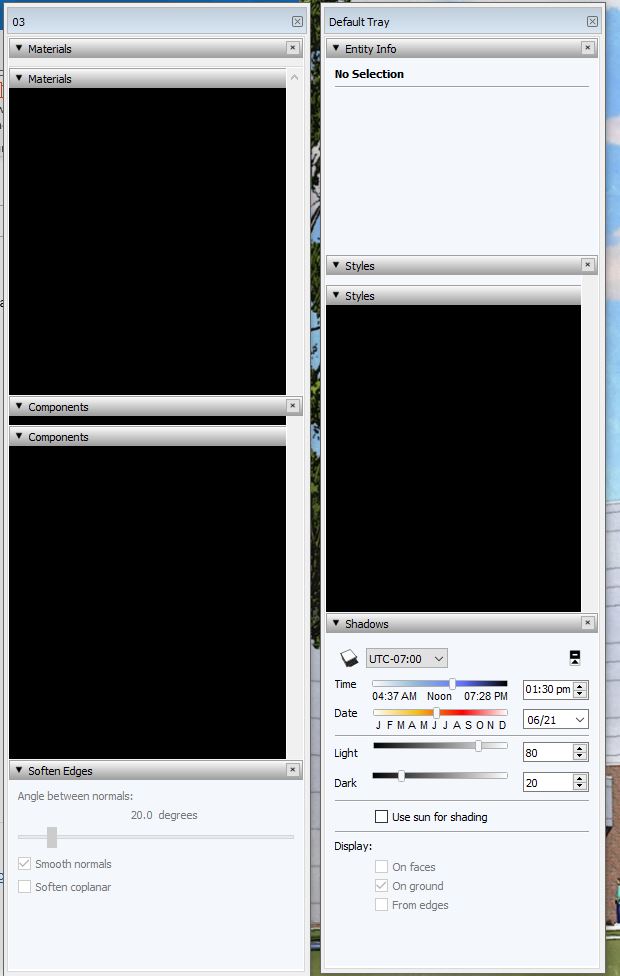
-
Is this happening with no extensions running?
If you dock the trays is it still persistent?
What version of Windows is that? v10?
I have 2023 trays undocked too and I'm running Windows 11

Here's my settings and I don't get any black tray panels
-
Windows 10.
Same settings.
No plugins running that I am aware of. Does this on startup.Odd thing, I docked each tray then un-docked them and they are working fine now.
Thanks Rich.
-
Hmmm, seems I need to do that each time I load SU. Not ideal.
-
So every undocked tray needs to be docked/undocked to force refresh?
What if you assign a shortcut key to show/hide tray then after startup you launch tray via shortcut key? So never start SketchUp with any trays loading.
-
@rich o brien said:
So every undocked tray needs to be docked/undocked to force refresh?
Yep.
I just got off the phone with Dave R. and apparently it is a known issue being worked on so I will just deal with it until there is a fix.
-
@rich o brien said:
What if you assign a shortcut key to show/hide tray then after startup you launch tray via shortcut key? So never start SketchUp with any trays loading.
That works but only for the default tray. I have 4 total.
-
Thanks guys for the assist.


Hello! It looks like you're interested in this conversation, but you don't have an account yet.
Getting fed up of having to scroll through the same posts each visit? When you register for an account, you'll always come back to exactly where you were before, and choose to be notified of new replies (either via email, or push notification). You'll also be able to save bookmarks and upvote posts to show your appreciation to other community members.
With your input, this post could be even better 💗
Register Login


Advertisement