3D warehouse issues - objects cannot be rotated
-
I am using SU Pro 2018 for Mac. I've been downloading some lighting instruments and other files from 3D warehouse and having issues with positioning them. When I use rotate tool to turn them they snap back to position they were in when downloaded directly into model. Has anyone else had this issue and resolved it?
Thanks much for any input.
-
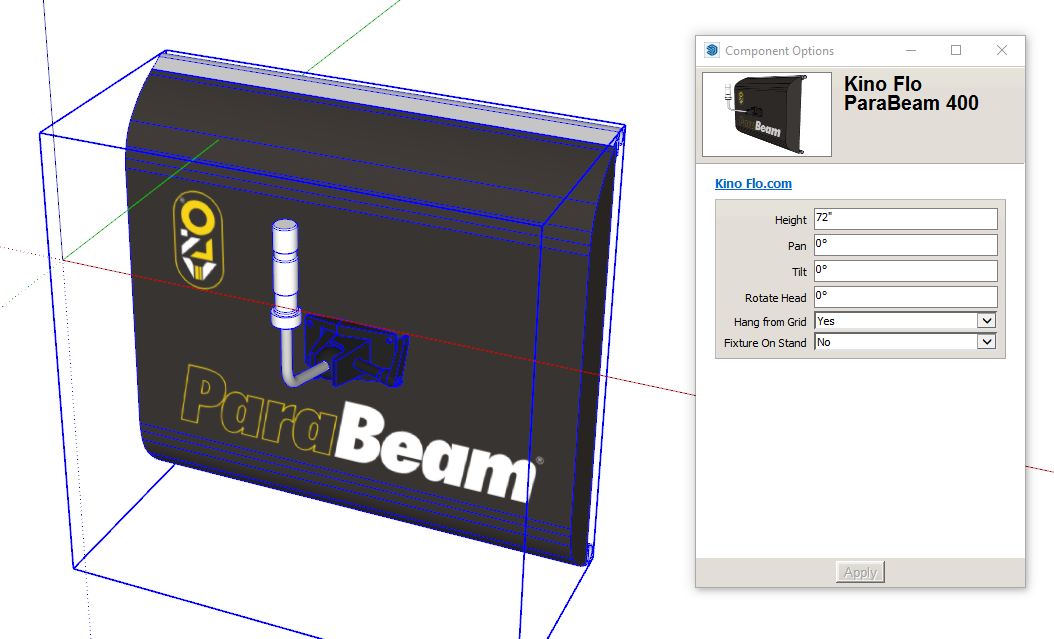
They may be dynamic components or possibly geolocated.
Adding a link to the model on the warehouse would help or attach your model. -
Might be as simple as needing to 'unglue' the component.
-
Thanks for your replies. I was able to sort it out by choosing different models. It only seemed to be an issue using files from the manufacturer of the product (Kino Flo lighting)
-
As Box guessed, they are Dynamic Components. Rotation is set in the Component Options panel.



Hello! It looks like you're interested in this conversation, but you don't have an account yet.
Getting fed up of having to scroll through the same posts each visit? When you register for an account, you'll always come back to exactly where you were before, and choose to be notified of new replies (either via email, or push notification). You'll also be able to save bookmarks and upvote posts to show your appreciation to other community members.
With your input, this post could be even better 💗
Register Login


Advertisement