Materials & Components won't load
-
Good day
I have recently had to reinstall Sketchup Pro 17 after a motherboard failure.
I can see all my materials and components in their folders on the hard drive but can not access them from within Sketchup.
Sketchup is installed on "G" drive and all the components and materials are visible in their respective folders under the main sketchup folder.
How do I get SketchUp to recognise them.
Thank you for your help. -
Have you set up the paths to those folders ?
Done in SketchUp > Window > Preferences > Files [for each type of folder]What's a typical path for you ?
PS:
In v2017 you should really set up your own Materials/Components/etc folders in:
C:\Users\USERNAME\AppData\Roaming\SketchUp\SketchUp 2017\SketchUp
Rather than SketchUp's own [protected] 'Program Files' folder...Here are mine...
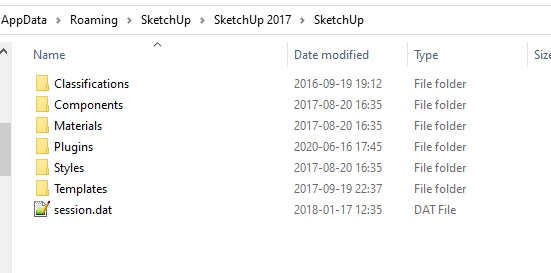
-
Thanks, moved the files as you showed and all work perfectly now.
Much obliged.
Mike

Hello! It looks like you're interested in this conversation, but you don't have an account yet.
Getting fed up of having to scroll through the same posts each visit? When you register for an account, you'll always come back to exactly where you were before, and choose to be notified of new replies (either via email, or push notification). You'll also be able to save bookmarks and upvote posts to show your appreciation to other community members.
With your input, this post could be even better 💗
Register Login


Advertisement