sketchucation logo sketchucation
    • Login
    Oops, your profile's looking a bit empty! To help us tailor your experience, please fill in key details like your SketchUp version, skill level, operating system, and more. Update and save your info on your profile page today!
    ⚠️ Update | Sketchucation Tools 5.0.8 released with licensing improvements and bugfixes Download

    [Plugin] ClothWorks v1.8.0 - 28 Apr 2024

    Scheduled Pinned Locked Moved Plugins
    716 Posts 167 Posters 883.4k Views 166 Watching
    Loading More Posts
    • Oldest to Newest
    • Newest to Oldest
    • Most Votes
    Reply
    • Reply as topic
    Log in to reply
    This topic has been deleted. Only users with topic management privileges can see it.
    • M
      Macon
      last edited by

      Bonsoir et joyeuses fêtes de fin d'année!

      Un grand merci pour ce plugin. J'ai pris la licence il y a quelques temps déjà, et je le trouve vraiment génial.

      Merci à l'auteur!

      1 Reply Last reply
      Reply Quote 0
      • creativ02C
        creativ02
        last edited by

        Hi there,
        I have the ClothWorks Full plugin about you
        Article No. WFULL bought. When and to which email address do I receive the email with the license file?
        Please reply to Th.Edel@t-online.de
        Mfg Th.Edel

        1 Reply Last reply
        Reply Quote 0
        • A
          Anton_S
          last edited by

          @creativ02 said:

          Hi there,
          I have the ClothWorks Full plugin about you
          Article No. WFULL bought. When and to which email address do I receive the email with the license file?
          Please reply to Th.Edel@t-online.de
          Mfg Th.Edel

          The licence should have arrived to your email address (the one you specified in the purchase steps) unless there are typos or something else. There is also a chance that it may have ended up in your spam folder. Regardless, I emailed your ClothWorks licence and instructions to the provided email address. Please check your email. Thank you for your purchase!

          1 Reply Last reply
          Reply Quote 0
          • summerson1990S
            summerson1990
            last edited by

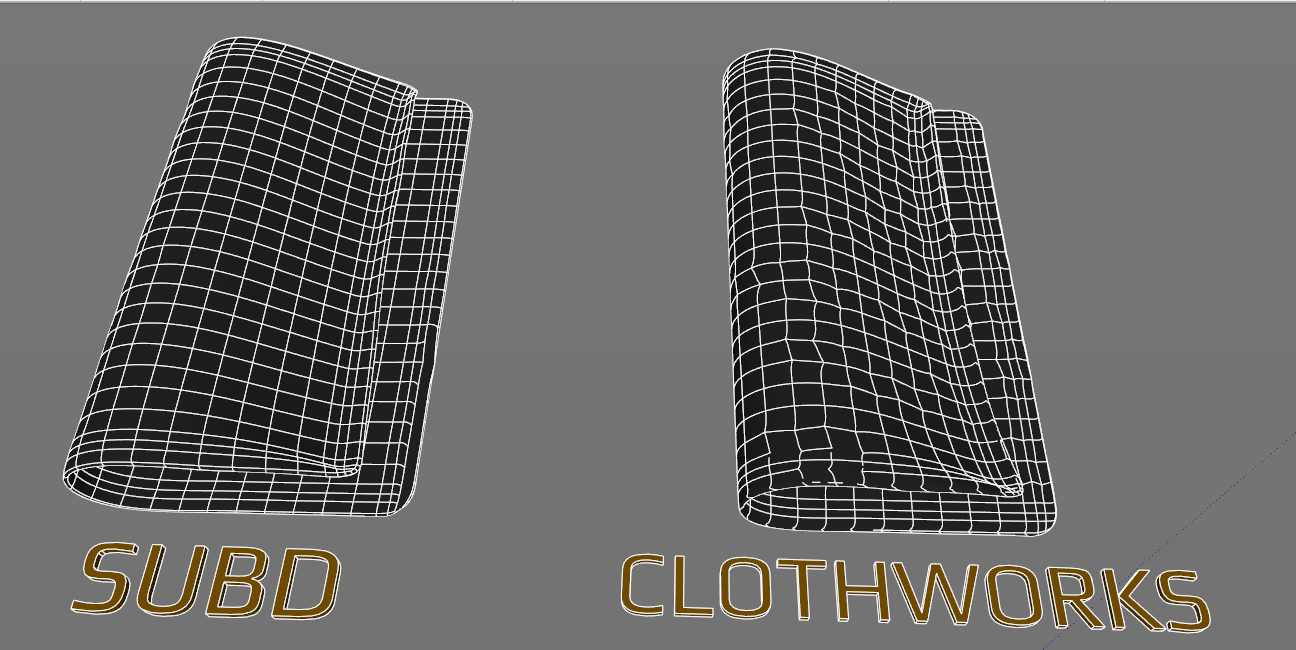
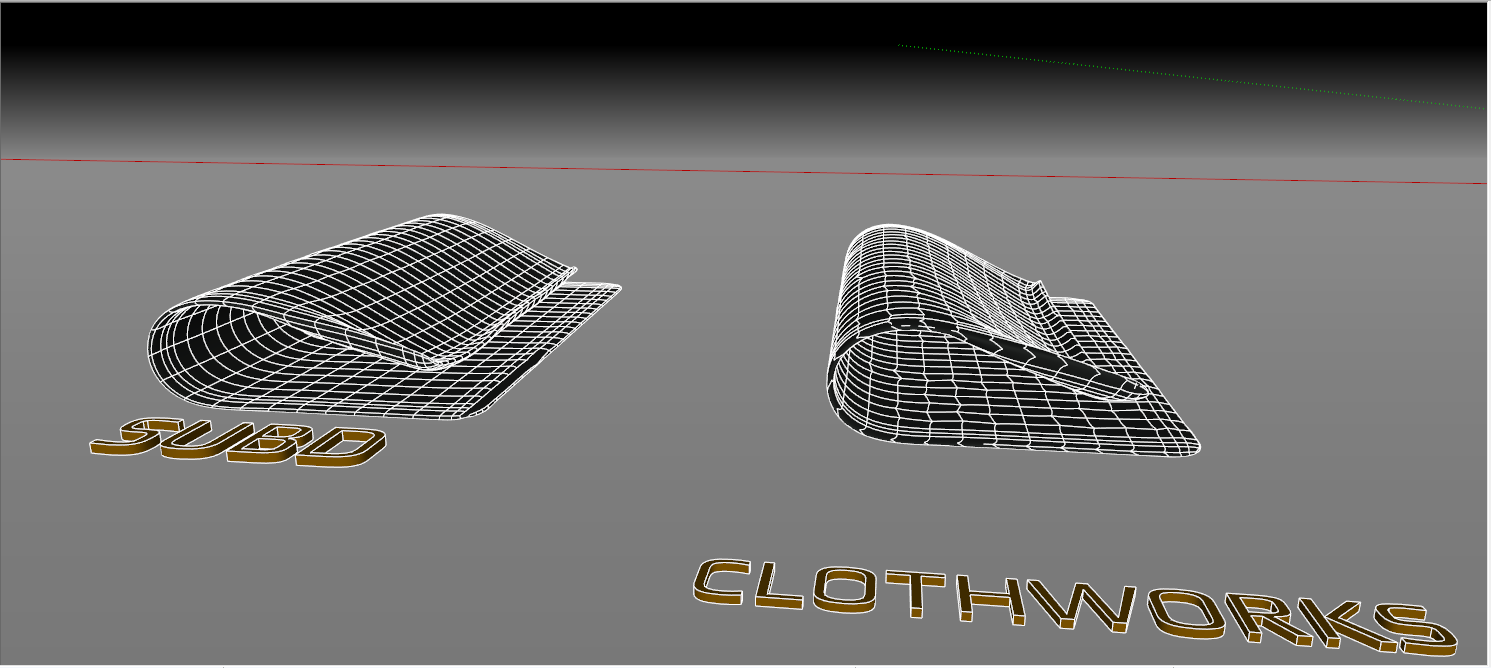
            Loop subdivision in ClothWorks is a great function because it's easy to project a texture on a flat surface and then with the help of switching drape button see the result on a simulated surface. But I think it works badly. Because after applying loop subdivisions edges lose its vector what causes a texture to be deformed. Look the difference how subD plugin does it and how ClothWorks.
            Screenshot_5.png


            Screenshot_6.png

            1 Reply Last reply
            Reply Quote 0
            • A
              Anton_S
              last edited by

              @summerson1990 said:

              Loop subdivision in ClothWorks is a great function because it's easy to project a texture on a flat surface and then with the help of switching drape button see the result on a simulated surface. But I think it works badly. Because after applying loop subdivisions edges lose its vector what causes a texture to be deformed. Look the difference how subD plugin does it and how ClothWorks.

              Thank you for your comment. I recall working on a fix a few months ago (and I believe I composed a couple of solutions). I had additional things planned for the new version, which I haven't got to yet, and figured to delay the release. When I get access to my desktop PC, I will re-prioritize the changes to allow for a sooner new release.

              1 Reply Last reply
              Reply Quote 0
              • summerson1990S
                summerson1990
                last edited by

                @anton_s said:

                @summerson1990 said:

                Loop subdivision in ClothWorks is a great function because it's easy to project a texture on a flat surface and then with the help of switching drape button see the result on a simulated surface. But I think it works badly. Because after applying loop subdivisions edges lose its vector what causes a texture to be deformed. Look the difference how subD plugin does it and how ClothWorks.

                Thank you for your comment. I recall working on a fix a few months ago (and I believe I composed a couple of solutions). I had additional things planned for the new version, which I haven't got to yet, and figured to delay the release. When I get access to my desktop PC, I will re-prioritize the changes to allow for a sooner new release.

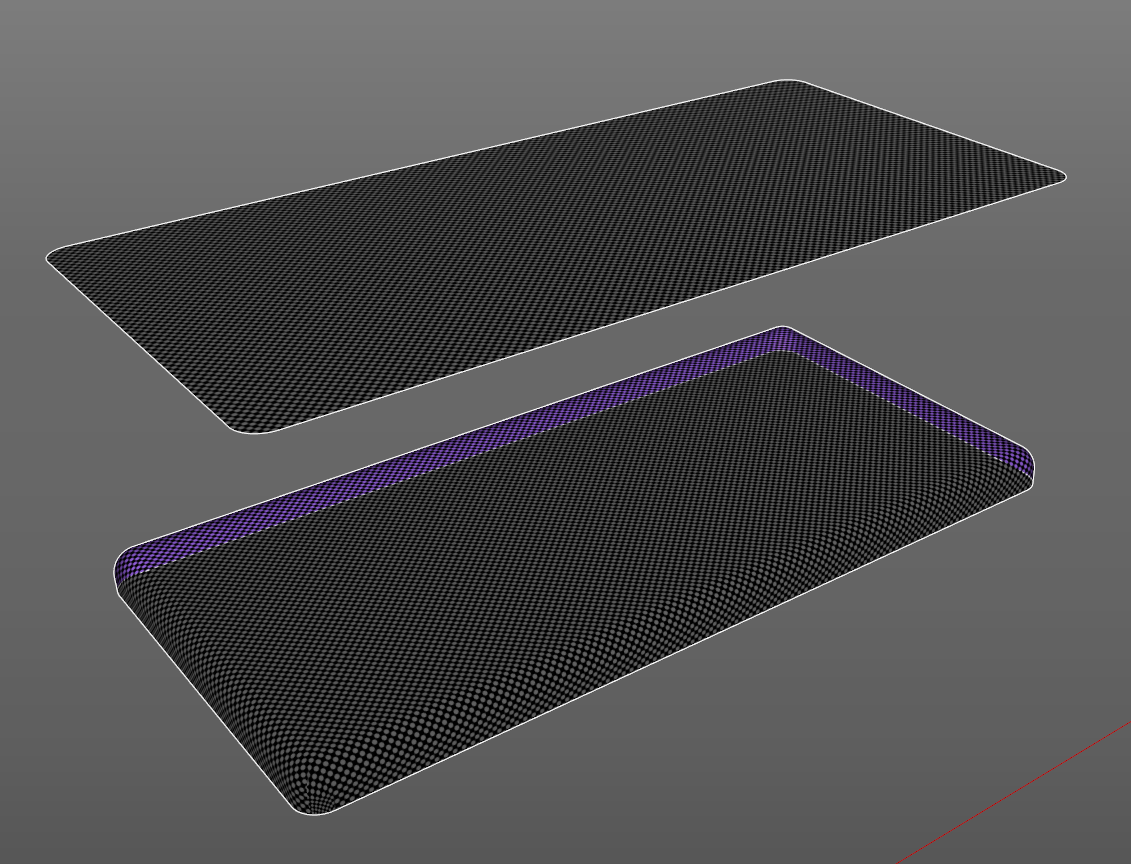
                Cool news! By the way, I'm interested if you could possibly do a feature to place patterns on flat surfaces and then project it to hard, that is to say, such surfaces with which "flowify" or other similar plugins can not work. Look as an example my screenshot. Such a feature presents in Maya, see the video about https://www.youtube.com/watch?v=OeJEthJe6cQ. So how do you think is it possible to realize in SU or what? Thanks!

                Screenshot_18.png

                1 Reply Last reply
                Reply Quote 0
                • summerson1990S
                  summerson1990
                  last edited by

                  @summerson1990 said:

                  @anton_s said:

                  @summerson1990 said:

                  Loop subdivision in ClothWorks is a great function because it's easy to project a texture on a flat surface and then with the help of switching drape button see the result on a simulated surface. But I think it works badly. Because after applying loop subdivisions edges lose its vector what causes a texture to be deformed. Look the difference how subD plugin does it and how ClothWorks.

                  Thank you for your comment. I recall working on a fix a few months ago (and I believe I composed a couple of solutions). I had additional things planned for the new version, which I haven't got to yet, and figured to delay the release. When I get access to my desktop PC, I will re-prioritize the changes to allow for a sooner new release.

                  Cool news! By the way, I'm interested if you could possibly do a feature to place patterns on flat surfaces and then project it to hard, that is to say, such surfaces with which "flowify" or other similar plugins can not work. Look as an example my screenshot. Such a feature presents in Maya, see the video about https://www.youtube.com/watch?v=OeJEthJe6cQ. So how do you think is it possible to realize in SU or what? Thanks!

                  Though it will make too many edges that SU will not be able to work with.

                  1 Reply Last reply
                  Reply Quote 0
                  • A
                    Anton_S
                    last edited by

                    @summerson1990 said:

                    @summerson1990 said:

                    Cool news! By the way, I'm interested if you could possibly do a feature to place patterns on flat surfaces and then project it to hard, that is to say, such surfaces with which "flowify" or other similar plugins can not work. Look as an example my screenshot. Such a feature presents in Maya, see the video about https://www.youtube.com/watch?v=OeJEthJe6cQ. So how do you think is it possible to realize in SU or what? Thanks!

                    Though it will make too many edges that SU will not be able to work with.

                    Why not use Blender for wrapping?

                    1 Reply Last reply
                    Reply Quote 0
                    • summerson1990S
                      summerson1990
                      last edited by

                      @anton_s said:

                      @summerson1990 said:

                      @summerson1990 said:

                      Cool news! By the way, I'm interested if you could possibly do a feature to place patterns on flat surfaces and then project it to hard, that is to say, such surfaces with which "flowify" or other similar plugins can not work. Look as an example my screenshot. Such a feature presents in Maya, see the video about https://www.youtube.com/watch?v=OeJEthJe6cQ. So how do you think is it possible to realize in SU or what? Thanks!

                      Though it will make too many edges that SU will not be able to work with.

                      Why not use Blender for wrapping?

                      Yes, but first I need to study blender a little bit because I haven’t got yet any experience working in it.

                      1 Reply Last reply
                      Reply Quote 0
                      • M
                        majmoonka
                        last edited by

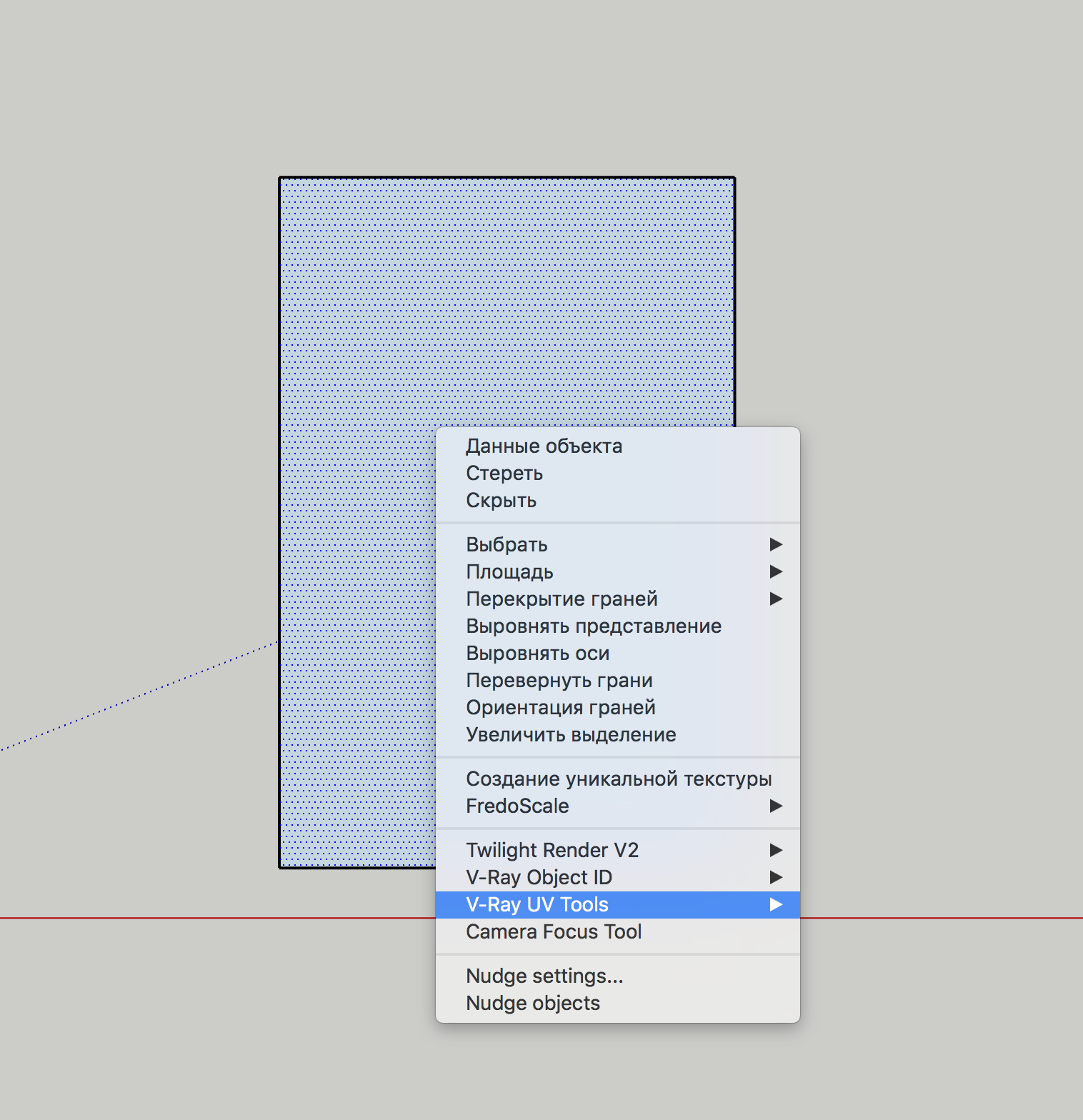
                        Hello Anton! I've bought the licence to Clothworks but it not working correctly. But context menu didn't appear after activation ((

                        Снимок экрана 2020-02-02 в 1.27.44.png

                        1 Reply Last reply
                        Reply Quote 0
                        • Dave RD
                          Dave R
                          last edited by

                          @majmoonka said:

                          but it not working correctly. But context menu didn't appear after activation ((

                          Clothworks shows up in the Context menu when you right click on a group or component. It's not supposed to show up when you right click on a face.

                          Read steps three and four under Draping Rectangular Table
                          https://drive.google.com/file/d/1TXQk2AM0HE3BvFLalYPpxQD5YVLIp6fF/view

                          Etaoin Shrdlu

                          %

                          (THERE'S NO PLACE LIKE)

                          G28 X0.0 Y0.0 Z0.0

                          M30

                          %

                          1 Reply Last reply
                          Reply Quote 0
                          • M
                            majmoonka
                            last edited by

                            @dave r said:

                            @majmoonka said:

                            but it not working correctly. But context menu didn't appear after activation ((

                            Clothworks shows up in the Context menu when you right click on a group or component. It's not supposed to show up when you right click on a face.

                            Read steps three and four under Draping Rectangular Table
                            https://drive.google.com/file/d/1TXQk2AM0HE3BvFLalYPpxQD5YVLIp6fF/view

                            Thank you! I didn't understand instruction 😳

                            1 Reply Last reply
                            Reply Quote 0
                            • B
                              Bifterx
                              last edited by

                              Hi I just don't get a context menu.
                              Don't know what I am doing wrong - on 19.3
                              Valid Licence on 1.7.2a

                              https://www.dropbox.com/s/d7nf3x0v59kmgqx/Screen%20Shot.png?dl=0

                              1 Reply Last reply
                              Reply Quote 0
                              • A
                                Anton_S
                                last edited by

                                @bifterx said:

                                Hi I just don't get a context menu.
                                Don't know what I am doing wrong - on 19.3
                                Valid Licence on 1.7.2a

                                https://www.dropbox.com/s/d7nf3x0v59kmgqx/Screen%20Shot.png?dl=0

                                Hello. It seems like you're trying to assign a Pin property to the selected object from within a group. If so, this is not exactly the way to do it. You must a assign a pin property to the outer, top-level group. The inner groups will be treated as sub-pins automatically.

                                The ClothWorks context menu is mostly available to top level groups and components. Let me know if this answers your question.

                                1 Reply Last reply
                                Reply Quote 0
                                • K
                                  kwoon
                                  last edited by

                                  ClothWorks Korean language version
                                  ClothWorks 한국어 언어 파일 입니다.


                                  ClothWorks Korean language version

                                  1 Reply Last reply
                                  Reply Quote 0
                                  • A
                                    Anton_S
                                    last edited by

                                    @kwoon said:

                                    ClothWorks Korean language version
                                    ClothWorks 한국어 언어 파일 입니다.

                                    Thank you! Very much appreciated. I will include your translation with the next release.

                                    1 Reply Last reply
                                    Reply Quote 0
                                    • K
                                      KostoK
                                      last edited by

                                      Hi, Does this extension work in Sketchup2020? I am getting stuck already at creating the quadrilateral grid step (nothing is created).

                                      Best regards,
                                      Ksenia

                                      1 Reply Last reply
                                      Reply Quote 0
                                      • Dave RD
                                        Dave R
                                        last edited by

                                        Yes. It works in SketchUp 2020. Here it is caught in process.
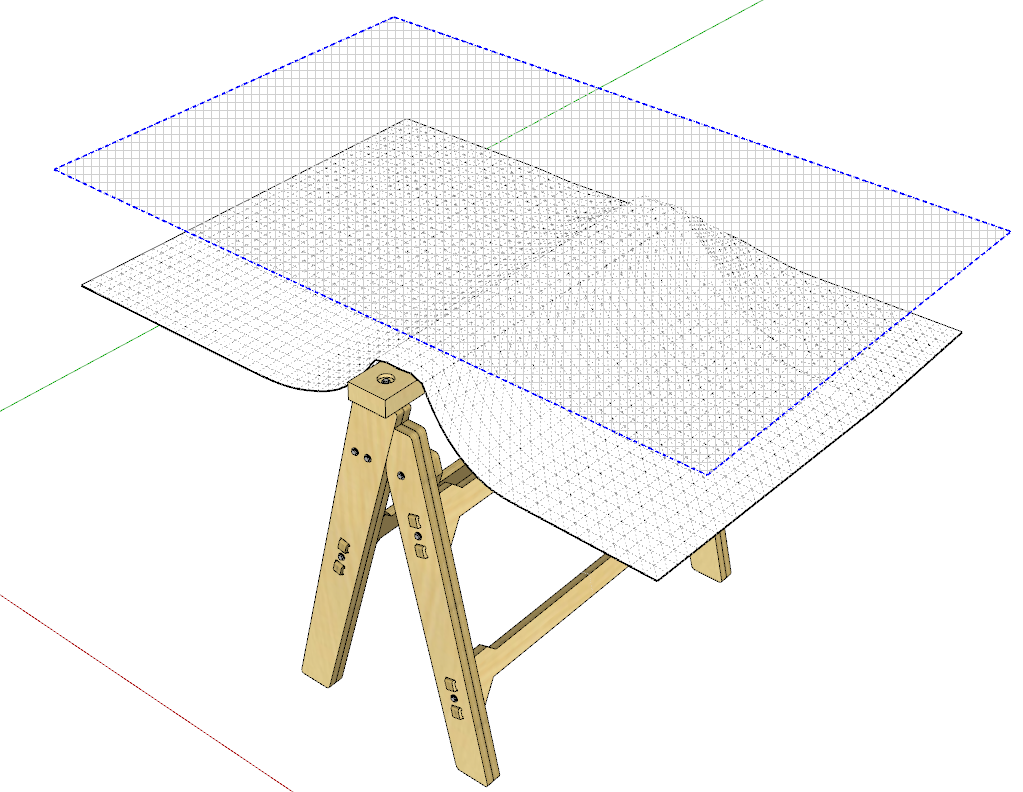
                                        Screenshot - 2_17_2020 , 9_43_34 PM.png

                                        Did you applying the grid to a component?

                                        Etaoin Shrdlu

                                        %

                                        (THERE'S NO PLACE LIKE)

                                        G28 X0.0 Y0.0 Z0.0

                                        M30

                                        %

                                        1 Reply Last reply
                                        Reply Quote 0
                                        • iichiversiiI
                                          iichiversii
                                          last edited by

                                          Hope someone can help me out, I ran into this issue today when trying to activate my licence again as I haven't used Clothworks for quite sometime, so straight to the point, when I try to use Menu>Clothworks>Licence this message pops up, as you can see clothworks is installed but i cant activate my licence, any ideas as to why this is happening, please excuse me but im just a modeler and am computer literate when it comes to issues like this.

                                          licence issue.PNG

                                          Bring on the Rain...

                                          1 Reply Last reply
                                          Reply Quote 0
                                          • TIGT
                                            TIG Moderator
                                            last edited by

                                            Have you tried reinstalling the SketchUcation Toolset - it includes the SCF_licensing stuff...
                                            https://sketchucation.com/pluginstore?pln=SketchUcationTools
                                            The file reported as missing is in its subfolder set ??

                                            TIG

                                            1 Reply Last reply
                                            Reply Quote 0

                                            Hello! It looks like you're interested in this conversation, but you don't have an account yet.

                                            Getting fed up of having to scroll through the same posts each visit? When you register for an account, you'll always come back to exactly where you were before, and choose to be notified of new replies (either via email, or push notification). You'll also be able to save bookmarks and upvote posts to show your appreciation to other community members.

                                            With your input, this post could be even better 💗

                                            Register Login
                                            • 1
                                            • 2
                                            • 21
                                            • 22
                                            • 23
                                            • 24
                                            • 25
                                            • 35
                                            • 36
                                            • 23 / 36
                                            • First post
                                              Last post
                                            Buy SketchPlus
                                            Buy SUbD
                                            Buy WrapR
                                            Buy eBook
                                            Buy Modelur
                                            Buy Vertex Tools
                                            Buy SketchCuisine
                                            Buy FormFonts

                                            Advertisement