How to Clean up material list ?
-
Hello
I have really annoying problem while using Vray for Sketchup
I just made hemi sphere and test to some vray materails
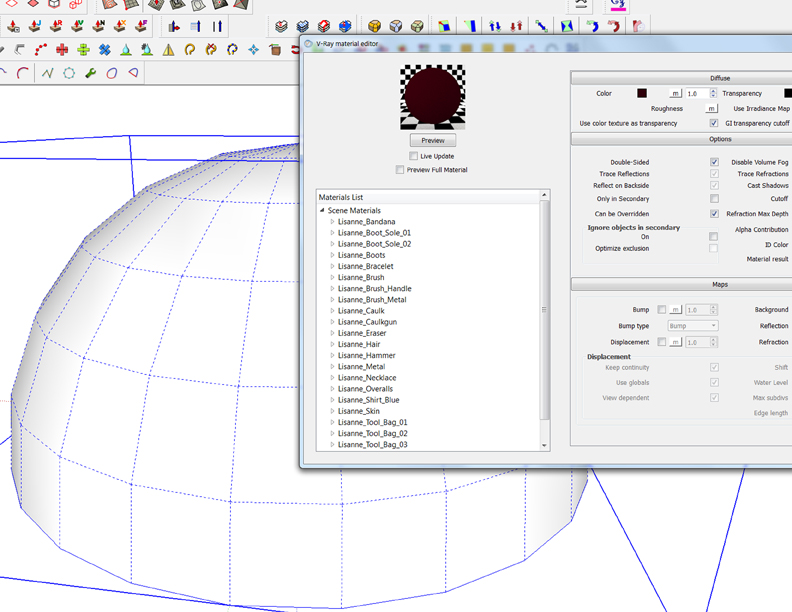
but even before I load up any materials, I already have tons of materials from Lisanne(Sketchup mam from startup)
is there anyway to remove those material(unneeded) at a time??
I know I can't hand pick and delete them one by one but just need faster way incas I got
tons of another material.
Can I have some advice from sketchup gurus??
-
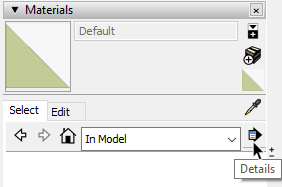
How about opening the Details menu and choosing Purge unused? If the materials aren't used in the model, they'll be deleted.
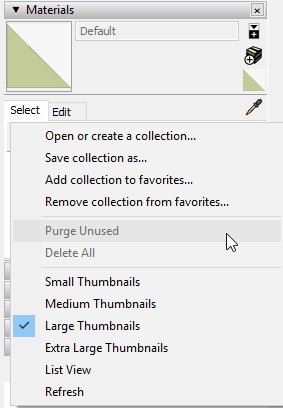
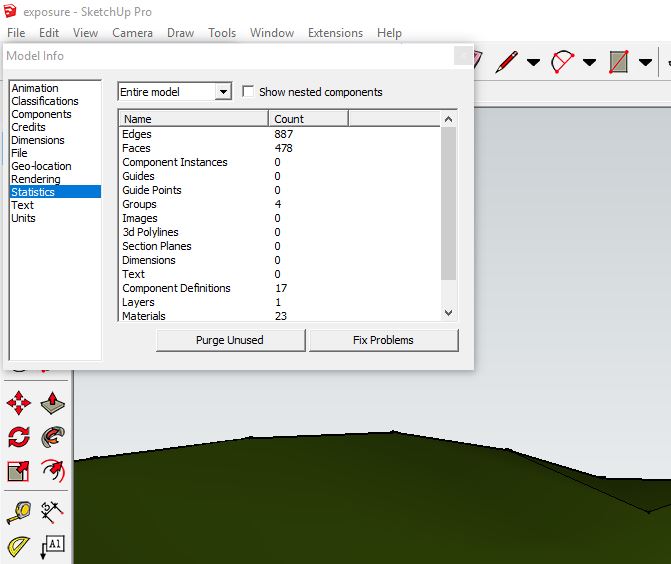
Or go to Window>Model Info>Statistics and click Purge unused.
-
Thanx For replying
I meant I wanna remove unused material from Vray material editor as you see in the pic attached
I did attached pic at the first time but somehow it it didn't show up
-
You should be asking this question in the Chaos Vray forum instead, then.
If you clean up your SketchUp file, those materials can't go to Vray ,anyway.
[mod=:2zzhq0ec]Moved thread to the SCF Vray forum.[/mod:2zzhq0ec]
-
Thanx For replying
Yes I also posted this thread on Vray forum but somehow it didn't show up very soon
(maybe loading time took longer than I expected) -
hi you can delete Lisanne(Sketchup mam) and go to windows-model info-statistics- purge unused materials. this will clean up all unused material in v ray material editor.

Hello! It looks like you're interested in this conversation, but you don't have an account yet.
Getting fed up of having to scroll through the same posts each visit? When you register for an account, you'll always come back to exactly where you were before, and choose to be notified of new replies (either via email, or push notification). You'll also be able to save bookmarks and upvote posts to show your appreciation to other community members.
With your input, this post could be even better 💗
Register Login


Advertisement