Push Pull Created New Object That Can't Be Intersected
-
Hello All,
Need a little help here.
SU 2017
Build 17.2.2555
64 Bit
Win 10I used push pull to extend a metal plate. Rather than extending the plate it created a new object which I am unable to join in any capacity to the initial plate. I have tried re-doing the process many times and many different ways... Plate 1 exploded, Plate 1 grouped, Push Pull with new wall, Push Pull with existing wall, post push pull explode, intersect and then regroup, etc.
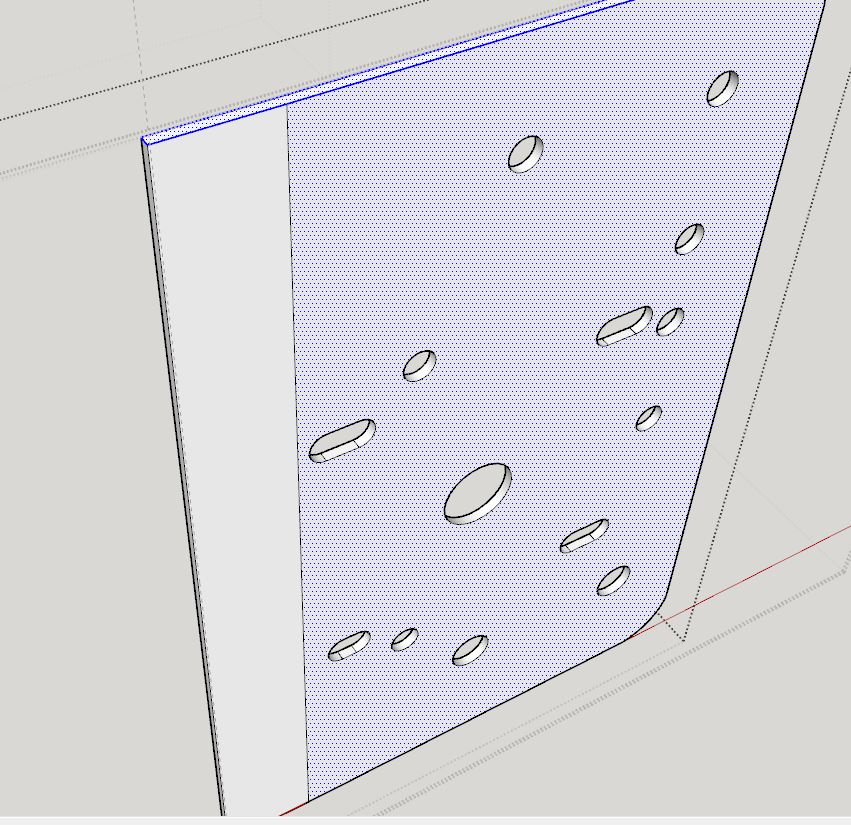
Now, what happens is then I try to delete the line that delineates the two objects (which it should be only one object) I, of course, lose the entire face of the plate. Normally I can just fix losing a face my pulling the other side, with a new wall, back to the front again. However, in this case, the other wall is also two objects.
I've also tried bisecting the line with other line so that I can delete it in portions.
What's also interesting is that the edges of the plate are a single object (please see image).
I need to make this a single object
Any direction you may be able to provide would be greatly appreciated.
Thanks kindly,
Trip
-
Do you upload the skp file.
-
Thanks Necati. I just did so.
-
UPDATE #1:
I've noticed the following...
While the edge I am pulling is absolutely 100% square and plumb (as confirmed by the protractor), the pulled extension is coming out 0.6% off. It's barely visible until you really zoom-in, but it is there.
Thanks!
Trip
UPDATE #2:
I have now found that if I take the one face of the original plate, copy it, then push-pull it to the proper thickness, and then, after than, push-pull the edge to the proper width, it is working-out fine and I can delete the line.
I have Nooooo idea why, or what's going on.
Trip
-
Before any operation Scale * 100 or *1000 your object!
When you explode all
Keep only bottom perimeter
Seems your initial surface is not planar! -
Thanks Pilou!
So, would this imply that at some point a did a rotation of the object and didn't quite get it to stick to an even multiple of 90 degrees... that I was off by a fraction of a degree?
-
@trip12091 said:
UPDATE #1:
I've noticed the following...
While the edge I am pulling is absolutely 100% square and plumb (as confirmed by the protractor), the pulled extension is coming out 0.6% off. It's barely visible until you really zoom-in, but it is there.
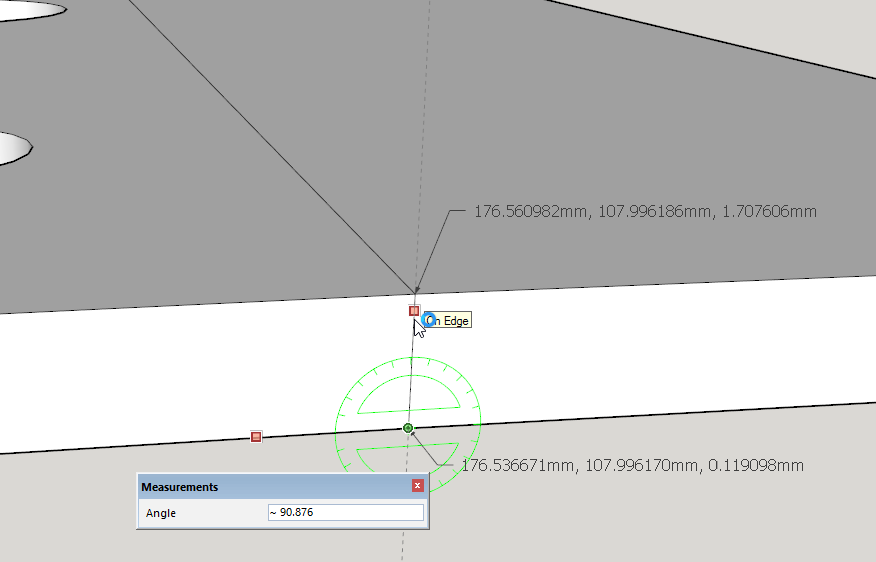
No. It isn't absolutely 100% square. If you set the precision in angle units higher, the Protractor will show confirm it. You can also check the coordinates using the Text tool.
UPDATE #2:
I have now found that if I take the one face of the original plate, copy it, then push-pull it to the proper thickness, and then, after than, push-pull the edge to the proper width, it is working-out fine and I can delete the line.
I have Nooooo idea why, or what's going on.
Trip[/quote]
The reason that works is because Push/Pull is precisely extruding at 90° to the face each time. So by copying the single face and extruding that, you areleaving the problem of your out-of-square edge behind.



Hello! It looks like you're interested in this conversation, but you don't have an account yet.
Getting fed up of having to scroll through the same posts each visit? When you register for an account, you'll always come back to exactly where you were before, and choose to be notified of new replies (either via email, or push notification). You'll also be able to save bookmarks and upvote posts to show your appreciation to other community members.
With your input, this post could be even better 💗
Register Login


Advertisement