Dimension at center
-
I have a trouble with Layout 2017.
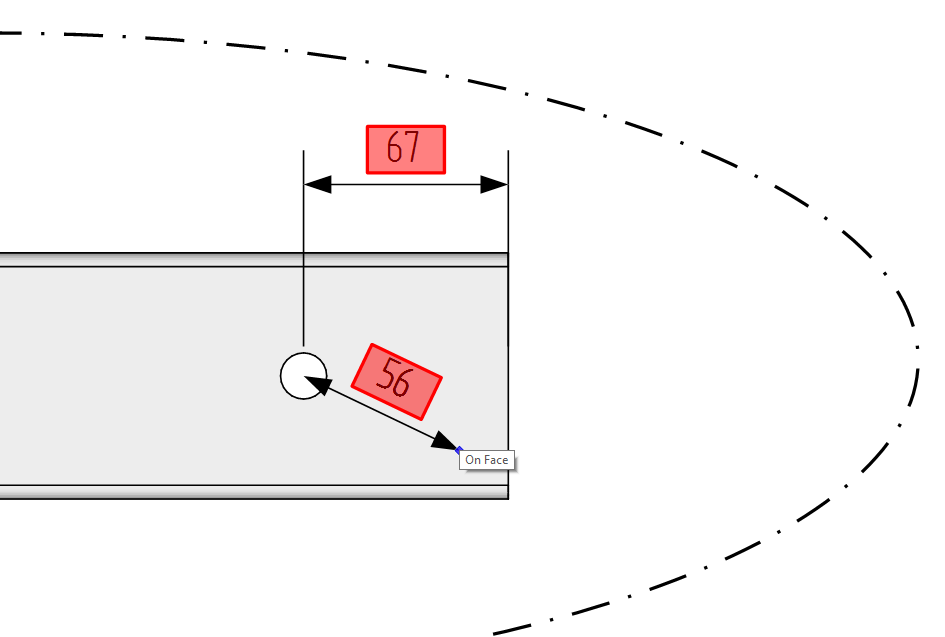
When I want to dimension at the center of a hole, the dimension box always becomes red.
What should I do?-Reconnect to model doesn't work
-The clipping mask is not the problem
-
The red box indicates that the dimension is disconnected from the geometry in the SketchUp file. Does selecting Reconnect from the right click context menu fix it?
Is the hole's edge a circle? Are you inferencing off the center of the circle?
If nothing else works, you could just right click on the dimension and choose Explode.
-
- No
- The hole edge is a real circle and not a polyline. I selected the center (blue dot appears), when selecting the edge of the circle its no problem
- Explode works fine
Is this a bug?
-
I doubt it.
-
smustard "set centerpoint.rb: is one of my most used plugins, may help if not you will find it useful anyways


Hello! It looks like you're interested in this conversation, but you don't have an account yet.
Getting fed up of having to scroll through the same posts each visit? When you register for an account, you'll always come back to exactly where you were before, and choose to be notified of new replies (either via email, or push notification). You'll also be able to save bookmarks and upvote posts to show your appreciation to other community members.
With your input, this post could be even better 💗
Register Login


Advertisement