Aligning multiple components to sit on one plane
-
Hello everybody,
This is my first post on sketchucation.
I am new to sketchup and I am still struggling with the basics. I have found answers to most of my questions on existing threads but this time I’m stuck. Perhaps it’s a matter of naming the problem properly.I want to align multiple components so that they sit on the same level/surface. I know how to do this manually by aligning each object separately using the move tool and locking the direction using the shift key. For aligning a couple of objects this is no problem but what if I were to align tens of objects? The attached picture illustrates the issue.
I have tried googling phrases such as “Aligning multiple components” or “Aligning components to face” but obtained not satisfying results. Most often I would come across the Align Plugin for SU which seems to be dedicated to aligning two components together.
Simon

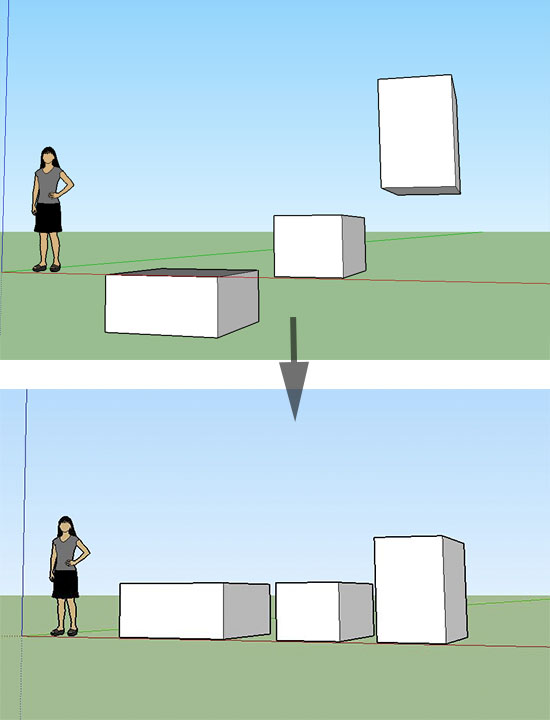
-
You might try Smart Drop.
-
@malanski said:
I want to align multiple components so that they sit on the same level/surface.
Select the components, open Windows>Ruby Console, paste this one-liner and press enter.
Sketchup.active_model.selection.grep(Sketchup;;ComponentInstance).each{|ci|
 ci.transform! Geom;;Transformation.translation([0,0,-ci.transformation.origin.z])
}
This will put all selected components on the XY plane.
-
Have a look at the 'Throw to' plugin.
-
-
Select the components, open Windows>Ruby Console, paste this one-liner and press enter.
Sketchup.active_model.selection.grep(Sketchup;;ComponentInstance).each{|ci|
 ci.transform! Geom;;Transformation.translation([0,0,-ci.transformation.origin.z])
}
This will put all selected components on the XY plane.[/quote]
sdmitch, thank you. Just what I needed. Just have to be careful to copy and paste the whole thing, even the last } which is on the bottom line.




 Dave is using a Script?

Hello! It looks like you're interested in this conversation, but you don't have an account yet.
Getting fed up of having to scroll through the same posts each visit? When you register for an account, you'll always come back to exactly where you were before, and choose to be notified of new replies (either via email, or push notification). You'll also be able to save bookmarks and upvote posts to show your appreciation to other community members.
With your input, this post could be even better 💗
Register Login


Advertisement