[Plugin] UCS Manager
-
Hi TIG,
no sorry still exact same error message. UCS is the only plugin in the standard folder
(haven't tried running it from an alternate location yet) Tested on two separate desktops.Is it working for you though?
-
It works fine for me ???
Please check you only have the one copy installed.
An earlier version loading from another Plugins folder would mess you up, as it'll overwrite the standard folder's version.Can you also post the path to your standard folder - obtained from this in the Ruby Console.
Sketchup.find_support_file('Plugins')Also I get this:
DBUR_Ucs::TR{"UCS Manager"=>"UCS Manager", "Save and restore User Coordinates Systems"=>"Save and restore User Coordinates Systems", "Save a User Coordinates System"=>"Save a User Coordinates System", "Restore a User Coordinates System"=>"Restore a User Coordinates System", "Delete a User Coordinates System"=>"Delete a User Coordinates System", "Save UCS"=>"Save UCS", "Restore UCS"=>"Restore UCS", "Delete UCS"=>"Delete UCS", "List UCS"=>"List UCS", "List User Coordinates Systems"=>"List User Coordinates Systems", "UCS main dialog"=>"UCS main dialog", "Pick UCS origin"=>"Pick UCS origin", "New UCS name: "=>"New UCS name: ", "Unnamed"=>"Unnamed", "Existing UCS: "=>"Existing UCS: ", "Select UCS"=>"Select UCS", "No UCS in this model."=>"No UCS in this model.", "Select existing UCS"=>"Select existing UCS", "Name: "=>"Name: ", "Origin: "=>"Origin: ", "X Axis: "=>"X Axis: ", "Y Axis: "=>"Y Axis: ", "Z Axis: "=>"Z Axis: "}
I'll make a slightly different version which sets up '
TR' differently, but I can't see why it fails for you ! -
Here's an update http://sketchucation.com/pluginstore?pln=DBUR_UcsManager_v1_0_0 It have recast some of the code making the Translation hash - it's no longer set up inside the RBS, it's now done in the subfolder's RB before loading the RBS at all.
At least that way we might get different error messages

Please retry and report back...
-
Hi TIG
UCS manager is now loading without error - when located in standard plugins location, and in alternate locations.
However the following errors appear on use:
Error: #<NoMethodError: undefined methodlist_all_ucs' for DBUR_Ucs:Module> C:/Program Files (x86)/Google/Google SketchUp 8/Plugins/DBUR_UcsManager/DBUR_UcsManager.rb:61 Error: #<NameError: uninitialized constant DBUR_Ucs::SaveUCSTool> C:/Program Files (x86)/Google/Google SketchUp 8/Plugins/DBUR_UcsManager/DBUR_UcsManager.rb:40 C:/Program Files (x86)/Google/Google SketchUp 8/Plugins/DBUR_UcsManager/DBUR_UcsManager.rb:61:incall'
C:/Program Files (x86)/Google/Google SketchUp 8/Plugins/DBUR_UcsManager/DBUR_UcsManager.rb:61
Error: #<NameError: uninitialized constant DBUR_Ucs::RestoreUCSTool>
C:/Program Files (x86)/Google/Google SketchUp 8/Plugins/DBUR_UcsManager/DBUR_UcsManager.rb:47
C:/Program Files (x86)/Google/Google SketchUp 8/Plugins/DBUR_UcsManager/DBUR_UcsManager.rb:40:incall' C:/Program Files (x86)/Google/Google SketchUp 8/Plugins/DBUR_UcsManager/DBUR_UcsManager.rb:40 Error: #<NoMethodError: undefined methoderase_ucs' for DBUR_Ucs:Module>
C:/Program Files (x86)/Google/Google SketchUp 8/Plugins/DBUR_UcsManager/DBUR_UcsManager.rb:54
C:/Program Files (x86)/Google/Google SketchUp 8/Plugins/DBUR_UcsManager/DBUR_UcsManager.rb:47:in `call'
C:/Program Files (x86)/Google/Google SketchUp 8/Plugins/DBUR_UcsManager/DBUR_UcsManager.rb:47As requested
Sketchup.find_support_file('Plugins')
C:/Program Files (x86)/Google/Google SketchUp 8/Plugins..and...
DBUR_Ucs::TR
{"Existing UCS: "=>"Existing UCS: ", "Save a User Coordinates System"=>"Save a User Coordinates System", "Origin: "=>"Origin: ", "Select UCS"=>"Select UCS", "List User Coordinates Systems"=>"List User Coordinates Systems", "Save UCS"=>"Save UCS", "Restore a User Coordinates System"=>"Restore a User Coordinates System", "Y Axis: "=>"Y Axis: ", "Delete a User Coordinates System"=>"Delete a User Coordinates System", "Unnamed"=>"Unnamed", "Pick UCS origin"=>"Pick UCS origin", "New UCS name: "=>"New UCS name: ", "Z Axis: "=>"Z Axis: ", "Name: "=>"Name: ", "List UCS"=>"List UCS", "UCS Manager"=>"UCS Manager", "X Axis: "=>"X Axis: ", "Restore UCS"=>"Restore UCS", "Save and restore User Coordinates Systems"=>"Save and restore User Coordinates Systems", "Select existing UCS"=>"Select existing UCS", "UCS main dialog"=>"UCS main dialog", "Delete UCS"=>"Delete UCS", "No UCS in this model."=>"No UCS in this model."}Thank you again (sorry for taking a few day to test and get back to you)
T -
This is weird...
I'll do some more investigations...
-
Here's an update http://sketchucation.com/pluginstore?pln=DBUR_UcsManager_v1_0_0 Some of its encrypted 'class' methods have been adjusted so they might now [hopefully] work better with earlier versions of SketchUp...
-
Exactly the same error messages, I'm afraid.
Would you like me to PM you them? (rather than saturating the thread with error messages)
-
Please copy+paste these three lines [one at a time] into the Ruby Console and report the three results...
` load('DBUR_UcsManager.rb')
load('DBUR_UcsManager/DBUR_UcsManager.rb')
Sketchup.load('DBUR_UcsManager/dbur_ucs.rbs')`
Then, in that same session, retry using the tool...
-
load('DBUR_UcsManager.rb')
true
load('DBUR_UcsManager/DBUR_UcsManager.rb')
C:/Program Files (x86)/Google/Google SketchUp 8/Plugins/DBUR_UcsManager/DBUR_UcsManager.rb:29: warning: already initialized constant TR
true
Sketchup.load('DBUR_UcsManager/dbur_ucs.rbs')
falseTool replies same error messages as before
Original version replies: true, true, false - with no elaboration or warnings
-
I'll PM you a possible solution...
-
And gents, did you solve it?
-
Hi,
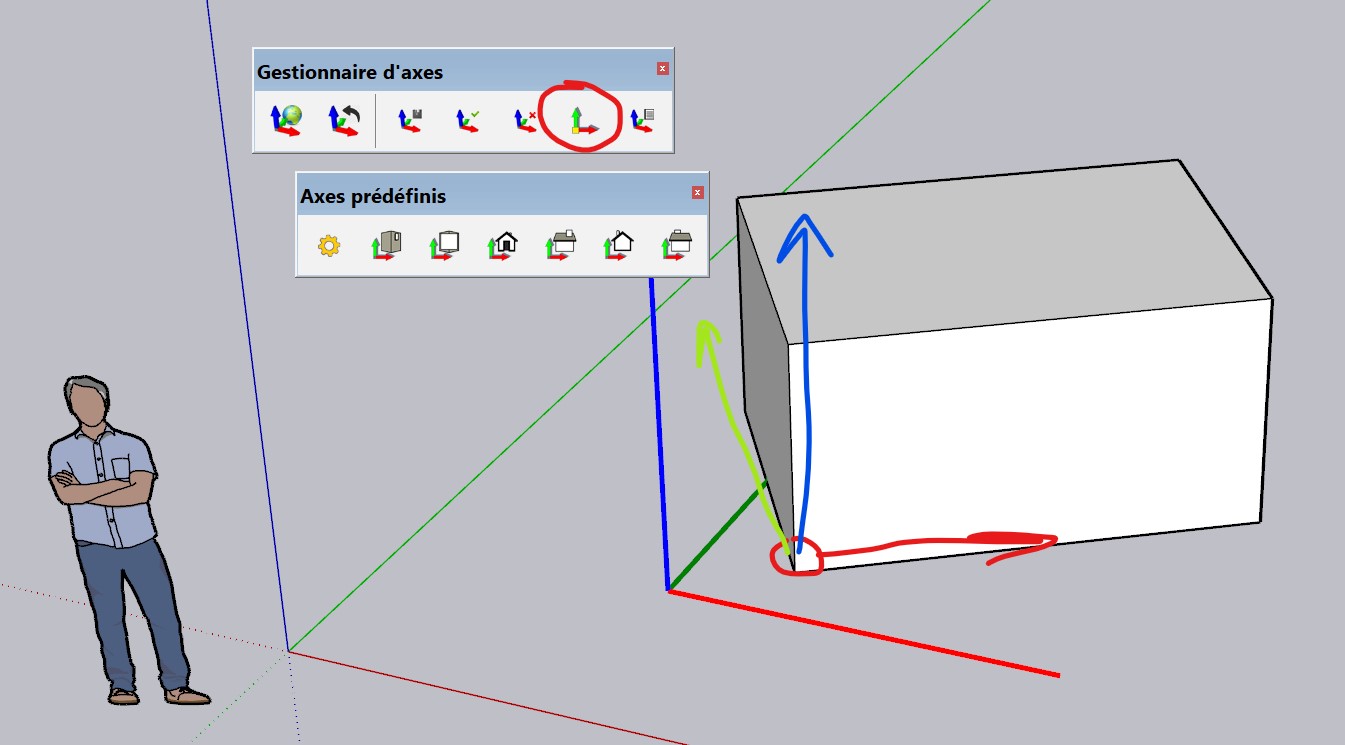
It would be a great improvement if we could choose the orientation of the three axes and not only the origin point, like the native "placer" tool.
-
Hello,
Yes, that's true.
I've just updated the plugin some days ago, and I wondered if I had to code what you want, and I did'nt did it.
I'll take your wish into account soon.
Regards, -
Hi Djé,
Version 1.1.0 of the plugin is now availbale.
- the UCS Origin now takes the current UCS for moving it
- a new tool lets you define a new UCS (just like the native SU tool)
Download it at the Plugin Store (also soon at the EW):
https://extensions.sketchup.com/extension/13e533c2-ebf7-4d86-805f-59dd2254564b/axes-managerRegards,


Hello! It looks like you're interested in this conversation, but you don't have an account yet.
Getting fed up of having to scroll through the same posts each visit? When you register for an account, you'll always come back to exactly where you were before, and choose to be notified of new replies (either via email, or push notification). You'll also be able to save bookmarks and upvote posts to show your appreciation to other community members.
With your input, this post could be even better 💗
Register Login


Advertisement