Yellow bounding box
-
Hi,
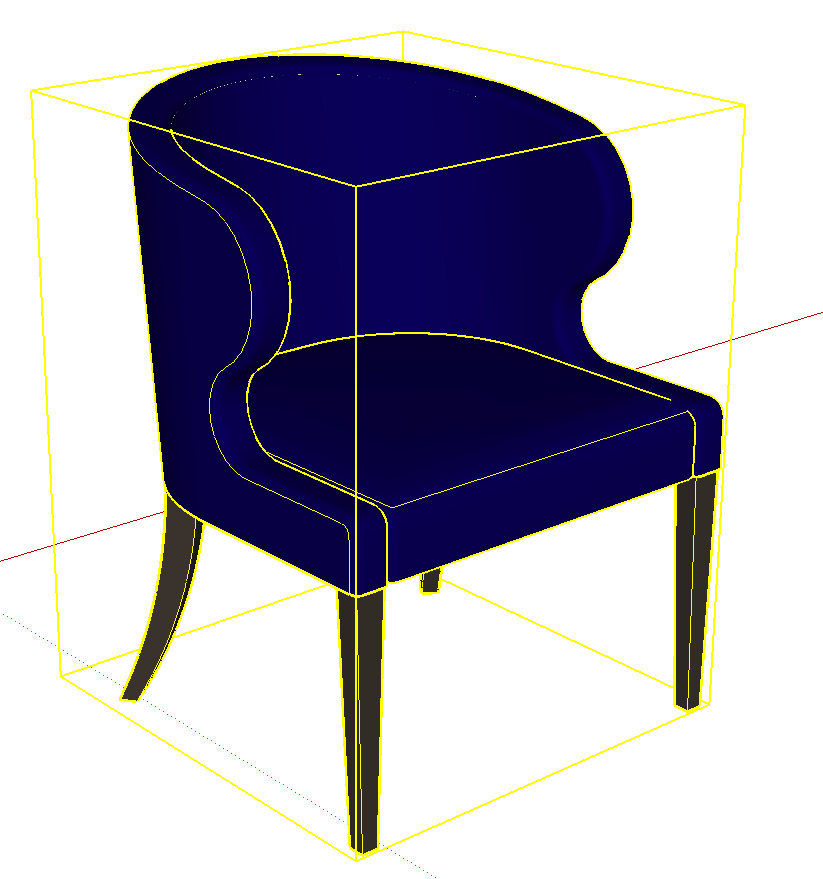
why is the bounding box yellow in this model?
thank you
-
Because the modeller chose to have his bounding boxes yellow. Probably a pre SU7 model.
Edit: here you go, download this and it should be carpenter style with a yellow bounding box. If it isn't then I'm wrong. You change the selection colour in the style edit dialog.
-
thank you - yes it is yellow. I wondered if it was anything special about the model but it isn't
thanks again
-
Ye olde versions of SketchUp [<v7?] had templates that used 'yellow' to highlight a selected object or bounds.
Newer SketchUp versions changed that to a 'blue' default.Your Style can set any color you desire for these kinds of things...
For example the shipped-default setting for locked bounds is now a 'pinkish red'... but again that's customizable...
See Style > Edit > Modeling Settings...
Personally - my own default templates use an 'amber' highlight color...
-
@susteve said:
thank you - yes it is yellow. I wondered if it was anything special about the model but it isn't
thanks again
The 'Selected' color can be changed as mentioned above and will also be saved per scene, much like different 'Section Cuts' colors.



Hello! It looks like you're interested in this conversation, but you don't have an account yet.
Getting fed up of having to scroll through the same posts each visit? When you register for an account, you'll always come back to exactly where you were before, and choose to be notified of new replies (either via email, or push notification). You'll also be able to save bookmarks and upvote posts to show your appreciation to other community members.
With your input, this post could be even better 💗
Register Login


Advertisement