[req] random polygon division and guide points @ vertices
-
@tig said:
To add guide-points at every selected vertex copy/paste + <enter> this in the Ruby Console.
m=Sketchup.active_model;a=m.active_entities;s=m.selection;vs=((s.grep(Sketchup;;Edge).collect{|e|e.vertices})+(s.grep(Sketchup;;Face).collect{|e|e.vertices})).flatten.uniq;m.start_operation('x');vs.each{|v|a.add_cpoint(v)};m.commit_operationIt's one step undo-able. It finds vertices from selected edges and/or faces and places a guide-point on each one... Note how it can use a 'vertex' and does not need 'vertex.position' to place the cpoint...
Is it possible to make a plugin out of this?
 It is indeed I suppose.
  Actually I find ruby console quite technical and programmo-expert sort of thing. So, that's why, Im asking for a plugin for a novice like me.
 -
It just needs adding to some code:
require 'sketchup.rb'
module TIG
def self.cpoint_vertices()
    m=Sketchup.active_model;a=m.active_entities;s=m.selection;vs=((s.grep(Sketchup;;Edge).collect{|e|e.vertices})+(s.grep(Sketchup;;Face).collect{|e|e.vertices})).flatten.uniq;m.start_operation('x');vs.each{|v|a.add_cpoint(v)};m.commit_operation
end
end
Copy paste it into a file named say
TIG-cpoint_vertices.rbin the Plugins folder.
It must be 'UTF8 without BOM' encoded to suit Ruby - you might need Notepad++.exe [free download] to be able to do that on a PC, as the built-in Notepad.exe might not automatically do that encoding...
When that file loads it makes the command that can be run from the Ruby Console:
TIG.cpoint_vertices
I expect you want a menu item too... add this extra code to the above module - just before its final 'end'...unless file_loaded?(__FILE__) UI.menu('Plugins').add_item('#{self}.cpoint_vertices'){ self.cpoint_vertices() } end file_loaded(__FILE__)It then appears in the 'Plugins' menu [retitled 'Extensions' under v2015].
That allows you to 'shortcut' it... -
Works for me with normal notepad.
-
@box said:
Works for me with normal notepad.
I have Notepad++ set for all text editing, so I was unsure.
I just re-enabled Notepad.exe and checked.
If you accept its save-default of "ANSI" and then open it in Notepad++ it reports as "UTF8 without BOM" 0 so it's OK !
Which is interesting...
So you can use Notepad.exe to edit/make RB files.
Just make sure it has the .rb file-type suffix, so that SketchUp recognizes it as a Ruby file as it starts and loads all of the scripts from the Plugins folder...
I still recommend Notepad++ - it has lots of goodies, like syntax coloring in files like RB...

-
@john2 said:
Another requirement, a plugin that places guide points at various vertices selected
You can use MarVertices which is part of FredoTools.
It works on a selection.Fredo
-
@john2 said:
Is there a plugin that divides my irregularly shaped plane into multiple polygons of random size? Actually I am using the Voronoi plugin and need to speed up things.
Are you looking for a Voronoi plugin? And what do you mean "Seep up things"?
Fredo
-
@fredo6 said:
@john2 said:
Is there a plugin that divides my irregularly shaped plane into multiple polygons of random size? Actually I am using the Voronoi plugin and need to speed up things.
Are you looking for a Voronoi plugin? And what do you mean "Seep up things"?
Fredo
I am using the voronoi plugin, the latest one. Well, I need polygon division quickly done automatically for a given surface. I have to manually divide it into polygons. "Seep up things?" , I wrote "Speed up things" i.e. to make the process of polygon division faster.
-
Looks like someone is already building a future classic!
-
And this little thing ?
Not exactly totally automatic but funny!
Protrude by Jim Foltz
Random Painter by Chris Fullmer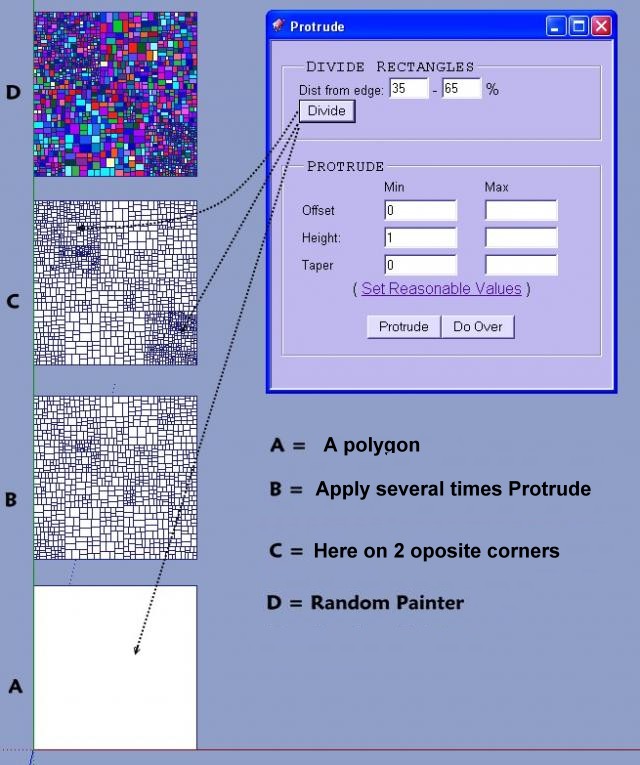
-
@rich o brien said:
Looks like someone is already building a future classic!
superb!
 I want to do that stuff exactly. How should I do it?






Hello! It looks like you're interested in this conversation, but you don't have an account yet.
Getting fed up of having to scroll through the same posts each visit? When you register for an account, you'll always come back to exactly where you were before, and choose to be notified of new replies (either via email, or push notification). You'll also be able to save bookmarks and upvote posts to show your appreciation to other community members.
With your input, this post could be even better 💗
Register Login


Advertisement