sketchucation logo sketchucation
    • Login
    Oops, your profile's looking a bit empty! To help us tailor your experience, please fill in key details like your SketchUp version, skill level, operating system, and more. Update and save your info on your profile page today!
    ⚠️ Important | Libfredo 15.6b introduces important bugfixes for Fredo's Extensions Update

    Spiral help please

    Scheduled Pinned Locked Moved Newbie Forum
    sketchup
    72 Posts 11 Posters 2.5k Views 11 Watching
    Loading More Posts
    • Oldest to Newest
    • Newest to Oldest
    • Most Votes
    Reply
    • Reply as topic
    Log in to reply
    This topic has been deleted. Only users with topic management privileges can see it.
    • jeff hammondJ Offline
      jeff hammond
      last edited by

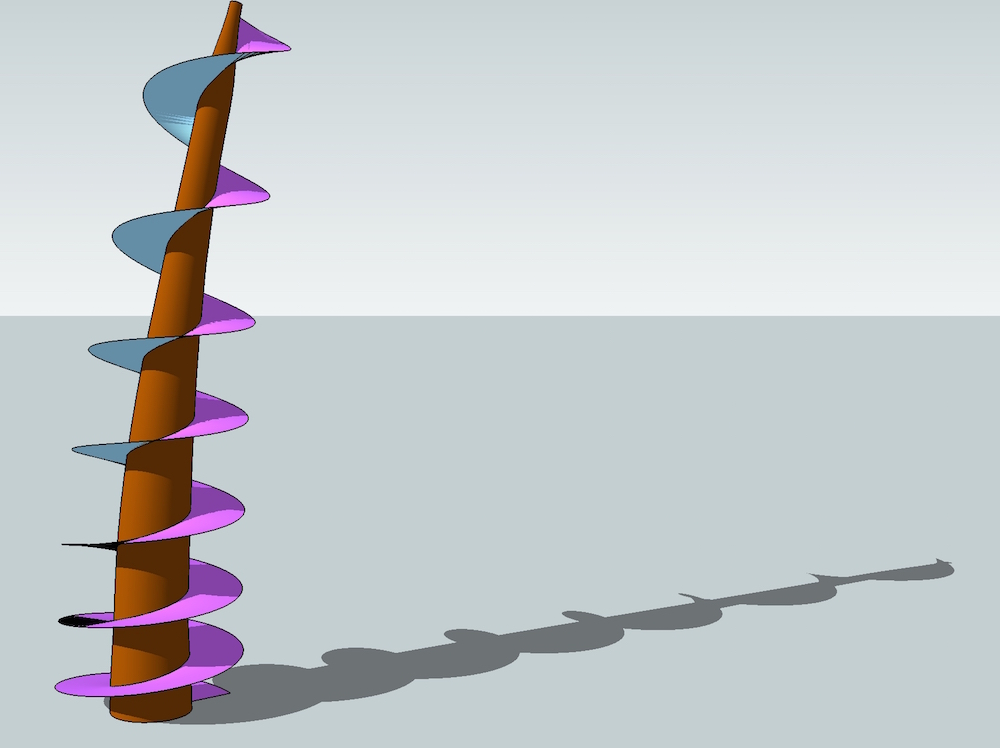
      treespiral.jpg
      i cheated ;)

      dotdotdot

      1 Reply Last reply Reply Quote 0
      • BoxB Offline
        Box
        last edited by

        I didn't. πŸ˜‰

        http://i155.photobucket.com/albums/s296/storeben/SU/Ball Race.gif

        I did reduce the quality of the gif to make it easier on the page though.

        1 Reply Last reply Reply Quote 0
        • jeff hammondJ Offline
          jeff hammond
          last edited by

          @box
          is your gif playing backwards or is it artistic license?

          dotdotdot

          1 Reply Last reply Reply Quote 0
          • BoxB Offline
            Box
            last edited by

            I used magnets.

            1 Reply Last reply Reply Quote 0
            • Dave RD Offline
              Dave R
              last edited by

              I didn't cheat, either.

              Etaoin Shrdlu

              %

              (THERE'S NO PLACE LIKE)

              G28 X0.0 Y0.0 Z0.0

              M30

              %

              1 Reply Last reply Reply Quote 0
              • jeff hammondJ Offline
                jeff hammond
                last edited by

                heh.. i didn't cheat either.. by cheating, i meant that i showed it in sketchup when it was modeled in a different application.

                dotdotdot

                1 Reply Last reply Reply Quote 0
                • jeff hammondJ Offline
                  jeff hammond
                  last edited by

                  dotdotdot

                  1 Reply Last reply Reply Quote 0
                  • Dave RD Offline
                    Dave R
                    last edited by

                    @jeff hammond said:

                    heh.. i didn't cheat either.. by cheating, i meant that i showed it in sketchup when it was modeled in a different application.

                    Ah. I see. I drew mine entirely in SketchUp. πŸ˜‰

                    Etaoin Shrdlu

                    %

                    (THERE'S NO PLACE LIKE)

                    G28 X0.0 Y0.0 Z0.0

                    M30

                    %

                    1 Reply Last reply Reply Quote 0
                    • ntxdaveN Offline
                      ntxdave
                      last edited by

                      You guys make me want to run and hide Here I was proud and happy that I finally got the screw created and then you guys just blew me away.

                      @box that is a really neat animation. Curios about the software you used for the animation.

                      @Jeff - that was a really interesting video.

                      @DaveR - I like the way you had multiple pitches to your helix and the transparency to the finished blade.

                      Honestly, I enjoy feedback like in this thread. For people like myself you certainly help me to advance my skills by reaching out and, at the very minimum, trying to learn new things which I do not normally use in the work I do. One never knows when one of he "tricks" you learn from these exercises will help solve something you are trying to do.

                      😍 😍 😍

                      1 Reply Last reply Reply Quote 0
                      • pilouP Offline
                        pilou
                        last edited by

                        @Jeff
                        There is an auto intersection at one place! πŸ’š

                        Frenchy Pilou
                        Is beautiful that please without concept!
                        My Little site :)

                        1 Reply Last reply Reply Quote 0
                        • jeff hammondJ Offline
                          jeff hammond
                          last edited by

                          @pilou said:

                          @Jeff
                          There is an auto intersection at one place! πŸ’š

                          rhino doesn't have collision detection.. maybe solidworks does πŸ˜‰

                          (if we're talking about the same thing)

                          dotdotdot

                          1 Reply Last reply Reply Quote 0
                          • pilouP Offline
                            pilou
                            last edited by

                            @unknownuser said:

                            (if we're talking about the same thing)

                            I suppose yes πŸ˜„

                            autoint.jpg

                            Else Albertsoft is like your Rhino! πŸ’š

                            Frenchy Pilou
                            Is beautiful that please without concept!
                            My Little site :)

                            1 Reply Last reply Reply Quote 0
                            • jeff hammondJ Offline
                              jeff hammond
                              last edited by

                              @pilou said:

                              I suppose yes πŸ˜„

                              haha.. i like your line choice for pointing out the problem in that picture πŸ˜†

                              dotdotdot

                              1 Reply Last reply Reply Quote 0
                              • BoxB Offline
                                Box
                                last edited by

                                @ntxdave said:

                                @box that is a really neat animation. Curios about the software you used for the animation.

                                It's all Sketchup, just a very simple bit of Sketchy Physics.

                                Here's a quick one for those with an everlasting sweet tooth.
                                You'll have to take my word for it that there is a lifting mechanism inside bringing the balls back to the top.

                                http://i155.photobucket.com/albums/s296/storeben/SU/Perpetual Gumballs.gif

                                1 Reply Last reply Reply Quote 0
                                • ntxdaveN Offline
                                  ntxdave
                                  last edited by

                                  @box said:

                                  @ntxdave said:

                                  @box that is a really neat animation. Curios about the software you used for the animation.

                                  It's all Sketchup, just a very simple bit of Sketchy Physics

                                  OK - how do you do that animation with Sketchup?

                                  1 Reply Last reply Reply Quote 0
                                  • BoxB Offline
                                    Box
                                    last edited by

                                    It's done with a plugin called Sketchy Physics, one of the most frustrating and fun plugins ever sent to torture us.
                                    There is a servo hinge on the little door at the top that opens with a slider and then it is simple gravity that makes the ball run.
                                    The chains, pulleys, buckets and assorted clockwork machinery that is running on the inside to elevate the balls, is a tad more complex.
                                    I'll warn you now before you rush off to try it, it doesn't work with 2015 yet.

                                    1 Reply Last reply Reply Quote 0
                                    • ntxdaveN Offline
                                      ntxdave
                                      last edited by

                                      @box said:

                                      It's done with a plugin called Sketchy Physics, one of the most frustrating and fun plugins ever sent to torture us.
                                      There is a servo hinge on the little door at the top that opens with a slider and then it is simple gravity that makes the ball run.
                                      The chains, pulleys, buckets and assorted clockwork machinery that is running on the inside to elevate the balls, is a tad more complex.
                                      I'll warn you now before you rush off to try it, it doesn't work with 2015 yet.

                                      Sorry to keep coming back but are you saying that Sketchy Physics creates the animated gif file?

                                      Another "learning" question: How do you achieve the indented curve look of your spiral blade? I have never had to do anything like this but when I learn tricks like that from you guys it helps me get a better overall grip of the tool.

                                      1 Reply Last reply Reply Quote 0
                                      • pilouP Offline
                                        pilou
                                        last edited by

                                        Pinky's ball wins the race at each time! πŸ’š

                                        @unknownuser said:

                                        It's done with a plugin called Sketchy Physics, one of the most frustrating and fun plugins ever sent to torture us.

                                        Actualized and debuged by Anton πŸ˜‰
                                        And a new other engine physic must be released always by Anton! β˜€ MSPhysics

                                        Frenchy Pilou
                                        Is beautiful that please without concept!
                                        My Little site :)

                                        1 Reply Last reply Reply Quote 0
                                        • M Offline
                                          mac1
                                          last edited by

                                          @kathryng said:

                                          Oh I got all of that. It was not the array that was the problem, it was that when I copied the array and moved it up on the blue axis it did not line up? Guess I'll try it again...

                                          Reason you have the unconnected points the line you are dealing with is really a diagonal of a rectangle and needs to be longer than the segment of the circle and the angle is established by how much you want the lead angle.
                                          To get the correct angle and line length just extrude the top face of the circle for example 1 foot, draw a diagonal line from one circle end point to the next one on top the that circle, that will give the line length and the angle. The you can do the radial copy and they will match, then do a right to left select of those lines and use the array copy to copy to height you want or you could delete the lines you don't want and then copy up=> up to you.
                                          BTW the 1 foot is probably bigger than you want since you are moving up 1 ft for each 15 degs. of rotation assuming you are using the default 24 seg. circle. That is your design decision. Moving up the end point will also work but you need to be very careful to use the inference engine or you can easily be in error by a small number

                                          1 Reply Last reply Reply Quote 0
                                          • BoxB Offline
                                            Box
                                            last edited by

                                            @ntxdave said:

                                            Sorry to keep coming back but are you saying that Sketchy Physics creates the animated gif file?

                                            Not exactly, Sketchy creates the animation within sketchup and I have simply used a screen recorder to capture it. I think the plugin has a way of exporting the animation, but I've not gone into that and I may be wrong. I know it does save animations that you can view from any angle though. Having looked further I see you can export the animation as PNG, JPG or SKP frames.

                                            @ntxdave said:

                                            Another "learning" question: How do you achieve the indented curve look of your spiral blade? I have never had to do anything like this but when I learn tricks like that from you guys it helps me get a better overall grip of the tool.

                                            There are quite a few ways, everyone has their favourite, screw was mentioned a few posts back, curviloft will do it, some of tig's tools etc etc

                                            This is one way, Eneroth makes some fantastic plugins but is very quiet about them, better known on the Extension warehouse I think.
                                            This is done using her Upright Extruder.

                                            http://i155.photobucket.com/albums/s296/storeben/SU/Up.gif

                                            1 Reply Last reply Reply Quote 0
                                            • 1
                                            • 2
                                            • 3
                                            • 4
                                            • 4 / 4
                                            • First post
                                              Last post
                                            Buy SketchPlus
                                            Buy SUbD
                                            Buy WrapR
                                            Buy eBook
                                            Buy Modelur
                                            Buy Vertex Tools
                                            Buy SketchCuisine
                                            Buy FormFonts

                                            Advertisement