sketchucation logo sketchucation
    • Login
    Oops, your profile's looking a bit empty! To help us tailor your experience, please fill in key details like your SketchUp version, skill level, operating system, and more. Update and save your info on your profile page today!
    ⚠️ Update | Sketchucation Tools 5.0.8 released with licensing improvements and bugfixes Download

    Guide lines

    Scheduled Pinned Locked Moved Newbie Forum
    sketchup
    16 Posts 4 Posters 998 Views 4 Watching
    Loading More Posts
    • Oldest to Newest
    • Newest to Oldest
    • Most Votes
    Reply
    • Reply as topic
    Log in to reply
    This topic has been deleted. Only users with topic management privileges can see it.
    • Jean LemireJ
      Jean Lemire
      last edited by

      Hi Jim, hi folks.

      Maybe your guides are on two different planes and do not intersect.

      Can you post your model for someone to check this.

      Just ideas.

      Jean (Johnny) Lemire from Repentigny, Quebec, Canada.

      1 Reply Last reply
      Reply Quote 0
      • J
        jimbojuliette
        last edited by

        Jean;
        Thanks for the prompt reply. I've even tried putting only the guide lines on layer 0 in different views and still can't get the tool to snap to the intersection.

        JIm

        1 Reply Last reply
        Reply Quote 0
        • Dave RD
          Dave R
          last edited by

          Maybe you could share the SKP file?

          Etaoin Shrdlu

          %

          (THERE'S NO PLACE LIKE)

          G28 X0.0 Y0.0 Z0.0

          M30

          %

          1 Reply Last reply
          Reply Quote 0
          • Jean LemireJ
            Jean Lemire
            last edited by

            Hi Jim, hi folks.

            Having your model to study would help in finding the real problem.

            In the meantime, see this SketchUp file for ideas.


            Guides that do not intersect.skp

            Jean (Johnny) Lemire from Repentigny, Quebec, Canada.

            1 Reply Last reply
            Reply Quote 0
            • BoxB
              Box
              last edited by

              You really need to post the model or at least a screen shot.

              Be careful you understand what you are doing with layers, they are only for viability, not to separate geometry.

              1 Reply Last reply
              Reply Quote 0
              • J
                jimbojuliette
                last edited by

                How do I insert the model in a post?

                Jim

                1 Reply Last reply
                Reply Quote 0
                • BoxB
                  Box
                  last edited by

                  Scroll down when you are in the reply window and you will see an Upload attachment section.

                  1 Reply Last reply
                  Reply Quote 0
                  • J
                    jimbojuliette
                    last edited by

                    Here is the file. I want to put a circle at each of the intersection points.


                    segment sled.skp

                    1 Reply Last reply
                    Reply Quote 0
                    • Dave RD
                      Dave R
                      last edited by

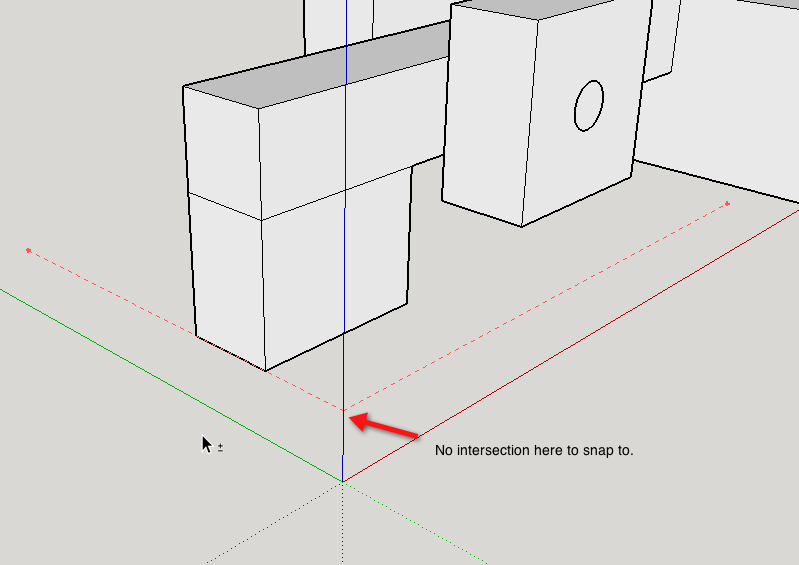
                      There is no intersection at the opposite ends of the lines from the guide points which is why there's nothing to snap to there. Put in guide lines instead of points and you'll get an intersection.
                      2014-11-12_12-50-18.png

                      As as was mentioned earlier, you need to pay attention to how you are using Layers. Faces and edges should remain on Layer 0 while components/groups can be associated with other layers.

                      Etaoin Shrdlu

                      %

                      (THERE'S NO PLACE LIKE)

                      G28 X0.0 Y0.0 Z0.0

                      M30

                      %

                      1 Reply Last reply
                      Reply Quote 0
                      • J
                        jimbojuliette
                        last edited by

                        This is an example of what I'm trying to do. I want to put a circle at the intersection of the guide lines.


                        guide line test.skp

                        1 Reply Last reply
                        Reply Quote 0
                        • Dave RD
                          Dave R
                          last edited by

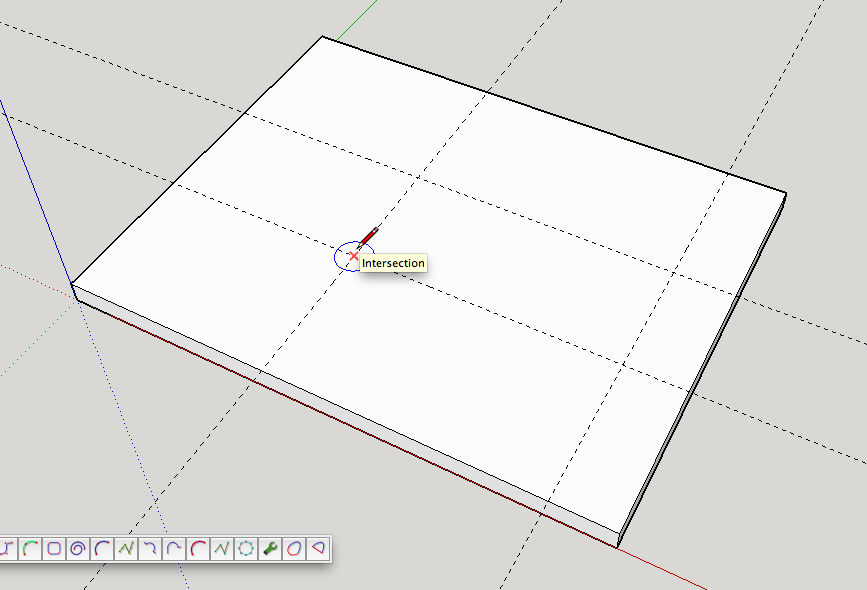
                          As I said, use guideLINES not guidepoints. There are no intersections created with the tails of the guidepoints.
                          2014-11-12_12-54-20.png

                          Etaoin Shrdlu

                          %

                          (THERE'S NO PLACE LIKE)

                          G28 X0.0 Y0.0 Z0.0

                          M30

                          %

                          1 Reply Last reply
                          Reply Quote 0
                          • BoxB
                            Box
                            last edited by

                            See below.

                            1 Reply Last reply
                            Reply Quote 0
                            • J
                              jimbojuliette
                              last edited by

                              Dave;
                              How do I get "guide lines".

                              Jim

                              1 Reply Last reply
                              Reply Quote 0
                              • Dave RD
                                Dave R
                                last edited by

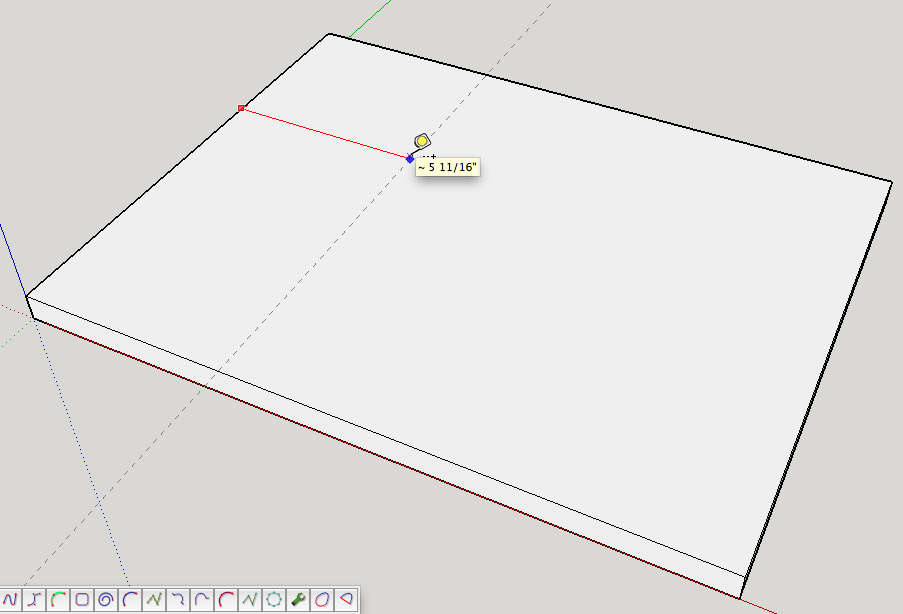
                                Use the Tape Measure tool and click on an axis line, an edge or an existing guideline.
                                2014-11-12_13-10-25.png

                                You get guide points if you start from a point such as the origin, an existing guide point or an intersection of edges and/or guidelines.

                                Etaoin Shrdlu

                                %

                                (THERE'S NO PLACE LIKE)

                                G28 X0.0 Y0.0 Z0.0

                                M30

                                %

                                1 Reply Last reply
                                Reply Quote 0
                                • J
                                  jimbojuliette
                                  last edited by

                                  Dave;
                                  Thank you so much. I've been fighting this thing for 2 days. Should have asked for help sooner.

                                  Jim

                                  1 Reply Last reply
                                  Reply Quote 0

                                  Hello! It looks like you're interested in this conversation, but you don't have an account yet.

                                  Getting fed up of having to scroll through the same posts each visit? When you register for an account, you'll always come back to exactly where you were before, and choose to be notified of new replies (either via email, or push notification). You'll also be able to save bookmarks and upvote posts to show your appreciation to other community members.

                                  With your input, this post could be even better 💗

                                  Register Login
                                  • 1 / 1
                                  • First post
                                    Last post
                                  Buy SketchPlus
                                  Buy SUbD
                                  Buy WrapR
                                  Buy eBook
                                  Buy Modelur
                                  Buy Vertex Tools
                                  Buy SketchCuisine
                                  Buy FormFonts

                                  Advertisement

