sketchucation logo sketchucation
    • Login
    Oops, your profile's looking a bit empty! To help us tailor your experience, please fill in key details like your SketchUp version, skill level, operating system, and more. Update and save your info on your profile page today!
    โš ๏ธ Update | Sketchucation Tools 5.0.8 released with licensing improvements and bugfixes Download

    Troubles With Toolbar Customization In SU 2015

    Scheduled Pinned Locked Moved SketchUp Discussions
    sketchup
    15 Posts 7 Posters 5.1k Views 7 Watching
    Loading More Posts
    • Oldest to Newest
    • Newest to Oldest
    • Most Votes
    Reply
    • Reply as topic
    Log in to reply
    This topic has been deleted. Only users with topic management privileges can see it.
    • F
      fcborik
      last edited by

      Hello,

      I'm trying to convert over to SU2015 and I'm having a problem figuring out how to customize the toolbar. The SU help page says that I should go to view>toolbars>custom. but the "custom" never shows. I've attached a screenshot of what I see after I go to view>toolbars.

      Any help would be appreciated.

      Thanks!

      Frank Borik

      1 Reply Last reply
      Reply Quote 0
      • F
        fcborik
        last edited by

        Tried to attach the file again.

        1 Reply Last reply
        Reply Quote 0
        • KrisidiousK
          Krisidious
          last edited by

          you need to go to Toolbars.

          Click New.

          Name the toolbar.

          It will open.

          Use ctrl to drag and drop tools on to it.

          only native tools will work.

          you'll need one or more of the customtoolbar plugins to do anything with the other plugins.

          By: Kristoff Rand
          Home DesignerUnique House Plans

          1 Reply Last reply
          Reply Quote 0
          • Dave RD
            Dave R
            last edited by

            Frank, the process is exactly the same as for SU2014.

            Etaoin Shrdlu

            %

            (THERE'S NO PLACE LIKE)

            G28 X0.0 Y0.0 Z0.0

            M30

            %

            1 Reply Last reply
            Reply Quote 0
            • BoxB
              Box
              last edited by

              Here is a little animation showing making a toolbar.

              Use Ctrl when you click and drag the tools so they make copies rather than drag them off the other toolbar. However it doesn't matter if you do drag them off by mistake because you only need to hit reset to get them back.
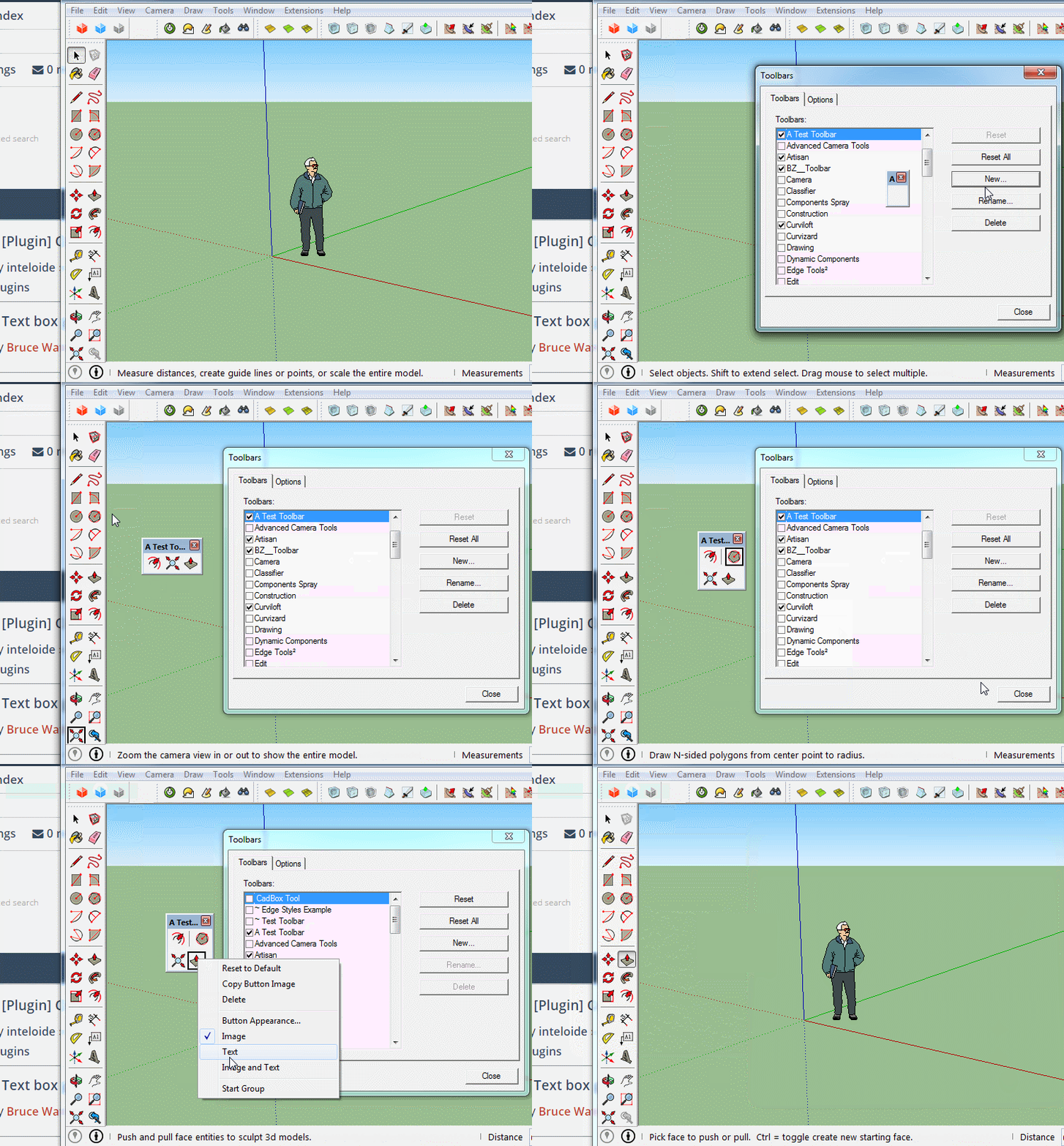

              Click to animate

              1 Reply Last reply
              Reply Quote 0
              • KrisidiousK
                Krisidious
                last edited by

                Very nice Box...

                By: Kristoff Rand
                Home DesignerUnique House Plans

                1 Reply Last reply
                Reply Quote 0
                • BoxB
                  Box
                  last edited by

                  @krisidious said:

                  Very nice Box...

                  I bet you say that to all the girls!

                  1 Reply Last reply
                  Reply Quote 0
                  • KrisidiousK
                    Krisidious
                    last edited by

                    Never compliment a woman... They'll get all uppity and think they can do better than you. At least that's what my Dad taught me... He's single btw.

                    By: Kristoff Rand
                    Home DesignerUnique House Plans

                    1 Reply Last reply
                    Reply Quote 0
                    • F
                      fcborik
                      last edited by

                      Forgot about the drag and drop. Many thanks for your help!

                      1 Reply Last reply
                      Reply Quote 0
                      • Mistro11M
                        Mistro11
                        last edited by

                        Box- All these years I been using Sketchup and did not know we can do that... ๐Ÿ˜ฒ

                        I have some rather large toolsets taking up valuable space where I only use 1 or 2 of the bunch. Now I know what to do. Thanks for that.

                        EDIT: Think I got excited too soon. Is it only the default tools that can be customized into a new toolbar? ๐Ÿ’š

                        Structural Integrity is Not Just Physical...It's in the Design and Purpose

                        1 Reply Last reply
                        Reply Quote 0
                        • KrisidiousK
                          Krisidious
                          last edited by

                          You'll need the Toolbar Editor or Jim's Custom Toolbars to edit the others or both like i do..

                          By: Kristoff Rand
                          Home DesignerUnique House Plans

                          1 Reply Last reply
                          Reply Quote 0
                          • B
                            Ben Ritter
                            last edited by

                            Box, How did you get your toolbars to be 2 columns wide at the left margin in SU2015?

                            Thanks.

                            1 Reply Last reply
                            Reply Quote 0
                            • BoxB
                              Box
                              last edited by

                              @ben ritter said:

                              Box, How did you get your toolbars to be 2 columns wide at the left margin in SU2015?

                              Thanks.

                              That is the default setting for the Large toolset, but it is the only one that will dock as two columns.

                              1 Reply Last reply
                              Reply Quote 0
                              • B
                                blackdogsketch
                                last edited by

                                Man this is frustrating for something so simple. On 2016 Pro, the CTRL and drag does not work at all. Using ALT and drag just MOVES tools from the original toolbar. Frustrating.

                                1 Reply Last reply
                                Reply Quote 0
                                • Dave RD
                                  Dave R
                                  last edited by

                                  Ctrl+drag does indeed work for moving tools from the native toolbars to your custom toolbars. If it isn't working for you, check your keyboard. You do have to have the toolbars window open while customizing the toolbars.

                                  You can also just drag the tools over without holding Ctrl. If you want to restore the tools on the native toolbars, click on Reset.


                                  Etaoin Shrdlu

                                  %

                                  (THERE'S NO PLACE LIKE)

                                  G28 X0.0 Y0.0 Z0.0

                                  M30

                                  %

                                  1 Reply Last reply
                                  Reply Quote 0

                                  Hello! It looks like you're interested in this conversation, but you don't have an account yet.

                                  Getting fed up of having to scroll through the same posts each visit? When you register for an account, you'll always come back to exactly where you were before, and choose to be notified of new replies (either via email, or push notification). You'll also be able to save bookmarks and upvote posts to show your appreciation to other community members.

                                  With your input, this post could be even better ๐Ÿ’—

                                  Register Login
                                  • 1 / 1
                                  • First post
                                    Last post
                                  Buy SketchPlus
                                  Buy SUbD
                                  Buy WrapR
                                  Buy eBook
                                  Buy Modelur
                                  Buy Vertex Tools
                                  Buy SketchCuisine
                                  Buy FormFonts

                                  Advertisement
