sketchucation logo sketchucation
    • Login
    Oops, your profile's looking a bit empty! To help us tailor your experience, please fill in key details like your SketchUp version, skill level, operating system, and more. Update and save your info on your profile page today!
    Mac User? | Join the Rayscaper Beta for Mac Learn More

    [Plugin][$] VisuHole - v1.5a - 01 Apr 24


    Scheduled Pinned Locked Moved Plugins
    104 Posts 40 Posters 141.7k Views 39 Watching
    Loading More Posts
    • Oldest to Newest
    • Newest to Oldest
    • Most Votes
    Reply
    • Reply as topic
    Log in to reply
    This topic has been deleted. Only users with topic management privileges can see it.
    • F
      function
      last edited by

      mega

      1 Reply Last reply
      Reply Quote 0
      • F
        feixia1127
        last edited by

        Yup a new cool one!

        1 Reply Last reply
        Reply Quote 0
        • OxerO
          Oxer
          last edited by

          Incredible plugin!! 👍
          I have done the Spanish Translation but there are some strings missing in the language file:
          • Current Stencil
          • Next Stencil in History
          • Previous Stencil in History
          • Pick a Stencil Shape in the Model

          Spanish Language File

          "The result is the end what is important is the process" by Oxer
          http://www.oxervision.blogspot.com/

          1 Reply Last reply
          Reply Quote 0
          • fredo6F
            fredo6
            last edited by

            Oxer,

            Thanks a lot. Actually, part of the strings are in LibFredo6.

            Fredo

            1 Reply Last reply
            Reply Quote 0
            • OxerO
              Oxer
              last edited by

              I know it, I have uploaded the new Spanish Language for LibFredo6 v6.1a but these are missing strings to translate in VisuHole:

              • "Current Stencil"
              • "Next Stencil in History"
              • "Previous Stencil in History"
              • "Pick a Stencil Shape in the Model"
              • "PICK A STENCIL SHAPE"
              • "Pick a Stencil Shape - Click / Release to pick or Click / Drag / Release to pick and orientate - Ctrl down to Force faces - Esc to cancel"
              

              "The result is the end what is important is the process" by Oxer
              http://www.oxervision.blogspot.com/

              1 Reply Last reply
              Reply Quote 0
              • fredo6F
                fredo6
                last edited by

                Oxer,

                There seems to be a small problem, maybe for because of the '/'.

                Still I was able to translate these strings to French. So I need to clarify.

                Fred

                1 Reply Last reply
                Reply Quote 0
                • OxerO
                  Oxer
                  last edited by

                  Thanks for the reply!

                  "The result is the end what is important is the process" by Oxer
                  http://www.oxervision.blogspot.com/

                  1 Reply Last reply
                  Reply Quote 0
                  • A
                    AcesHigh
                    last edited by

                    Awesome, I will try as soon as I can.

                    Quick question before downloading it: saw the first minutes of the tutorial video... when moving the stencil shape over the surface you want to apply the stencil, it seems the stencil is "grabbed" by it´s middle.

                    Is it possible however to for example, move a stencil by it´s corner, and then position it precisely somewhere?

                    1 Reply Last reply
                    Reply Quote 0
                    • pilouP
                      pilou
                      last edited by

                      @unknownuser said:

                      Is it possible however to for example, move a stencil by it´s corner, and then position it precisely somewhere?

                      Yes of course! ☀
                      When you select a new stencil you choose its own origin and even its orientation! 😉
                      And when you draw it on the volume again position and orientation (on the volume) are possible! 🤓
                      A must indeed! 😎

                      Frenchy Pilou
                      Is beautiful that please without concept!
                      My Little site :)

                      1 Reply Last reply
                      Reply Quote 0
                      • cottyC
                        cotty
                        last edited by

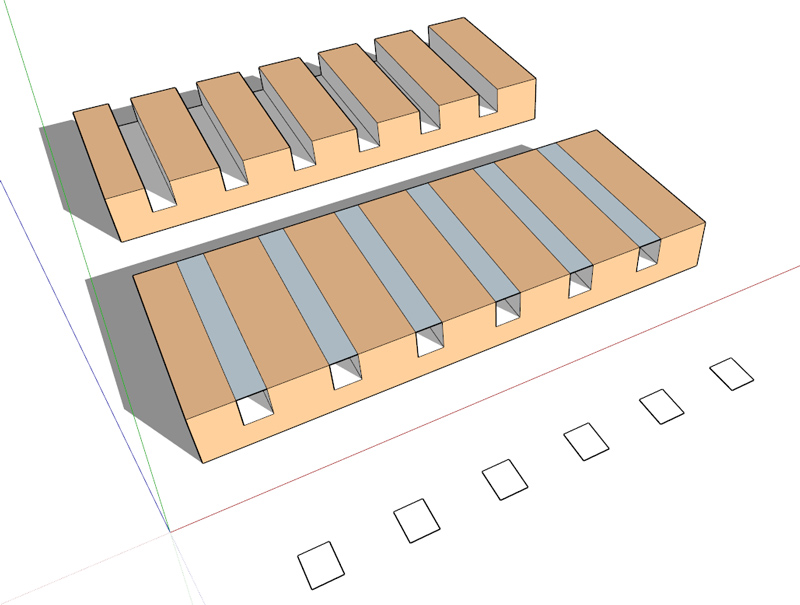
                        Is it possible to get the result in the back (one step) if you place the drill shape at a border?
                        drill_border.jpg

                        my SketchUp gallery

                        1 Reply Last reply
                        Reply Quote 0
                        • fredo6F
                          fredo6
                          last edited by

                          @cotty said:

                          Is it possible to get the result in the back (one step) if you place the drill shape at a border?

                          [attachment=0:6kxwbix7]<!-- ia0 -->drill_border.jpg<!-- ia0 -->[/attachment:6kxwbix7]

                          Just make the rectangle a little bit higher. With exact dimensions, VisuHole has difficulty because it does know the original border faces stay.

                          Fredo

                          1 Reply Last reply
                          Reply Quote 0
                          • Y
                            yiannis76
                            last edited by

                            I can not use this plugin.Whetever i try to do i get the attached error


                            VisuHole error

                            1 Reply Last reply
                            Reply Quote 0
                            • cottyC
                              cotty
                              last edited by

                              Is it possible to snap the stencil shape (drill thru) to guide points, guide lines? Or to use the normal inference system for positioning the hole?

                              my SketchUp gallery

                              1 Reply Last reply
                              Reply Quote 0
                              • pilouP
                                pilou
                                last edited by

                                @unknownuser said:

                                Is it possible to snap the stencil shape (drill thru) to guide points, guide lines?

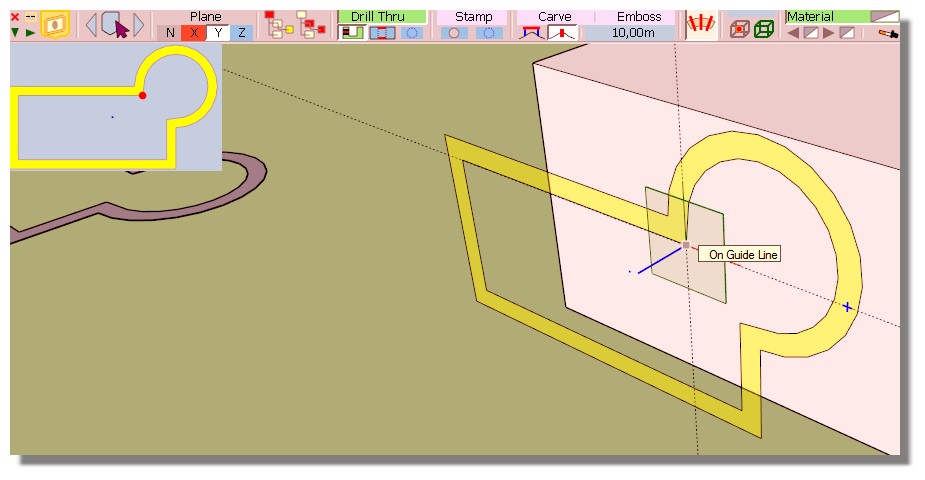
                                You can yet with this little trick and if your face volume is Parallel to one axe! 💭

                                Draw your guides lines crossing anywhere you want
                                Then call the Stencil and Press one of the the Keyboard Arrow (so x, y, z axis)
                                The snap will be fine on the crossing guides lines! 😉

                                Curiously don't work with a Guide Point on the surface but Yes if the Guide Point is on the empty space! 😮
                                So put the Guide Point on Guideline(s) who will be itself on the surface volume! 😄
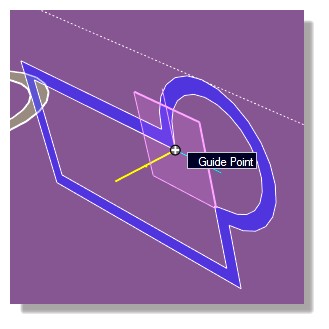
                                drill1.jpg

                                Edit : seems you cant draw your stencil on any position on the space of one Guide Line!
                                So no need to press the Arrows'keys! 😄
                                But not on their intersection! Even Drawn a Point Guide at the intersection first! 😮
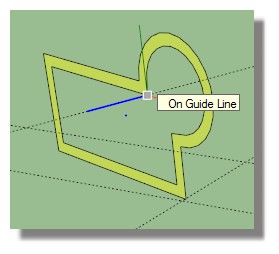
                                drill2.jpg
                                All must be on the surface of the volume! 🤓
                                Guide line(s) + Point Guide

                                drill.jpg

                                drill3.jpg

                                Frenchy Pilou
                                Is beautiful that please without concept!
                                My Little site :)

                                1 Reply Last reply
                                Reply Quote 0
                                • O
                                  optimaforever
                                  last edited by

                                  WWWWWWWonderful script indeed! 😄

                                  1 Reply Last reply
                                  Reply Quote 0
                                  • N
                                    numerobis
                                    last edited by

                                    😍
                                    Fantastic plugin! (as usual 😉 ) Thank you very much! 👍

                                    1 Reply Last reply
                                    Reply Quote 0
                                    • pilouP
                                      pilou
                                      last edited by

                                      We have yet the rotation 👍
                                      but...
                                      ... does this is possible ? 😄
                                      Will be very smart! 😄
                                      And a Gizmo with separated scale X, Y, Z super smart! ☀
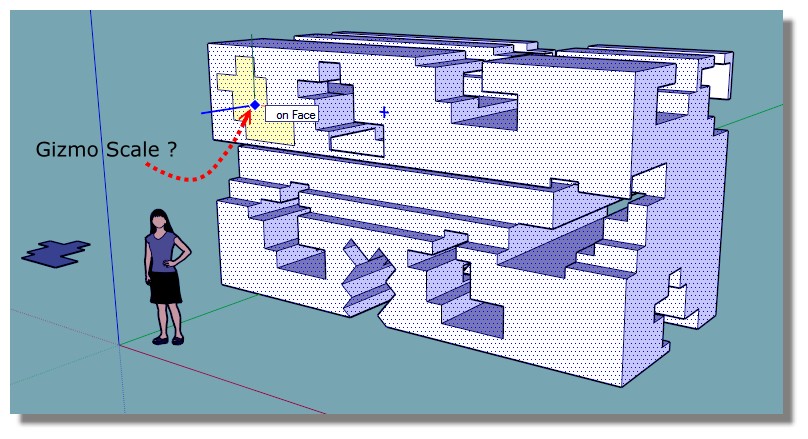
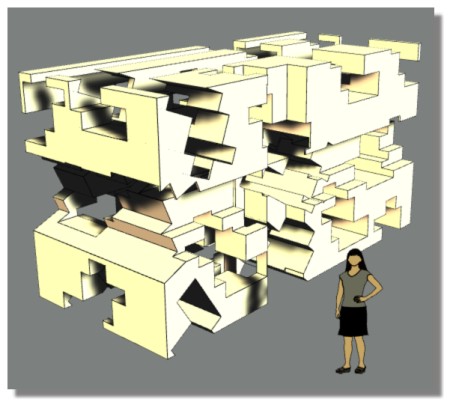
                                      gizmo_scale.jpg
                                      gizmo_scale1.jpg

                                      Frenchy Pilou
                                      Is beautiful that please without concept!
                                      My Little site :)

                                      1 Reply Last reply
                                      Reply Quote 0
                                      • W
                                        Whaat
                                        last edited by

                                        Congrats Fredo! Another great release! I am looking forward to playing with this one... 👍

                                        SketchUp Plugins for Professionals

                                        1 Reply Last reply
                                        Reply Quote 0
                                        • ElibjrE
                                          Elibjr
                                          last edited by

                                          Fredo this looks amazing! I can 't wait to play with this one!

                                          1 Reply Last reply
                                          Reply Quote 0
                                          • fredo6F
                                            fredo6
                                            last edited by

                                            NEW RELEASE: VisuHole v1.1a - 19 Oct 14

                                            VisuHole 1.1a is required for the support of usernames with non-ascii characters in Sketchup 2014

                                            See main post of this thread for Download of VisuHole.

                                            Fredo

                                            1 Reply Last reply
                                            Reply Quote 0

                                            Hello! It looks like you're interested in this conversation, but you don't have an account yet.

                                            Getting fed up of having to scroll through the same posts each visit? When you register for an account, you'll always come back to exactly where you were before, and choose to be notified of new replies (either via email, or push notification). You'll also be able to save bookmarks and upvote posts to show your appreciation to other community members.

                                            With your input, this post could be even better 💗

                                            Register Login
                                            • 1
                                            • 2
                                            • 3
                                            • 4
                                            • 5
                                            • 6
                                            • 1 / 6
                                            • First post
                                              Last post
                                            Buy SketchPlus
                                            Buy SUbD
                                            Buy WrapR
                                            Buy eBook
                                            Buy Modelur
                                            Buy Vertex Tools
                                            Buy SketchCuisine
                                            Buy FormFonts

                                            Advertisement