SketchUp 2014 Icon missing from Toolbar ? Solved!
-
Have you got the exact same installation of all files for both computers ?
The missing button icon suggests that the image file is not found in the path/name specified in the toolbar button making code ?
Double check the toolbar making code is the same on both machines and that the image file exists and that the name matches that given in the toolbar button making code
I know of no v2014 issues like this - in more recent versions the button image sizes have increased, BUT older images should work, albeit perhaps shrunk or over-sized...
-
I double checked this on both systems, the 3 icons reside in the same folder.
I'm also fully aware of the new plugin folder location
I'm curious because my SU 8 install has never faulted in reading these iconsconcrete_frame_icon1.png
concrete_frame_icon4.png
concreteaddon_icon.png -
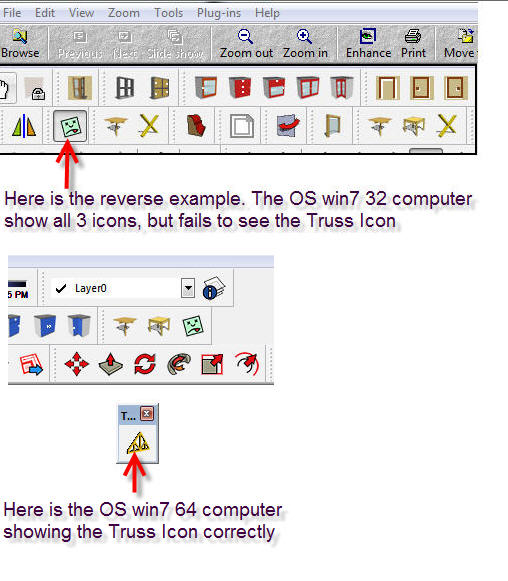
I just found another example (see attachment)
-
Double check all of these subfolders' security permissions are FULL and that that trickles down to their contents.
Perhaps you can't 'read' the file ? -
Thanks for your help. Nothing has changed Permission wise etc.
There are 3 icons in the folder. What would cause only 2 to be read?
Another question if SU8 has no problems opening these Icons on either my computers, one with win7 32 and the other with win7 64, why can't Su2014 do the same?
Particularly when my example uses the same naming characters on each computer.
Yet the results are totally unexpected.I would hope someone at Trimble will take note of this:
-
Can you provide a short example that recreate this?
Have a code snippet to refer to ensure we all are looking at the same thing and can make comparisons. We've not seen any issues loading toolbar icons so far and would need steps to reproduce. -
Are you 100% sure that the image file exists in the specified folder exactly as it's typed into the toolbar-making code.
Do you have two valid and correctly named images [one for each toolbar size], and have them accurately specified in code ??
The "green-yeuk!" image on a button appears when the specified image cannot be found [or is unusable].
Perhaps you got something obscure like a special-character in the image's file-name?
Try renaming it with copy+paste from the code itself.
Or perhaps an image in the v2014 subfolder with obscure security permission settings - NOT readable for example ? Or a corrupted png ?
If you bring in a copy from the working earlier version and overwrite does it work.
Can we see the toolbar making code and a list of the image files?? -
Here are the 2 example I sited again
concrete_frame_icon1.png
concrete_frame_icon4.png
concreteaddon_icon.png <--- this is the "green-yeuk!" iconThe other example was the truss icon:
truss_icon.png <--- this is the "green-yeuk!" icon
I can't seem to produce a screen capture of the tooltip which shows correctly when the
"green-yeuk!" icon is highlighted by my mouse, these Rubies still run, the "green-yeuk!" icon just annoyingly sits thereBut again I must emphasize, I see no reason why these Icons trade there "green-yeukyness"
based on what what computer they run on. Once more there is NO "green-yeukyness" icon in SU 8 which also runs happily on both computers. -
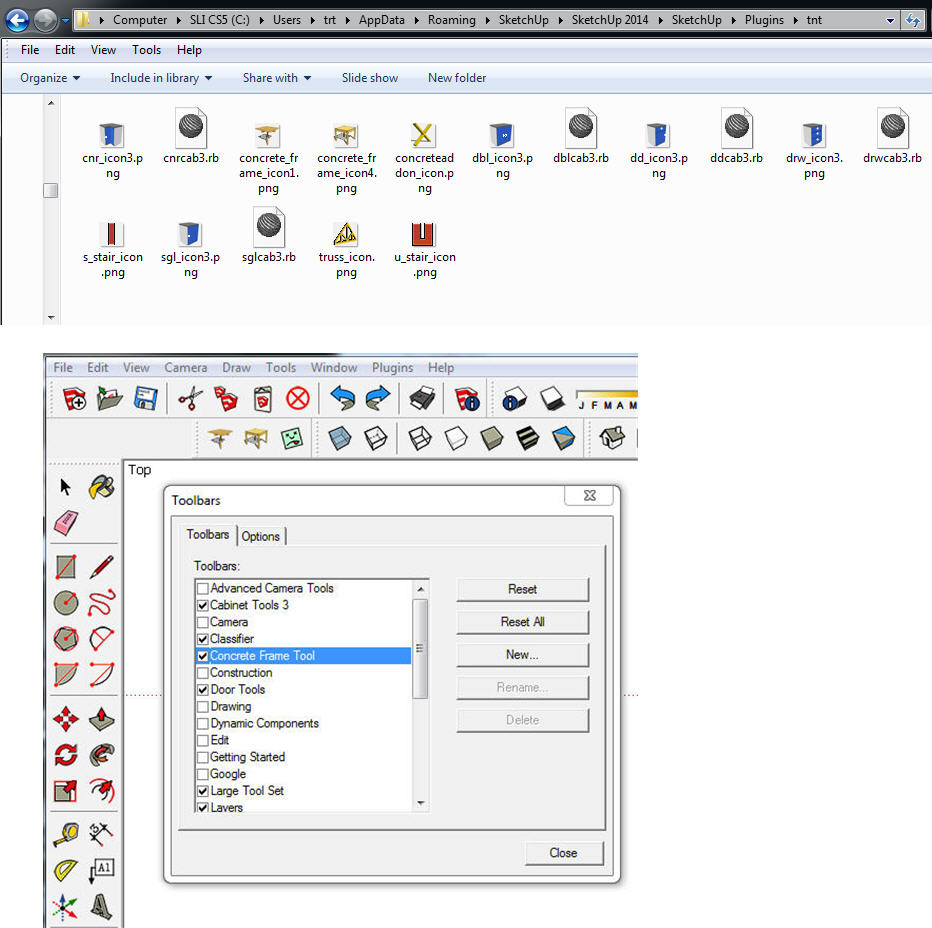
I asked for a screen-shot of your Plugins subfolder showing the icon files, and a snippet of the code that is trying to use them for the buttons, so we could be sure they 'exist' and the code matches the path etc.
When the image is not used it suggests that either there is something wrong with the image OR it has not been found !
To test it exists try this code snippet in the Ruby Console:File.exist?("full_path_to_the_png")Where you substitute the "full_path..." with where the file ought to be -
"C:/...../Plugins/.../concreteaddon_icon.png"etc...If it returns 'true' then that file does exist...
So there is something wrong with it !
Check its details in an image-editor - size, format etc, compared to an image that you know will work...If it returns 'false' then it is missing, so make sure it is there in the folder and retest...
-
Can you supply a full working example with code and icons? ZIP or RBZ we can install and debug?
-
@tt_su said:
Can you supply a full working example with code and icons? ZIP or RBZ we can install and debug?
You got mail!
-
@tig said:
I asked for a screen-shot of your Plugins subfolder showing the icon files, and a snippet of the code that is trying to use them for the buttons, so we could be sure they 'exist' and the code matches the path etc.
Please trust me, there is no change in the snippet of code, pertaining to the use of the 3 icons, otherwise SU8 would show the same error. BUT SU8 has no "green-yeuk!" icon
-
So there's maybe something wrong with the PNG itself ?
Did you try all of the tests I suggested to at least rule out misnaming etc -
I found the problem!

I just installed my original Bootable Disk image HDD
It has NO Icon Problem, with SU14.So I looked thru the code. and yes an _ (underscore) went missing in the icon title.
I'm current looking at a 3rd Bootable Backup to see whats happening with it.I strongly suspect this may have been a file saving error. Caused by my Editor.
SU8 shows no errors, because the _ is not missing. -
So it was a file [mis]naming issue !
Had you tried my suggested tests on the file-path in the code File.exist?()
http://sketchucation.com/forums/viewtopic.php?p=516878#p516878
then you might have got a clue nearly a week earlier...
-
Point well taken. Its an odd coincidence, which transpired with my desperate attempt to become SU14 compliant. ......S**T happens!
-
Tell me about it... 
Look what's just cropped up with users of v2014 who include a' in their Windows User name... their Plugins won't load...
OR v2014 Windows Users who manage to setup an accented-name that is not UTF8 encoded [unexpectedly surprisingly easy!], bringing us all back to the pre-v2014 days of accented-user-names dismally failing when accessing FILE/TEMP etc... it can be fixed in v2014 by considerable [unexpected] convoluted hoop-jumping by plugins-authors, who now need to avoid an issue that Ruby2.0 was mean to circumvent - AND NOT MAKE WORSE [FFS]!


Hello! It looks like you're interested in this conversation, but you don't have an account yet.
Getting fed up of having to scroll through the same posts each visit? When you register for an account, you'll always come back to exactly where you were before, and choose to be notified of new replies (either via email, or push notification). You'll also be able to save bookmarks and upvote posts to show your appreciation to other community members.
With your input, this post could be even better 💗
Register Login


Advertisement