Creating a new texture
-
Hi,
how to create a new texture pls ?
A striped one for the example, which I could put on an edge with curves (like on attached pic bellow), without puting black color, and after yellow, and black and yellow, etc.. by normal way.perhaps this new colors could be called a ''non flat color'' or ''texture'' ?
ot perhaps, need I export it from photoshop ?I hope my explanation is understadable

thanks
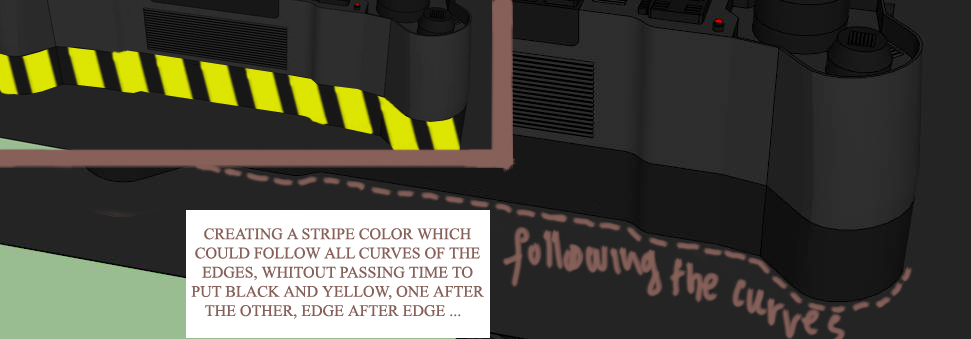
-
You can easily make a striped .png file image in Gimp or Photoshop - it needs to 'tile' - top edge joins onto bottom edge and right edge onto left edge etc.
Use that image as a texture in a custom material.
Now apply the material it to your surface[s].
It might work as a projected-texture, otherwise use one of the freely available UV mapping tools and 'map' it onto your surfaces so it 'flows' across its facets...
-
Hi TIG
when you say ''Use that image as a texture in a custom material.''
what is the proceed for add it in my colors ?
I found this tuto, is it good ? or are they somethings I dont need inside ?
http://www.youtube.com/watch?v=A5m_PngBZTo -
It's not so hard...

Make a new material.
Edit it and there are options to add a texture.
Find the image and use it.
Adjust its size etc as desire...Then you can export that Material as a SKM file for reuse from a 'material collection' in any SKP later on...
-
ok, will try it

Hello! It looks like you're interested in this conversation, but you don't have an account yet.
Getting fed up of having to scroll through the same posts each visit? When you register for an account, you'll always come back to exactly where you were before, and choose to be notified of new replies (either via email, or push notification). You'll also be able to save bookmarks and upvote posts to show your appreciation to other community members.
With your input, this post could be even better 💗
Register Login


Advertisement