sketchucation logo sketchucation
    • Login
    Oops, your profile's looking a bit empty! To help us tailor your experience, please fill in key details like your SketchUp version, skill level, operating system, and more. Update and save your info on your profile page today!
    Mac User? | Join the Rayscaper Beta for Mac Learn More

    3d Animals

    Scheduled Pinned Locked Moved Organic Modelling
    17 Posts 7 Posters 12.1k Views 7 Watching
    Loading More Posts
    • Oldest to Newest
    • Newest to Oldest
    • Most Votes
    Reply
    • Reply as topic
    Log in to reply
    This topic has been deleted. Only users with topic management privileges can see it.
    • S
      Sartje
      last edited by

      hello

      i want to know how to make 3d Animals.
      but i can't figure it out 😒

      i have already made something but i don't know if im doing it good.
      and i don't know how to add it here to show it ❓

      i hope someone can help me πŸ˜„

      1 Reply Last reply
      Reply Quote 0
      • massimoM
        massimo Moderator
        last edited by

        @unknownuser said:

        and i don't know how to add it here to show it ❓

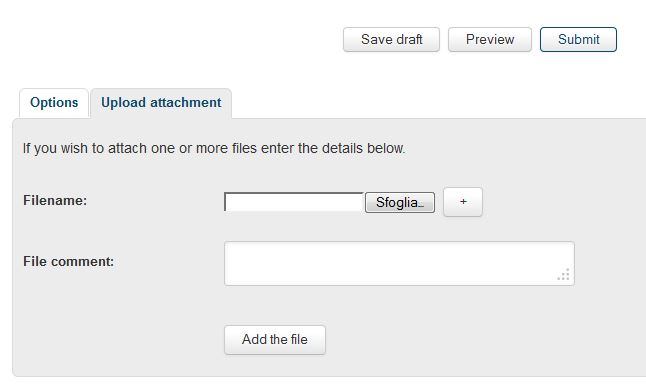
        Hi, use the upload attachment feature which you can see at the bottom of the posting panel.
        Click the "upload attachment" label-->browse the file-->add the file.
        Once loaded the file you can also place it inline by pressing the "place inline" button.
        Cattura.JPG

        1 Reply Last reply
        Reply Quote 0
        • pilouP
          pilou
          last edited by

          With Artisan or Subdivide an Smooth both by Dale Martens

          Girafe By Solo

          http://sketchucation.com/forums/download/file.php?id=63754&t=1

          http://sketchucation.com/forums/download/file.php?id=63755&t=1

          Frenchy Pilou
          Is beautiful that please without concept!
          My Little site :)

          1 Reply Last reply
          Reply Quote 0
          • S
            Sartje
            last edited by

            i hope this is the good file


            Leeuw.skp

            1 Reply Last reply
            Reply Quote 0
            • S
              Sartje
              last edited by

              @unknownuser said:

              With Artisan or Subdivide an Smooth both by Dale Martens

              Girafe By Solo

              http://sketchucation.com/forums/download/file.php?id=63754&t=1

              http://sketchucation.com/forums/download/file.php?id=63755&t=1

              woow 😲 this is what i want to but i can't finf a tutorial
              to do this

              1 Reply Last reply
              Reply Quote 0
              • olisheaO
                olishea
                last edited by

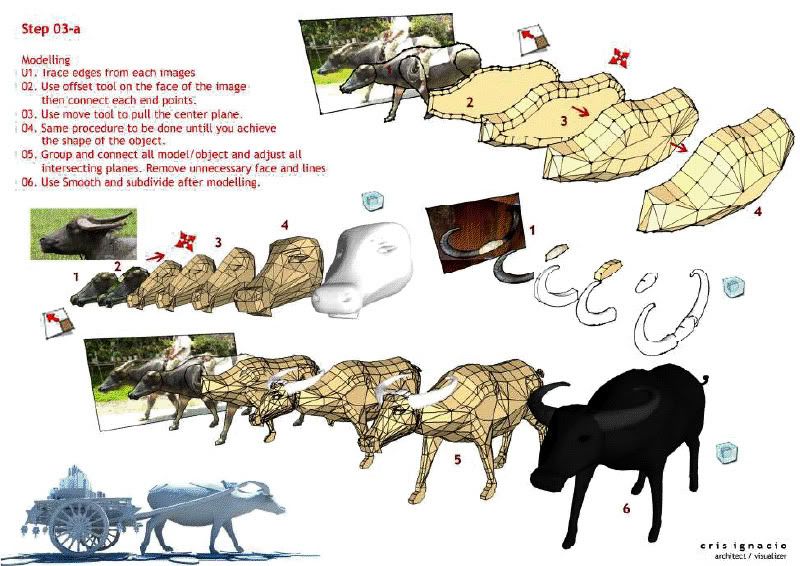
                The image is the tutorial πŸ˜‰

                oli

                1 Reply Last reply
                Reply Quote 0
                • pilouP
                  pilou
                  last edited by

                  @unknownuser said:

                  Image is the tutorial πŸ˜‰

                  Yes! πŸ€“
                  Import an Image as model
                  Make a close surface (for the half model)
                  Divide it by lines
                  Make some extrude volumes and faces
                  Refine them
                  Apply subdivison with one of the 2 plugins above
                  That's all πŸ˜‰

                  Another one by Nomeradona 😎

                  http://i334.photobucket.com/albums/m421/nomeradona_1234/Ignacio/3.jpg

                  Now you can make a complet zoo! πŸ˜‰

                  Frenchy Pilou
                  Is beautiful that please without concept!
                  My Little site :)

                  1 Reply Last reply
                  Reply Quote 0
                  • S
                    Sartje
                    last edited by

                    @olishea said:

                    The image is the tutorial πŸ˜‰

                    πŸ˜„

                    1 Reply Last reply
                    Reply Quote 0
                    • S
                      Sartje
                      last edited by

                      @unknownuser said:

                      @unknownuser said:

                      Image is the tutorial πŸ˜‰

                      Yes! πŸ€“
                      Import an Image as model
                      Make a close surface (for the half model)
                      Divide it by lines
                      Make some extrude volumes and faces
                      Refine them
                      Apply subdivison with one of the 2 plugins above
                      That's all πŸ˜‰

                      Another one by Nomeradona 😎

                      http://i334.photobucket.com/albums/m421/nomeradona_1234/Ignacio/3.jpg

                      Now you can make a complet zoo! πŸ˜‰

                      thank you i will try it πŸ˜›

                      1 Reply Last reply
                      Reply Quote 0
                      • BoxB
                        Box
                        last edited by

                        It might be worth pointing out that you have saved your file looking at your lion from underneath. It is lying on it's side and under the ground plane.
                        Getting the orientation right makes life easier.
                        With the origin point at bottom left of the screen, Solid blue line goes up, solid red to the right and solid green into the distance.
                        This is the position you view from if you go Camera/standard views/Front.

                        1 Reply Last reply
                        Reply Quote 0
                        • S
                          Sartje
                          last edited by

                          @box said:

                          It might be worth pointing out that you have saved your file looking at your lion from underneath. It is lying on it's side and under the ground plane.
                          Getting the orientation right makes life easier.
                          With the origin point at bottom left of the screen, Solid blue line goes up, solid red to the right and solid green into the distance.
                          This is the position you view from if you go Camera/standard views/Front.

                          thanks for the info
                          but how do i get it to stand up then?

                          1 Reply Last reply
                          Reply Quote 0
                          • pbacotP
                            pbacot
                            last edited by

                            @sartje said:

                            @box said:

                            It might be worth pointing out that you have saved your file looking at your lion from underneath. It is lying on it's side and under the ground plane.
                            Getting the orientation right makes life easier.
                            With the origin point at bottom left of the screen, Solid blue line goes up, solid red to the right and solid green into the distance.
                            This is the position you view from if you go Camera/standard views/Front.

                            thanks for the info
                            but how do i get it to stand up then?

                            Use the rotate tool to rotate it into position. Move it up if needed--above ground plane.

                            MacOSX MojaveSketchUp Pro v19 Twilight v2 Thea v3 PowerCADD

                            1 Reply Last reply
                            Reply Quote 0
                            • BoxB
                              Box
                              last edited by

                              Select all of it and use the rotate tool.

                              Or make it a group or component and you can easily move it about and rotate it etc.

                              [screenr:2ymubpls]am9H[/screenr:2ymubpls]

                              1 Reply Last reply
                              Reply Quote 0
                              • S
                                Sartje
                                last edited by

                                @box said:

                                Select all of it and use the rotate tool.

                                Or make it a group or component and you can easily move it about and rotate it etc.

                                [screenr:w3zkzdz5]am9H[/screenr:w3zkzdz5]

                                thankss πŸ˜„

                                1 Reply Last reply
                                Reply Quote 0
                                • S
                                  Sartje
                                  last edited by

                                  i have followed the steps only when i want to use the Move tool to make layers
                                  it wont work?
                                  its not going forward but it goes right or left πŸ˜•


                                  Leeuw 3.skp

                                  1 Reply Last reply
                                  Reply Quote 0
                                  • soloS
                                    solo
                                    last edited by

                                    @sartje said:

                                    thanks for the info
                                    but how do i get it to stand up then?

                                    The question is how are your SU skills? If you do not know how to move and align a model yet maybe creating animals is premature with your current SU proficiency.

                                    At moment I'm swamped with work, maybe some time in the future I will do a tutorial video on how to create animals.

                                    http://www.solos-art.com

                                    If you see a toilet in your dreams do not use it.

                                    1 Reply Last reply
                                    Reply Quote 0
                                    • S
                                      Sartje
                                      last edited by

                                      @solo said:

                                      @sartje said:

                                      thanks for the info
                                      but how do i get it to stand up then?

                                      The question is how are your SU skills? If you do not know how to move and align a model yet maybe creating animals is premature with your current SU proficiency.

                                      At moment I'm swamped with work, maybe some time in the future I will do a tutorial video on how to create animals.

                                      I am a beginner yes but know already alot about sketchup and have made different things
                                      but never had to use the rotate to get something stand up so that's why i didn't know it.

                                      1 Reply Last reply
                                      Reply Quote 0

                                      Hello! It looks like you're interested in this conversation, but you don't have an account yet.

                                      Getting fed up of having to scroll through the same posts each visit? When you register for an account, you'll always come back to exactly where you were before, and choose to be notified of new replies (either via email, or push notification). You'll also be able to save bookmarks and upvote posts to show your appreciation to other community members.

                                      With your input, this post could be even better πŸ’—

                                      Register Login
                                      • 1 / 1
                                      • First post
                                        Last post
                                      Buy SketchPlus
                                      Buy SUbD
                                      Buy WrapR
                                      Buy eBook
                                      Buy Modelur
                                      Buy Vertex Tools
                                      Buy SketchCuisine
                                      Buy FormFonts

                                      Advertisement