sketchucation logo sketchucation
    • Login
    Oops, your profile's looking a bit empty! To help us tailor your experience, please fill in key details like your SketchUp version, skill level, operating system, and more. Update and save your info on your profile page today!
    ⚠️ Important | Libfredo 15.6a introduces important bugfixes for Fredo's Extensions Update

    Quicly Simplify "Jagged" Curves / Line

    Scheduled Pinned Locked Moved Plugins
    14 Posts 7 Posters 3.0k Views 7 Watching
    Loading More Posts
    • Oldest to Newest
    • Newest to Oldest
    • Most Votes
    Reply
    • Reply as topic
    Log in to reply
    This topic has been deleted. Only users with topic management privileges can see it.
    • TIGT Offline
      TIG Moderator
      last edited by

      I wrote a tool to mimic 'Entity Info' - where you can manually change the number of segments in a selected arc IF it's not 'constrained' by connected geometry...
      http://forums.sketchucation.com/viewtopic.php?p=158903#p158903

      TIG

      1 Reply Last reply Reply Quote 0
      • onzkiO Offline
        onzki
        last edited by

        @unknownuser said:

        you could also adjust your style settings

        style->edit->edge settings->endpoints.

        turn endpoints off and you won't see all of that even on an exploded arc.

        Wow, that was easy.. now it looks neat. Thanks!


        [/hr]Dell Alienware Area-51. SKU 2021 Pro. AutoCAD 2023. Landscape design firm

        1 Reply Last reply Reply Quote 0
        • onzkiO Offline
          onzki
          last edited by

          @tig said:

          I wrote a tool to mimic 'Entity Info' - where you can manually change the number of segments in a selected arc IF it's not 'constrained' by connected geometry...
          http://forums.sketchucation.com/viewtopic.php?p=158903#p158903

          I love that one.. thanks for sharing!


          [/hr]Dell Alienware Area-51. SKU 2021 Pro. AutoCAD 2023. Landscape design firm

          1 Reply Last reply Reply Quote 0
          • A Offline
            archdeacon
            last edited by

            hi there,
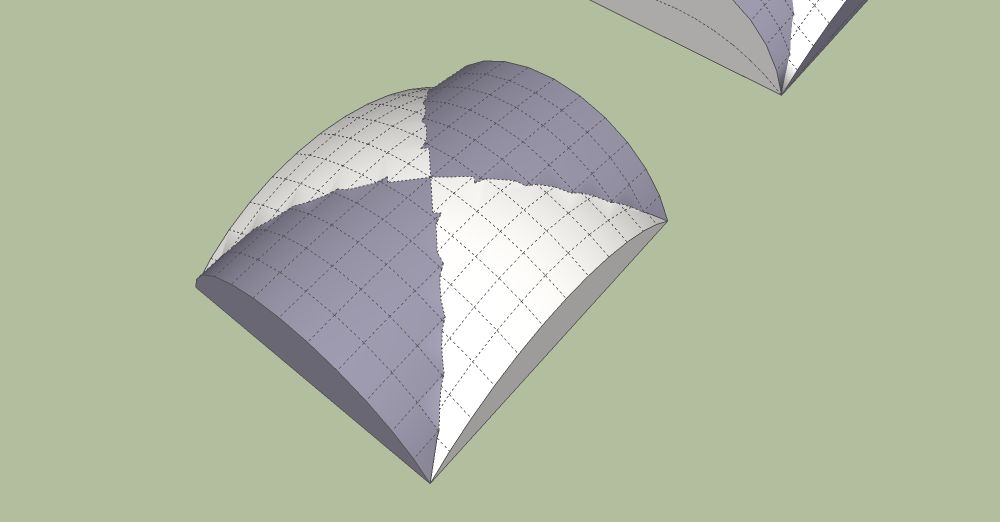
            these jagged lines are derived from unifying two curved solids into a cross vault. i am trying to make the line of interface curved (the groin). Any ideas? see image below, many thanks.jagged lines at the interface of the two curved surfaces
            1 Reply Last reply Reply Quote 0
            • Rich O BrienR Offline
              Rich O Brien Moderator
              last edited by

              Build a framework of curves and loft them.

              Curviloft, Extrude Tools etc... will do the heavy lifting

              Download the free D'oh Book for SketchUp πŸ“–

              1 Reply Last reply Reply Quote 0
              • A Offline
                archdeacon
                last edited by

                i have already tried that but it does not produce what this is i.e. the intersection of two surfaces. And that is also quite a lot of work, making all the lofts to exactly follow the geometry. There has to be an easier way to make this work.

                1 Reply Last reply Reply Quote 0
                • Rich O BrienR Offline
                  Rich O Brien Moderator
                  last edited by

                  Can we see your failed attempt?

                  Download the free D'oh Book for SketchUp πŸ“–

                  1 Reply Last reply Reply Quote 0
                  • Rich O BrienR Offline
                    Rich O Brien Moderator
                    last edited by

                    Image 1.png

                    Download the free D'oh Book for SketchUp πŸ“–

                    1 Reply Last reply Reply Quote 0
                    • BoxB Offline
                      Box
                      last edited by

                      Rich, I think he has a curve the other way also, in other words, the quadrants are domed.

                      1 Reply Last reply Reply Quote 0
                      • Rich O BrienR Offline
                        Rich O Brien Moderator
                        last edited by

                        Curved or straight...profiles are profiles.
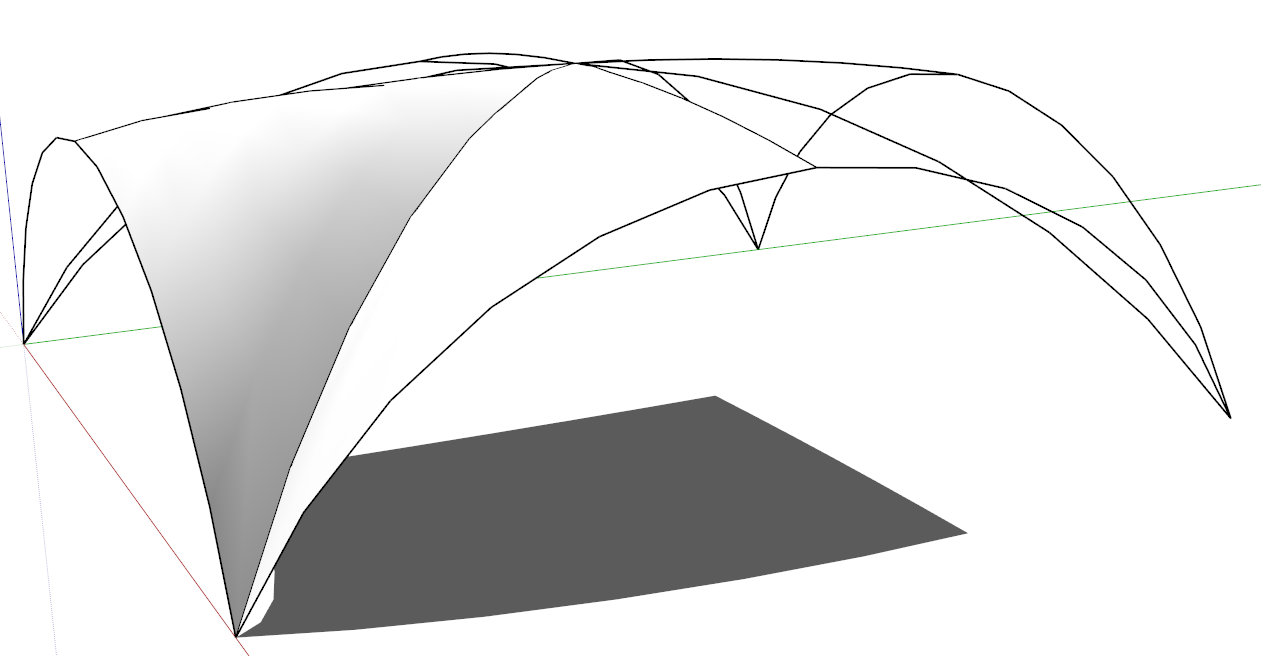
                        Image 2.png

                        Proper topology with segment count is all that is needed

                        Download the free D'oh Book for SketchUp πŸ“–

                        1 Reply Last reply Reply Quote 0
                        • BoxB Offline
                          Box
                          last edited by

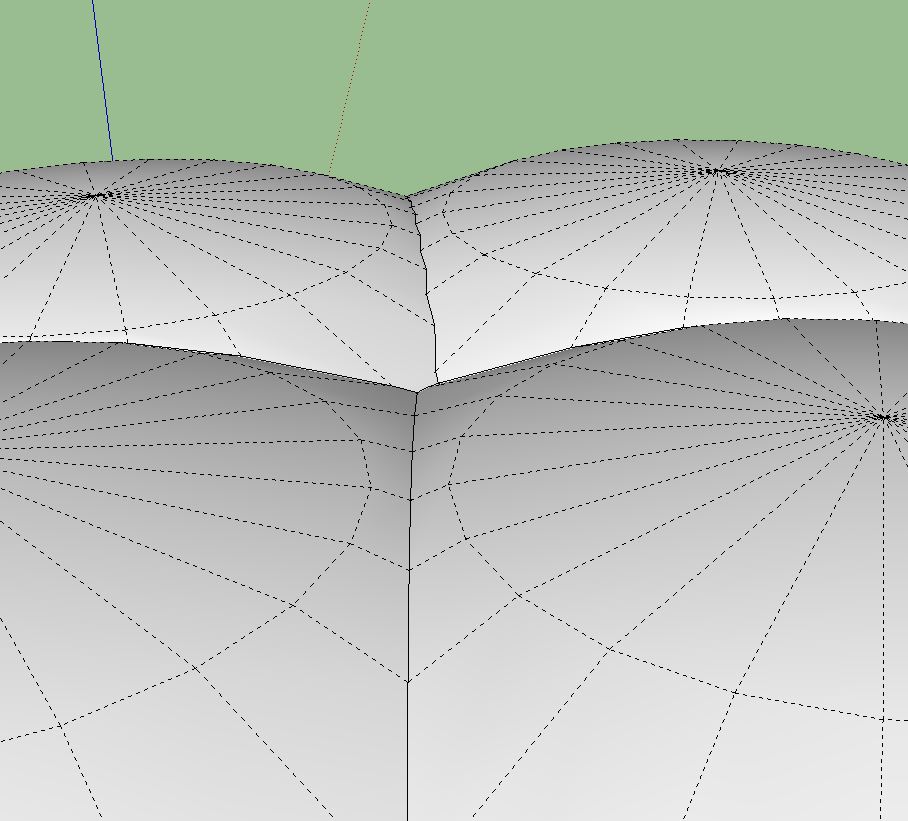
                          I agree, I was just pointing out the difference, and why he may be having trouble. If you intersect spheres incorrectly you will get a jagged line.


                          Sphere.JPG

                          1 Reply Last reply Reply Quote 0
                          • 1 / 1
                          • First post
                            Last post
                          Buy SketchPlus
                          Buy SUbD
                          Buy WrapR
                          Buy eBook
                          Buy Modelur
                          Buy Vertex Tools
                          Buy SketchCuisine
                          Buy FormFonts

                          Advertisement