"Side by side configuration is incorrect"
-
So I installed Sketchup on a new PC today, everything was fine, all my plugins installed no problem.
[Windows 8, latest version of Sketchup]
Somewhere along the line, something got messed up and now when I try to start Sketchup I get this message:
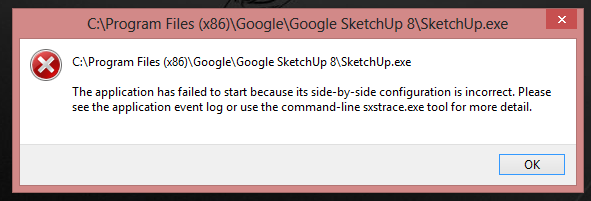
I don't think its any of the plugins, because I renamed the plugins folder to "Plugins1" to disable it, and the problem persists. Searching around online suggests something is messed up with the Visual C++ service packs. I installed several of them to no avail.

Any other ideas?
-
Did you try this?
@unknownuser said:
(a). Use the System File Checker tool (SFC.exe) to determine which file is causing the issue, and then replace the file. To do this, follow these steps:
Open an elevated command prompt. To do this, click Start, click All Programs, click Accessories, right-click Command Prompt, and then click Run as administrator. If you are prompted for an administrator password or for a confirmation, type the password, or click Allow.
Type the following command, and then press ENTER:
sfc /scannow
The sfc /scannow command scans all protected system files and replaces incorrect versions with correct Microsoft versions.
-
Yes, I tried both things suggested in that answer...no luck.
-
I have you cleared the registry?
-
No, how's that done?
Edit: I'm not a fan of CCleaner or any of those other programs if that's what you mean.
-
yeah, that's what I use... They are dangerous. But they do a good job of cleaning up registries. Thomthom has one for sketchup but since this is a new installation that should not be needed. I'm at a loss.
-
@krisidious said:
But they do a good job of cleaning up registries.
They do a good job of messing up stuff. I strong discourage their use!
-
Do you have problems with other RBZ files? Or just this one?
-
Sorry for the confusion Thom...this is a separate problem from the one I asked about on Github. This one is more serious...I can't even open Sketchup!
-
Uninstall & reinstalling Sketchup appears to have fixed the "Side by Side" problem. Woot!

-
@d12dozr said:
Uninstall & reinstalling Sketchup appears to have fixed the "Side by Side" problem. Woot!
Like...
-
Yes!
Thanks for pitching in, guys.

-
I was going to ask that question but assumed you had already been doing that and that i had already been asking you things you had already done.
-
Ccleaner kicks butt.


Hello! It looks like you're interested in this conversation, but you don't have an account yet.
Getting fed up of having to scroll through the same posts each visit? When you register for an account, you'll always come back to exactly where you were before, and choose to be notified of new replies (either via email, or push notification). You'll also be able to save bookmarks and upvote posts to show your appreciation to other community members.
With your input, this post could be even better 💗
Register Login


Advertisement