[Layout Tip] - improving workflow
-
-
No problem, guys, happy you find it helpful....

-
what are the little red arrows in the template for and how do you get rid of them? Thanks for the template!
-
Hi Joel, if you're referring to red arrows around text it will be because I use a custom typeface that you won't have on your computer. What happens if you open a file that contains a typeface you don't have it loads a default which will no doubt have different size, scale, etc properties..
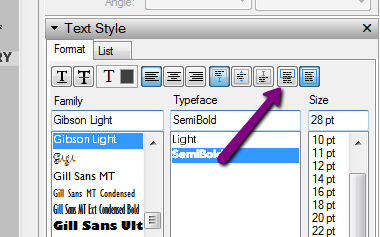
You'll need to select the text where you see a red arrow, go to your text editor and click unbounded....
-
Whoops, forgot to upload;
Tim's version of utiler's template; 36x24" etc


Hello! It looks like you're interested in this conversation, but you don't have an account yet.
Getting fed up of having to scroll through the same posts each visit? When you register for an account, you'll always come back to exactly where you were before, and choose to be notified of new replies (either via email, or push notification). You'll also be able to save bookmarks and upvote posts to show your appreciation to other community members.
With your input, this post could be even better 💗
Register Login


Advertisement