sketchucation logo sketchucation
    • Login
    Oops, your profile's looking a bit empty! To help us tailor your experience, please fill in key details like your SketchUp version, skill level, operating system, and more. Update and save your info on your profile page today!
    ⚠️ Important | Libfredo 15.6a introduces important bugfixes for Fredo's Extensions Update

    Plugin installation on Lion

    Scheduled Pinned Locked Moved Newbie Forum
    sketchup
    17 Posts 5 Posters 1.7k Views 5 Watching
    Loading More Posts
    • Oldest to Newest
    • Newest to Oldest
    • Most Votes
    Reply
    • Reply as topic
    Log in to reply
    This topic has been deleted. Only users with topic management privileges can see it.
    • Dave RD Offline
      Dave R
      last edited by

      No! You aren't starting in the right place. πŸ˜’


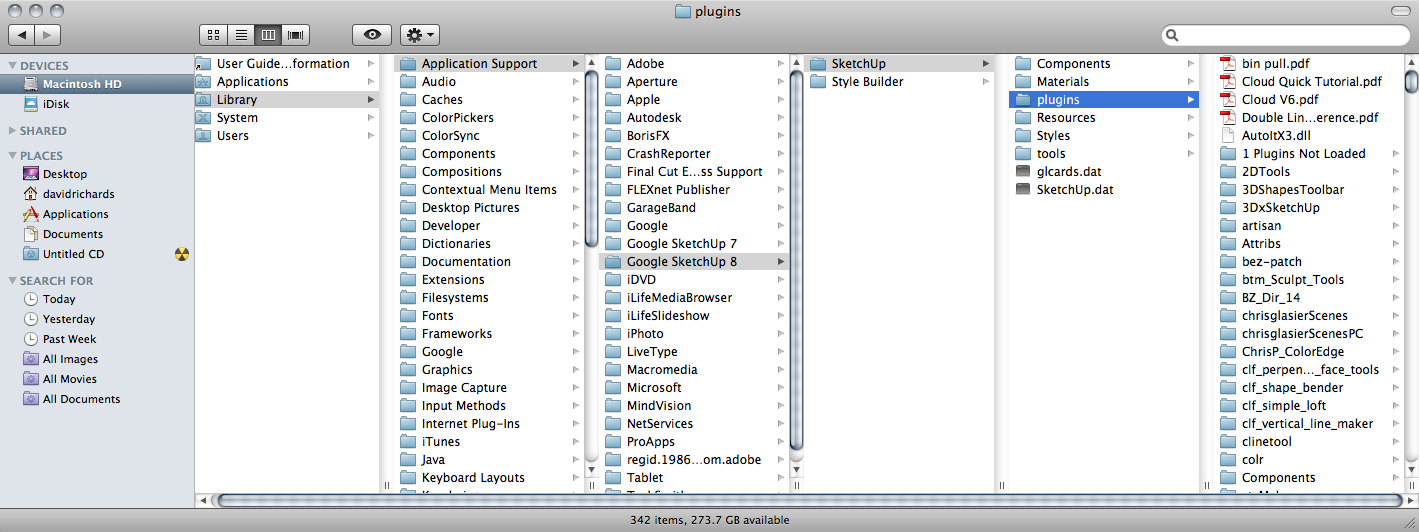
      This is the full path

      Etaoin Shrdlu

      %

      (THERE'S NO PLACE LIKE)

      G28 X0.0 Y0.0 Z0.0

      M30

      %

      1 Reply Last reply Reply Quote 0
      • M Offline
        matarazzodesign
        last edited by

        That is as far out as I can go. I guess they restricted my access to the HD. I'll have to contact my IT department to see if they can help me get to the right location.

        Thanks for the help.

        1 Reply Last reply Reply Quote 0
        • D Offline
          driven
          last edited by

          Your /Library/ is hidden by default in Lion.

          it is easy to turn everything on from terminal, but this should open just the Sketchup folder.

          I put it in a code block so you can SELLECT ALL, copy and then paste into Terminal.app [found in the Utilities folder]

          open /Library/Application\ Support/Google\ SketchUp\ 8/SketchUp/


          you mayhave to hit return after pasting, and the folder should open.
          you mayhave to give an admin password, but if you installed SU than you are an administrator.

          otherwise get the IT boys to sort that out as well...

          Once the Sketchup folder opens, drag the Plugins folder to your sidebar and leave it there to easy use.

          hope this helps

          john

          learn from the mistakes of others, you may not live long enough to make them all yourself...

          1 Reply Last reply Reply Quote 0
          • M Offline
            matarazzodesign
            last edited by

            Thanks, I'll give this a shot tomorrow at work.

            1 Reply Last reply Reply Quote 0
            • M Offline
              matarazzodesign
              last edited by

              Thanks for all of your help guys. It took a bit of tweaking but now I can access and use al the plugins my little heart desires.

              Once again thanks!

              1 Reply Last reply Reply Quote 0
              • Dave RD Offline
                Dave R
                last edited by

                I'm glad you got it sorted out. πŸ‘

                Etaoin Shrdlu

                %

                (THERE'S NO PLACE LIKE)

                G28 X0.0 Y0.0 Z0.0

                M30

                %

                1 Reply Last reply Reply Quote 0
                • D Offline
                  driven
                  last edited by

                  Glad it's working,

                  Can you spell out your solution for others that may have the same problem in the future...

                  john

                  learn from the mistakes of others, you may not live long enough to make them all yourself...

                  1 Reply Last reply Reply Quote 0
                  • blruuskaB Offline
                    blruuska
                    last edited by

                    matarazzodesign,

                    Could you provide the detailed steps needed to resolve this problem?

                    1 Reply Last reply Reply Quote 0
                    • D Offline
                      driven
                      last edited by

                      Hi

                      if you can't find your plugins folder
                      copy/paste this into 'Ruby Console' found under SU's 'Window' menu item.

                      system('osascript<<OPEN
                      tell application "Finder"
                      	open ("/Library/Application Support/Google SketchUp 8/SketchUp/plugins/" as POSIX file)
                      end tell
                      OPEN
                      ')


                      then hit return...
                      john

                      learn from the mistakes of others, you may not live long enough to make them all yourself...

                      1 Reply Last reply Reply Quote 0
                      • M Offline
                        matarazzodesign
                        last edited by

                        Hi All,

                        Sorry, I completely forgot to post how it all worked.

                        Driven helped me out by supplying the Terminal code to make the HD appear while running Lion.

                        @unknownuser said:

                        Terminal.app [found in the Utilities folder]

                        
                        > open /Library/Application\ Support/Google\ SketchUp\ 8/SketchUp/
                        

                        you may have to hit return after pasting, and the folder should open.
                        you may have to give an admin password, but if you installed SU than you are an administrator.

                        After that showed me the HD location. I used Dave R's image to help me find the full path:

                        http://sketchucation.com/forums/download/file.php?id=75080&t=1

                        From there I made an alias of the Plugins folder (right-click, make alias) and moved it to My Documents, so I could access it easily.

                        Hope this helps future users, and thanks again for helping me figure this out!

                        1 Reply Last reply Reply Quote 0
                        • 1 / 1
                        • First post
                          Last post
                        Buy SketchPlus
                        Buy SUbD
                        Buy WrapR
                        Buy eBook
                        Buy Modelur
                        Buy Vertex Tools
                        Buy SketchCuisine
                        Buy FormFonts

                        Advertisement