Survey plans - developing a mesh from an imported PDF
-
@mike lucey said:
Andrew, just a shot in the dark. Have you thought about running the PDF through PDF2CAD? I am testing the latest version at the moment and find that it sometimes produces entities at different level. If you like, email / PM the file to me and I will see how it works with it.
Mike
Yeah, but not this program, Mike. Can't recall what one it was but I did trial a piece of software last year...
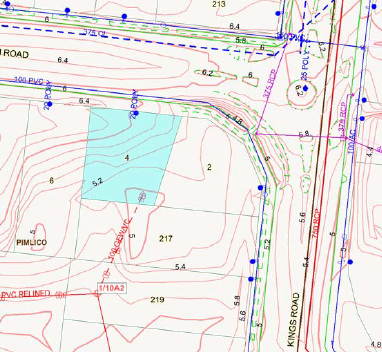
Thanks again for the input, Nick. I do understand your viewpoint but maybe this image might give you an idea of another need for extracting elevation data from an image / PDF.
I opened it in GIMP, saved to jpeg then imported it into SU and scaled it to suit. I then went about drawing bezier curves around each contour [very time consuming as well as fiddly as you have to make sure that the length of each contour has roughly the same segment lengths...] to an extend around the site that is necessary.
While in GIMP, I even tried selecting contours by color, creating a new layer then somehow converting to vector via inkscape but the image size is always an issue.Anyway, I hope this explains a little more about how we could work around terrain modelling for general use rather than build specific.

-
If you can get the acad file, you could create that topography for that site with sandbox tools in minutes. Am I missing something?
-
You're not missing anything, Nick. If the DWG is not available or in this case the PDF has come from the local council from the geo-cadastal program I'll just wanting to explore a work around.
Yes, given a DWG file of contours would take no time whatsoever... -
TGI3D has some clever mesh creation tools that can tessellate skins and all sorts of trickery.
If you can share a section you want smoothed it would help
Sent from my iPad
-
Some pdf files are actually vector based and the Mac version of SU can import them űas such (no need to retrace them?). I understand that you are omn Windows however...
As for softening or makingb the mesh more "regular looking", you can use Fredo's Terrain reshaper. It has features like defining final quad/tri density (i.e. downsampling a too dense mesh) etc.
-
He's uploaded the pdf in question. Its a raster pdf.
If you have a better/cleaner raster you can also use illustrator or any other vector software to trace the line work for you. Its never simple nor perfect, sometimes can be helpful.
-
I'd hire the local thugs and shake that DWG out of the surveyor!
Now I understand - you can't get the DWG for some reason, or it was created on something other than ACAD. I've never run into this yet.
-
@rich o brien said:
TGI3D has some clever mesh creation tools that can tessellate skins and all sorts of trickery.
If you can share a section you want smoothed it would help
.
About this much, ma wee lad....
-
@mike lucey said:
.... or you could try it yourself as there's a 30 day trial.
Pretty similar to Bluebeam, Mike. Although I think BB looks a better all round package...
http://www.bluebeam.com/us/products/revu/Andrew
-
@unknownuser said:
I'd hire the local thugs and shake that DWG out of the surveyor!
Now I understand - you can't get the DWG for some reason, or it was created on something other than ACAD. I've never run into this yet.
 For some reason, Nick I do! I'd much rather have sent to me a nice clean survey DWG but no, the client always expects you to create a little magic!




Hello! It looks like you're interested in this conversation, but you don't have an account yet.
Getting fed up of having to scroll through the same posts each visit? When you register for an account, you'll always come back to exactly where you were before, and choose to be notified of new replies (either via email, or push notification). You'll also be able to save bookmarks and upvote posts to show your appreciation to other community members.
With your input, this post could be even better 💗
Register Login


Advertisement