sketchucation logo sketchucation
    • Login
    Oops, your profile's looking a bit empty! To help us tailor your experience, please fill in key details like your SketchUp version, skill level, operating system, and more. Update and save your info on your profile page today!
    ⚠️ Update | Sketchucation Tools 5.0.8 released with licensing improvements and bugfixes Download

    Another Problem :(

    Scheduled Pinned Locked Moved Newbie Forum
    sketchup
    14 Posts 5 Posters 643 Views 5 Watching
    Loading More Posts
    • Oldest to Newest
    • Newest to Oldest
    • Most Votes
    Reply
    • Reply as topic
    Log in to reply
    This topic has been deleted. Only users with topic management privileges can see it.
    • Dave RD
      Dave R
      last edited by

      OK. So first of all, it is too small to avoid the tiny face issue. Scale it up by 100 or 1000 and work on it that way. then, when you've finished, scale it down to the correct size.

      Yes, absolutely you can work on half, copy it and flip it to make the other side. For a boat hull I wouldn't do it any other way.

      You must be a glutton for punishment, huh? I'm guessing you'd learn to fly by being pushed out of an airplane. πŸ˜› πŸ˜› πŸ˜† I don't think I'd choose to teach a person new to SketchUp by making them model a boat hull.

      Etaoin Shrdlu

      %

      (THERE'S NO PLACE LIKE)

      G28 X0.0 Y0.0 Z0.0

      M30

      %

      1 Reply Last reply
      Reply Quote 0
      • B
        benhardwick
        last edited by

        Oh Great, so how would I half the Boat so I can duplicate it..

        I am really sorry, I am just at the very basic level,

        thanks.

        1 Reply Last reply
        Reply Quote 0
        • Dave RD
          Dave R
          last edited by

          No need to apologize. Since I can't see your SketchUp model, I can only give you generalities but I would just delete one half of the hull. You can probably just use the Eraser tool or select edges and delete them. Worry about making the copy of the half after you've drawn the half hull model.

          Etaoin Shrdlu

          %

          (THERE'S NO PLACE LIKE)

          G28 X0.0 Y0.0 Z0.0

          M30

          %

          1 Reply Last reply
          Reply Quote 0
          • B
            benhardwick
            last edited by

            There is an attachment on my first post.

            However there is a slight issue,some of the objects Cannot half.

            But to be perfectly honest, I do not know how to star half'ing.

            1 Reply Last reply
            Reply Quote 0
            • ely862meE
              ely862me
              last edited by

              You can draw a plane in the middle then select all the geometry ,right click and chose intersect selected then erase half of it . Still you have some holes here and there.
              What would you need the model for ?
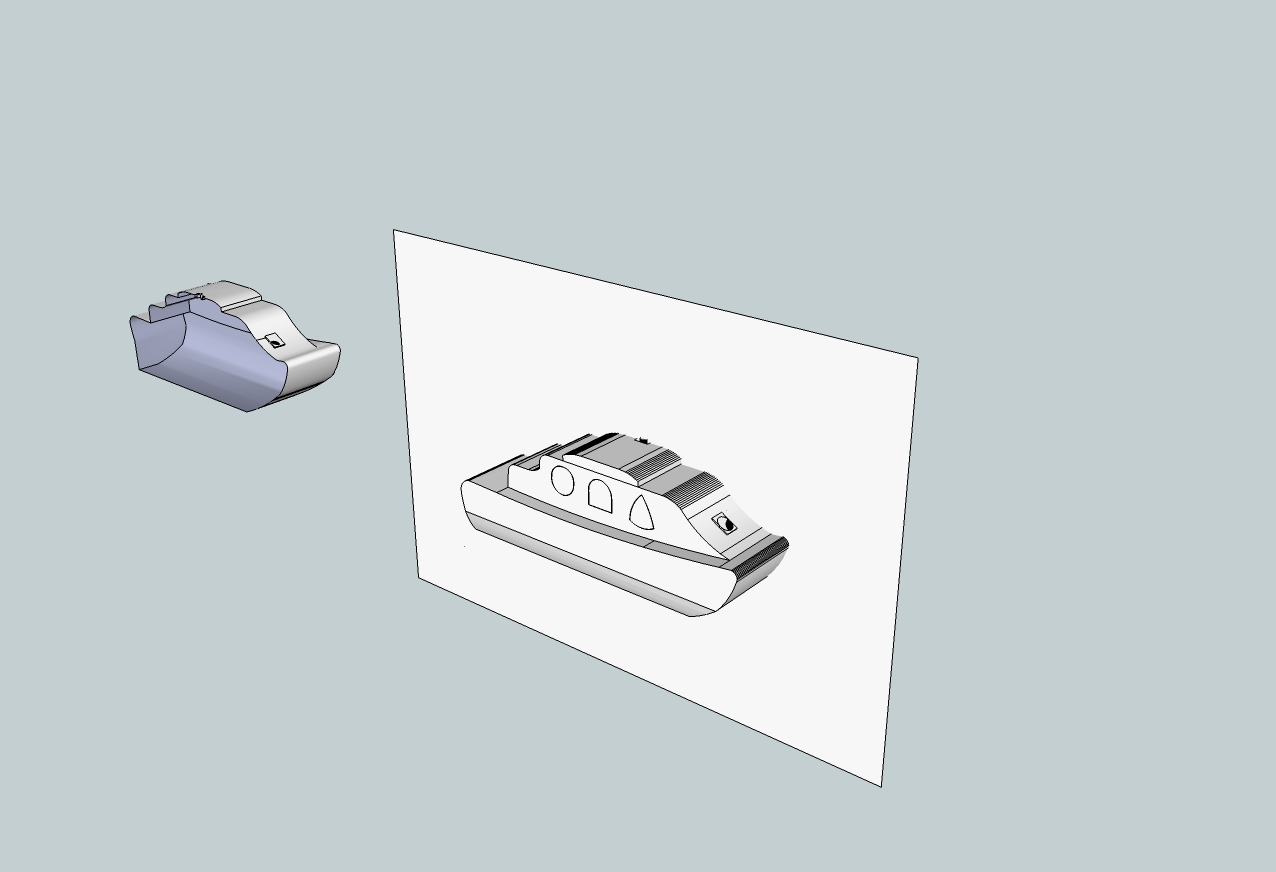

              Boat #3 - Work UPDATED.jpg

              Elisei (sketchupper)


              Before no life was done on Earth it was THE LIFE ITSELF...GOD
              Come and See EliseiDesign

              1 Reply Last reply
              Reply Quote 0
              • B
                benhardwick
                last edited by

                Fantastic Thank you.

                I'm using this Model for an Engineering Design for my Lecture.

                I have been working on that stupid model for 3 days now haha..

                Thanks again.

                Working on it now.. Ill update you if I have succeeded or not πŸ˜„

                1 Reply Last reply
                Reply Quote 0
                • B
                  benhardwick
                  last edited by

                  Awesome,

                  I am done it guys, thank you very much for your help with this Model. I will be now adding colours and ready for the marking process πŸ˜„

                  Thank you once again guys, cannot wait for other projects. πŸ€“


                  8238232781298.png

                  1 Reply Last reply
                  Reply Quote 0
                  • pbacotP
                    pbacot
                    last edited by

                    If you are adding textures, it may save time to use the soften /smooth window. Turn those many joints with low angle to a smooth surface-all of which is textured at one operation. And it makes the model look more natural. (see the example in elisei's picture if you haven't figured this out already. Switch "hidden geometry" in view to see those edges again (they don't go away--it's all an illusion). You can also "Hide" the edges down the middle..under the edit menu.

                    MacOSX MojaveSketchUp Pro v19 Twilight v2 Thea v3 PowerCADD

                    1 Reply Last reply
                    Reply Quote 0
                    • B
                      benhardwick
                      last edited by

                      @pbacot said:

                      If you are adding textures, it may save time to use the soften /smooth window. Turn those many joints with low angle to a smooth surface-all of which is textured at one operation. And it makes the model look more natural. (see the example in elisei's picture if you haven't figured this out already. Switch "hidden geometry" in view to see those edges again (they don't go away--it's all an illusion). You can also "Hide" the edges down the middle..under the edit menu.

                      Great Thank you for the Advice.

                      Regards

                      1 Reply Last reply
                      Reply Quote 0
                      • J
                        jpalm32
                        last edited by

                        You might find this interesting. Never used it but woner if it imports clean files that may solve some problems.
                        Here is free software for ship design that as Export to various 2D/3D file formats (.STL, .DXF, .OBJ, .GHS etc.)
                        http://www.delftship.net/delftship/index.php/delftship-free

                        1 Reply Last reply
                        Reply Quote 0
                        • Dave RD
                          Dave R
                          last edited by

                          John,

                          I was thinking about the same thing. It is a much better tool for designing boat hulls. I've used it a few times and it would be my choice over SketchUp for its intended purpose.


                          Etaoin Shrdlu

                          %

                          (THERE'S NO PLACE LIKE)

                          G28 X0.0 Y0.0 Z0.0

                          M30

                          %

                          1 Reply Last reply
                          Reply Quote 0

                          Hello! It looks like you're interested in this conversation, but you don't have an account yet.

                          Getting fed up of having to scroll through the same posts each visit? When you register for an account, you'll always come back to exactly where you were before, and choose to be notified of new replies (either via email, or push notification). You'll also be able to save bookmarks and upvote posts to show your appreciation to other community members.

                          With your input, this post could be even better πŸ’—

                          Register Login
                          • 1 / 1
                          • First post
                            Last post
                          Buy SketchPlus
                          Buy SUbD
                          Buy WrapR
                          Buy eBook
                          Buy Modelur
                          Buy Vertex Tools
                          Buy SketchCuisine
                          Buy FormFonts

                          Advertisement