Applying colour not able to do
-
From time to time I find myself not able to apply colour or textures, no matter if I triple click on component or just to closed component I can't apply colour- It must be a simple proceedure I am missing-any suggestions?
Earle -
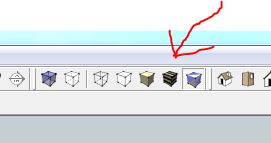
Very likely it is just the face style you are using. Go to View>Face Style and make sure you have either Shaded or shaded with texture selected before you start applying materials and colors.
It's a good idea to work in Monochrome style when you are drawing so you can easily keep tabs on reversed faces and correct them as they occur.
-
make sure that the correct face style is selected. If you're in "monochrome" stlye, materials won't appear even if they are technically applied to the surface.
-
jinx!
-
Is your face style set to monochrome?
If so try setting it to shaded with textures.
-
As with a lot of things in SketchUp, there's usually more than one way to get to the final result.

-
Shaded with texture is selected.
-
Thanks-don't know what I was doing but it works now?
-
And that fixed the problem?


Hello! It looks like you're interested in this conversation, but you don't have an account yet.
Getting fed up of having to scroll through the same posts each visit? When you register for an account, you'll always come back to exactly where you were before, and choose to be notified of new replies (either via email, or push notification). You'll also be able to save bookmarks and upvote posts to show your appreciation to other community members.
With your input, this post could be even better 💗
Register Login


Advertisement