sketchucation logo sketchucation
    • Login
    Oops, your profile's looking a bit empty! To help us tailor your experience, please fill in key details like your SketchUp version, skill level, operating system, and more. Update and save your info on your profile page today!
    ⚠️ Update | Sketchucation Tools 5.0.8 released with licensing improvements and bugfixes Download

    Perfect Isometric View in Sketchup

    Scheduled Pinned Locked Moved SketchUp Tutorials
    sketchup
    20 Posts 14 Posters 93.7k Views 14 Watching
    Loading More Posts
    • Oldest to Newest
    • Newest to Oldest
    • Most Votes
    Reply
    • Reply as topic
    Log in to reply
    This topic has been deleted. Only users with topic management privileges can see it.
    • broomstickB
      broomstick
      last edited by

      @paul russam said:

      That's so perfectly simple its almost painful that it never dawned on me before!!

      Well done on seeing the obvious and explaining it.

      The obvious is only seen when you need it. That's what I always think πŸ˜‰

      1 Reply Last reply
      Reply Quote 0
      • S
        Snowy
        last edited by

        Very nice tutorial Broomstick!

        Can i add one thing to this? πŸ˜„
        I have a slightly different workflow.

        here's the file that u can use/import as component for different projects.
        isometric cube placed.skp

        step 1: place the cube on the red and green axes.
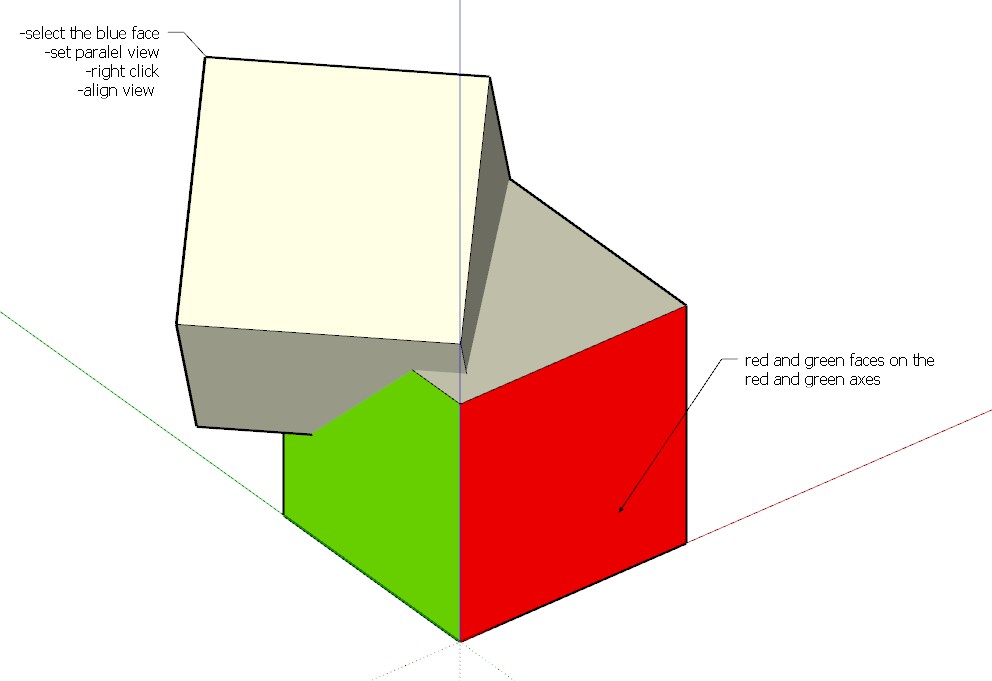
        ScreenHunter_80 Oct. 11 14.23.jpg

        step 2: set view to parallel
        step 3: select the blue face
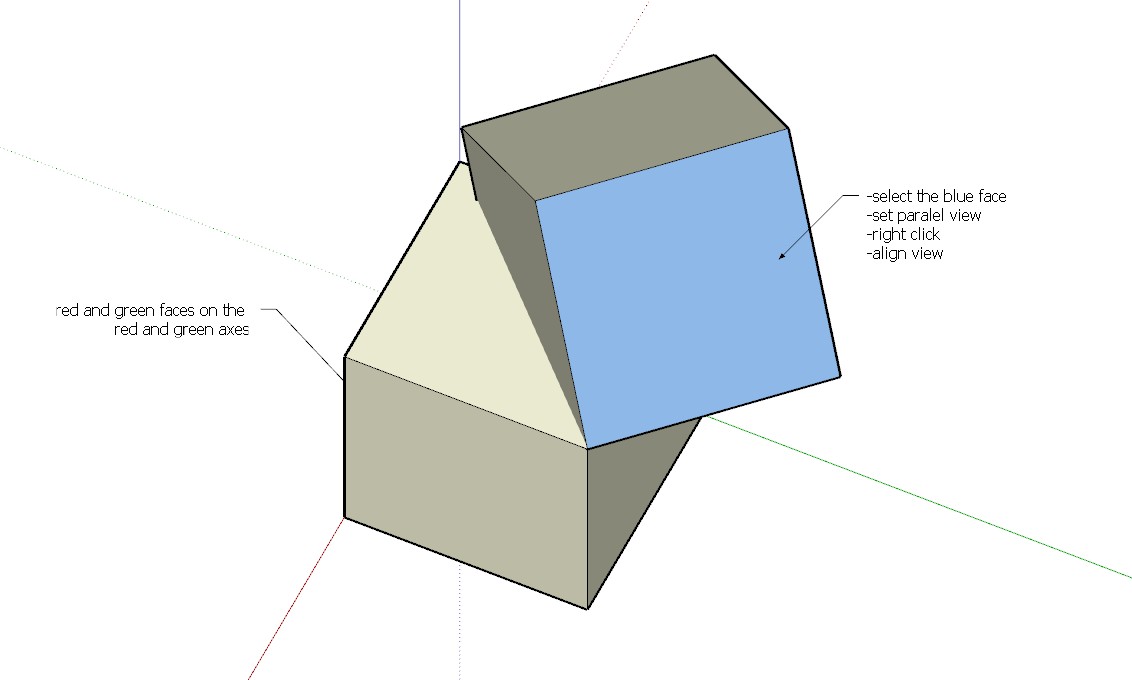
        ScreenHunter_81 Oct. 11 14.23.jpg

        step 4: right click and press align view
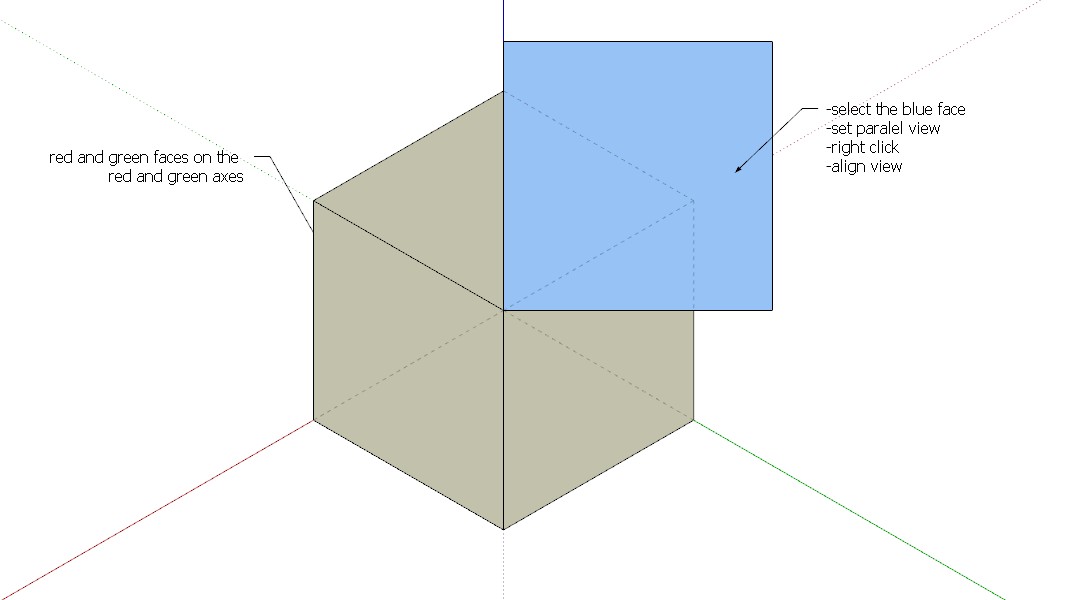
        ScreenHunter_82 Oct. 11 14.23.jpg

        and this should do the job.

        Hope this will add something and thanks for bringing the subject up.

        Greetings Erwin

        1 Reply Last reply
        Reply Quote 0
        • pbacotP
          pbacot
          last edited by

          Thanks all. That's brilliant! If only I had any understanding why it works, I would know HOW brilliant. πŸ˜’

          MacOSX MojaveSketchUp Pro v19 Twilight v2 Thea v3 PowerCADD

          1 Reply Last reply
          Reply Quote 0
          • H
            HPW
            last edited by

            Is it not the same as menu:

            Camera\Standardviews\Iso

            ??

            1 Reply Last reply
            Reply Quote 0
            • broomstickB
              broomstick
              last edited by

              @hpw said:

              Is it not the same as menu:

              Camera\Standardviews\Iso

              ??

              wow, now I feel like an idiot.

              But yes, you're right. Lets just say that the metod I showed allows you to do an ISO view in the direction you prefer...

              1 Reply Last reply
              Reply Quote 0
              • H
                HPW
                last edited by

                Lets just say that the metod I showed allows you to do an ISO view in the direction you prefer...

                Hm, the Sketchup function let you do this also.
                Rotate fairly into the wanted view and choose ISO and it will be aligned exactly into the prefered view.

                1 Reply Last reply
                Reply Quote 0
                • pilouP
                  pilou
                  last edited by

                  For diametric and other view Stuff β˜€

                  From the Eboy site! 😎

                  http://hello.eboy.com/eboy/wp-content/uploads/2012/06/FRD-Bonn-SW-05s-FLAT-SW-882x623.png

                  Frenchy Pilou
                  Is beautiful that please without concept!
                  My Little site :)

                  1 Reply Last reply
                  Reply Quote 0
                  • broomstickB
                    broomstick
                    last edited by

                    @hpw said:

                    Lets just say that the metod I showed allows you to do an ISO view in the direction you prefer...

                    Hm, the Sketchup function let you do this also.
                    Rotate fairly into the wanted view and choose ISO and it will be aligned exactly into the prefered view.

                    I did not know that, that's why I came up with my solution

                    thanks for pointing it out for me..

                    1 Reply Last reply
                    Reply Quote 0
                    • S
                      Snowy
                      last edited by

                      @unknownuser said:

                      by HPW Β» Thu Oct 11, 2012 11:17 pm

                      Lets just say that the metod I showed allows you to do an ISO view in the direction you prefer...

                      Hm, the Sketchup function let you do this also.
                      Rotate fairly into the wanted view and choose ISO and it will be aligned exactly into the prefered view.

                      Haha that's something i completely overlooked. Thanks for the tip.

                      Got one more question about this:
                      The Architecture projects i work on are mostly world orientated so they don't follow the sketchup basic axes.
                      When i change the axes to follow the direction of the building and i want that view in isometric view. sketchup still shows the isometric view based on the basic axes.
                      Do i something wrong here? or is that the only restriction that your model has to follow the basic axes.

                      1 Reply Last reply
                      Reply Quote 0
                      • broomstickB
                        broomstick
                        last edited by

                        @snowy said:

                        @unknownuser said:

                        by HPW Β» Thu Oct 11, 2012 11:17 pm

                        Got one more question about this:
                        The Architecture projects i work on are mostly world orientated so they don't follow the sketchup basic axes.
                        When i change the axes to follow the direction of the building and i want that view in isometric view. sketchup still shows the isometric view based on the basic axes.
                        Do i something wrong here? or is that the only restriction that your model has to follow the basic axes.

                        In this case I imagine that my solution should work, but you would have to try it out πŸ˜‰

                        1 Reply Last reply
                        Reply Quote 0
                        • A
                          alcohorse
                          last edited by

                          Thanks for the awesome tip - just what i need for some iso architectural diagrams! πŸ˜„

                          1 Reply Last reply
                          Reply Quote 0
                          • N
                            NZ Fire Service Training
                            last edited by

                            TIG also has created a great plugin for both Axometricand Isometricviews which can be found in the link below:

                            404 Not Found

                            favicon

                            (sketchucation.com)

                            I've found this invaluable in my workflow

                            1 Reply Last reply
                            Reply Quote 0
                            • W
                              wallride
                              last edited by

                              Perfect!! Very thank much you!!

                              1 Reply Last reply
                              Reply Quote 0
                              • P
                                puchengtian
                                last edited by

                                Perfect

                                1 Reply Last reply
                                Reply Quote 0
                                • J
                                  j03150315
                                  last edited by

                                  Thank you SOOOOO MUCH!!!!! πŸŽ‰

                                  1 Reply Last reply
                                  Reply Quote 0
                                  • majidM
                                    majid
                                    last edited by

                                    This is exactly, what I was searching for! Thanks for sharing the tip!

                                    My inspiring A, B, Sketches book: https://sketchucation.com/shop/books/intermediate/2612-alphabet-inspired-sketches--inspiring-drills-for-architects--3d-artists-and-designers-

                                    1 Reply Last reply
                                    Reply Quote 0

                                    Hello! It looks like you're interested in this conversation, but you don't have an account yet.

                                    Getting fed up of having to scroll through the same posts each visit? When you register for an account, you'll always come back to exactly where you were before, and choose to be notified of new replies (either via email, or push notification). You'll also be able to save bookmarks and upvote posts to show your appreciation to other community members.

                                    With your input, this post could be even better πŸ’—

                                    Register Login
                                    • 1 / 1
                                    • First post
                                      Last post
                                    Buy SketchPlus
                                    Buy SUbD
                                    Buy WrapR
                                    Buy eBook
                                    Buy Modelur
                                    Buy Vertex Tools
                                    Buy SketchCuisine
                                    Buy FormFonts

                                    Advertisement
