Curviloft -HELP
-
I've read and re-read the various threads about installing and activating curviloft. It appears all the required files are in the plugging folder, but still nothing. PLEASE - HELP!
Joe -
You have got the required 'FredoLib' folder of support files etc, haven't you?
Can you post a screen-shot your 'plugins' folder/subfolders/files...
Remember that the 'plugins' folder should be the one in the Mac HD 'root' lib folder path and not a 'user' one.
Also note that depending on your settings Safari can unzip things as they arrive, confusing Mac users who then try to #unpack' things further than they need to be...
As a Newbie why aren't you trying v8 ?
That has possibilities of automating the installation process... -
@tig said:
You have got the required 'FredoLib' folder of support files etc, haven't you?
Can you post a screen-shot your 'plugins' folder/subfolders/files...
Remember that the 'plugins' folder should be the one in the Mac HD 'root' lib folder path and not a 'user' one.
Also note that depending on your settings Safari can unzip things as they arrive, confusing Mac users who then try to #unpack' things further than they need to be...
As a Newbie why aren't you trying v8 ?
That has possibilities of automating the installation process...Thank you. The downloaded files were copied then pasted to the plugin folder. I must be missing something, but, haven't been able to figure it out. Your help is really appreciated.
Joe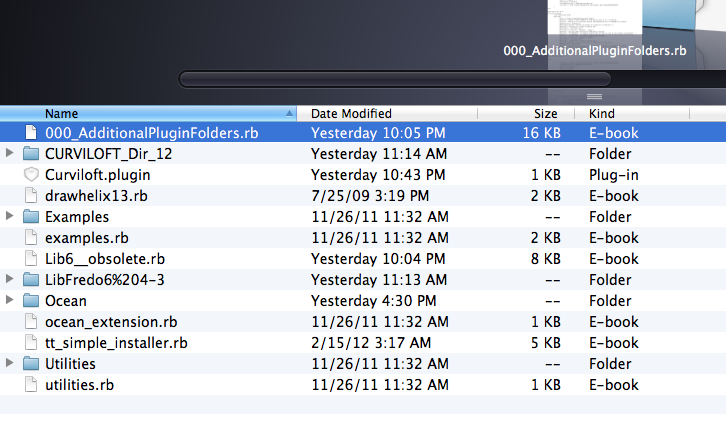
-
@tig said:
You have got the required 'FredoLib' folder of support files etc, haven't you?
Can you post a screen-shot your 'plugins' folder/subfolders/files...
Remember that the 'plugins' folder should be the one in the Mac HD 'root' lib folder path and not a 'user' one.
Also note that depending on your settings Safari can unzip things as they arrive, confusing Mac users who then try to #unpack' things further than they need to be...
As a Newbie why aren't you trying v8 ?
That has possibilities of automating the installation process...I am using version 8. Sorry, missed that part of your initial response. Again, I appreciate all the help.
Joe -
The folder for 'LibFredo...' that is shown in your plugins folder looks like it's the 'container' - i.e. the folder that's created when you extract the zip-file's contents.
You do not put that into the plugins folder, rather you put its contents into the plugins folder.
So... in that folder there will be a .rb file and a subfolder with a similar name to 'LibFredo...'.
That .rb file and the subfolder should both be in the plugins folder !
Leave any files in the subfolder where they are - i.e. inside the subfolder, which is in the plugins folder.
So it looks like you have not extracted the Lib's file/subfolder properly.
Your Safari settings might be extracting zips as they download, which can be confusing...
But the CurviLoft stuff looks OK
-
@tig said:
The folder for 'LibFredo...' that is shown in your plugins folder looks like it's the 'container' - i.e. the folder that's created when you extract the zip-file's contents.
You do not put that into the plugins folder, rather you put its contents into the plugins folder.
So... in that folder there will be a .rb file and a subfolder with a similar name to 'LibFredo...'.
That .rb file and the subfolder should both be in the plugins folder !
Leave any files in the subfolder where they are - i.e. inside the subfolder, which is in the plugins folder.
So it looks like you have not extracted the Lib's file/subfolder properly.
Your Safari settings might be extracting zips as they download, which can be confusing...
But the CurviLoft stuff looks OKTHANK YOU - Everything seems to working fine. If you are every in Alaska and in the Fairbanks area - let me know - I owe you BIG TIME! Thank you again.
Joe -
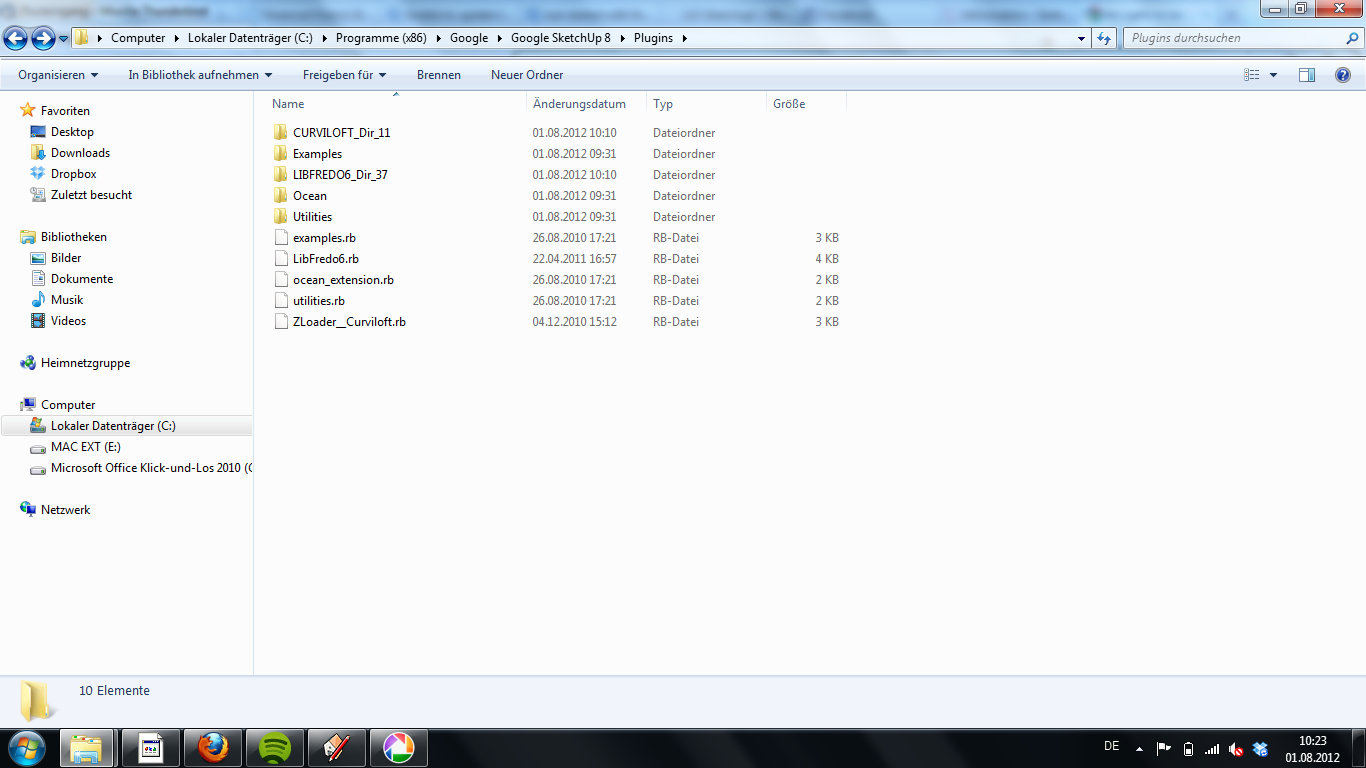
It doesnt work with me either! I searched 3 hours now but cant find the problem.
I made a scrrenshot. and there seems to be a problem with the rights of administration.It would be so great if someone could help me!!!

Hello! It looks like you're interested in this conversation, but you don't have an account yet.
Getting fed up of having to scroll through the same posts each visit? When you register for an account, you'll always come back to exactly where you were before, and choose to be notified of new replies (either via email, or push notification). You'll also be able to save bookmarks and upvote posts to show your appreciation to other community members.
With your input, this post could be even better 💗
Register Login


Advertisement