sketchucation logo sketchucation
    • Login
    Oops, your profile's looking a bit empty! To help us tailor your experience, please fill in key details like your SketchUp version, skill level, operating system, and more. Update and save your info on your profile page today!
    ⚠️ Important | Libfredo 15.6b introduces important bugfixes for Fredo's Extensions Update

    Making a curved pole

    Scheduled Pinned Locked Moved Newbie Forum
    sketchup
    17 Posts 7 Posters 1.2k Views 7 Watching
    Loading More Posts
    • Oldest to Newest
    • Newest to Oldest
    • Most Votes
    Reply
    • Reply as topic
    Log in to reply
    This topic has been deleted. Only users with topic management privileges can see it.
    • gillesG Offline
      gilles
      last edited by

      Also have look at "lines to tubes".
      http://forums.sketchucation.com/viewtopic.php?t=12354#p88592

      " c'est curieux chez les marins ce besoin de faire des phrases "

      1 Reply Last reply Reply Quote 0
      • Dave RD Offline
        Dave R
        last edited by

        Since it is all round tubing, native Follow Me will do the trick. Or, if you need another plugin option, Tube Along Path, an oldie but goodie, will work.

        Etaoin Shrdlu

        %

        (THERE'S NO PLACE LIKE)

        G28 X0.0 Y0.0 Z0.0

        M30

        %

        1 Reply Last reply Reply Quote 0
        • GaieusG Offline
          Gaieus
          last edited by

          [off:1nswdh8e]Dave beat me but still...[/off:1nswdh8e]
          Guys I do not think any plugin would be needed here (not even fredo's shear). The whole thing could be done with a simple follow me operation. The curves only curve on a single, vertical plane so there is no difficulty in it at all.

          The matter is to plan all the paths for the follow me tool ahead.


          slide.skp

          Gai...

          1 Reply Last reply Reply Quote 0
          • gillesG Offline
            gilles
            last edited by

            @unknownuser said:

            The matter is to plan all the paths for the follow me tool ahead.

            That's why I'd use Lines to tubes: select all the lines then Tools/ convert lines to tubes.

            " c'est curieux chez les marins ce besoin de faire des phrases "

            1 Reply Last reply Reply Quote 0
            • pilouP Offline
              pilou
              last edited by

              Have you the Gaieus file in V6 ?

              Frenchy Pilou
              Is beautiful that please without concept!
              My Little site :)

              1 Reply Last reply Reply Quote 0
              • GaieusG Offline
                Gaieus
                last edited by

                here you go, Pilou


                slide.skp

                Gai...

                1 Reply Last reply Reply Quote 0
                • L Offline
                  lionrock
                  last edited by

                  Thanks for your replies!

                  As I said, I'm very new to Sketchup. I'd be grateful if you could tell me about the following:

                  1. @Gaieus: How did you make the curve? I tried recreating what you made in the 'slide.skp' file. I made a slanting line. Then a horizontal one. And then using the arc tool I joined the end-point of the first line and the start-point of the second to draw the arc. This left me with 3 segments and I couldn't use the follow-me tool.

                  2. How would you draw the above curve in a 'crowded' file. I mean, in my file there are lots of objects. I tried to draw the curve by going into 'parallel projection' camera mode and then going to 'Front' view to draw the curve. But then too I had problems with snapping.

                  1 Reply Last reply Reply Quote 0
                  • Jean LemireJ Offline
                    Jean Lemire
                    last edited by

                    Hi Lionrock, hi folks.

                    @unknownuser said:

                    1. @Gaieus: How did you make the curve? I tried recreating what you made in the 'slide.skp' file. I made a slanting line. Then a horizontal one. And then using the arc tool I joined the end-point of the first line and the start-point of the second to draw the arc. This left me with 3 segments and I couldn't use the follow-me tool.

                    Click in sequence on the scenes tabs of attached SU file for ideas.

                    Arc tangent to two intersecting edges.skp

                    @unknownuser said:

                    1. How would you draw the above curve in a 'crowded' file. I mean, in my file there are lots of objects. I tried to draw the curve by going into 'parallel projection' camera mode and then going to 'Front' view to draw the curve. But then too I had problems with snapping.

                    Create a component (or a group) with your object. Then, use View Menu --> Component Edit --> Hide rest of model. This will allow you to see only the object being edited. When done, right click in the void and click on the pop-up close groupor close componentor simply click outside the component/group bounding box. The rest of the model will reapears.

                    Just ideas.

                    Jean (Johnny) Lemire from Repentigny, Quebec, Canada.

                    1 Reply Last reply Reply Quote 0
                    • pilouP Offline
                      pilou
                      last edited by

                      Seems there is no viewer version for V8 only for V7 !

                      So if someone can transform the V8 of Jean in V6 😄

                      Frenchy Pilou
                      Is beautiful that please without concept!
                      My Little site :)

                      1 Reply Last reply Reply Quote 0
                      • GaieusG Offline
                        Gaieus
                        last edited by

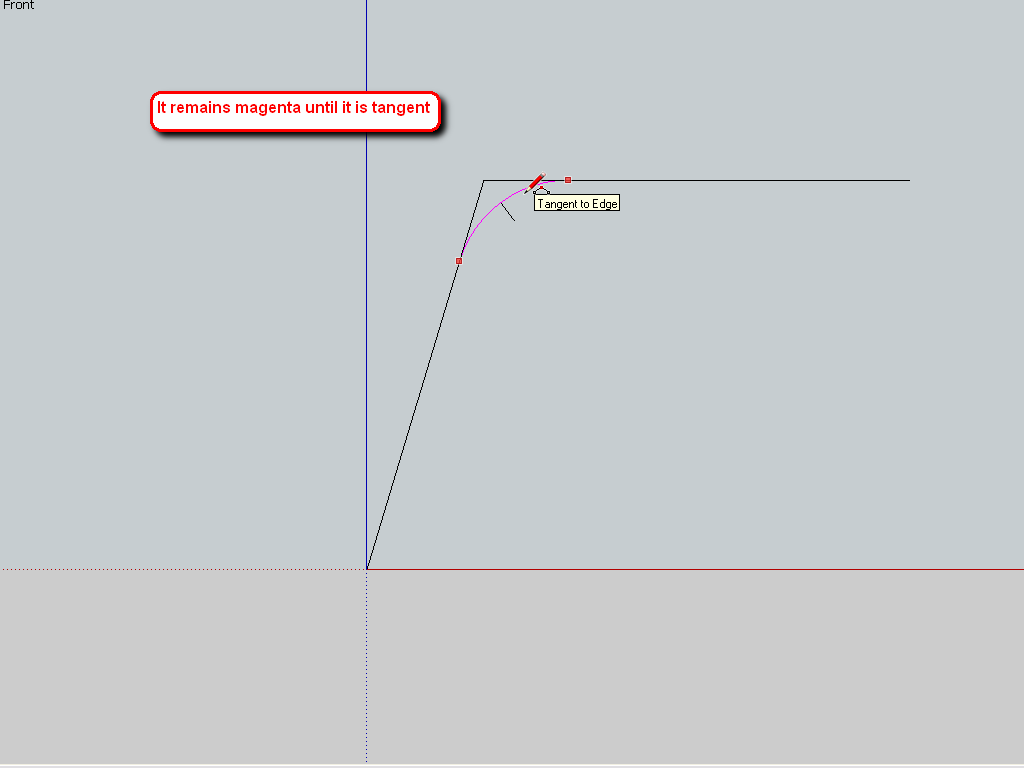
                        Jean's tutorial sums it up. Here are two screenshots as well. When done with the arc, just delete the corner. I also used a plugin called Weld to make the two, straight edges and the arc one, continuous polyline but that is not necessary.

                        [off:39w7z7lh]Pilou: upgrade to v8 [/off:39w7z7lh]
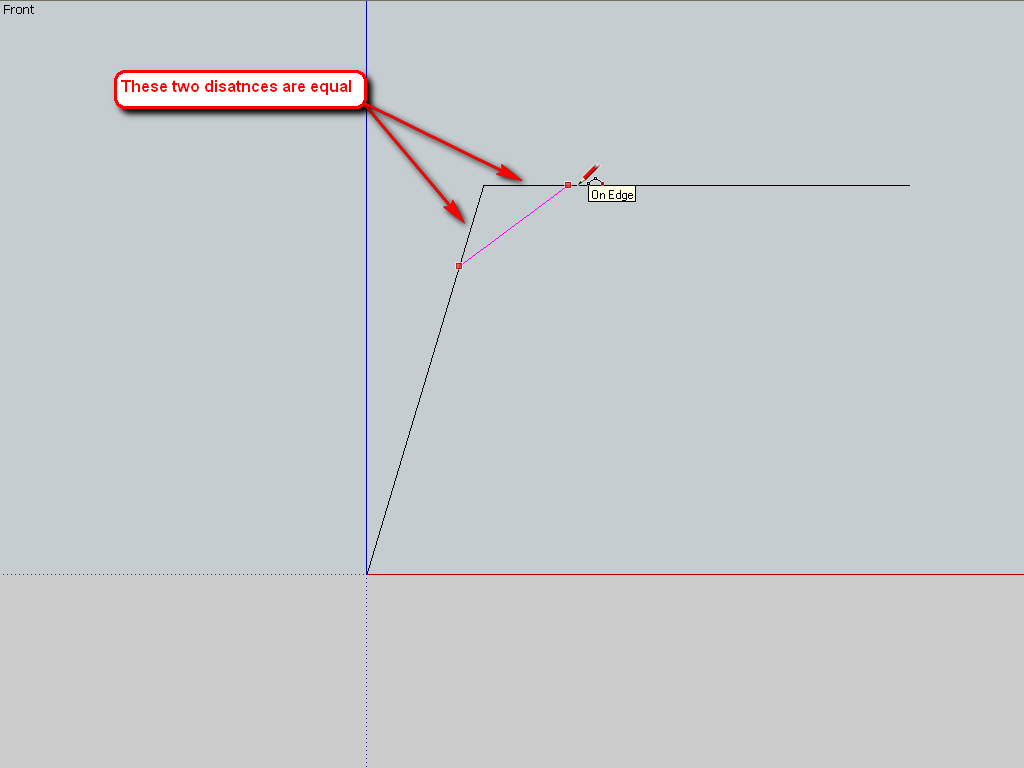

                        tangent-1.png


                        tangent-2.png

                        Gai...

                        1 Reply Last reply Reply Quote 0
                        • Dave RD Offline
                          Dave R
                          last edited by

                          In your photograph the structure appears to be symmetrical down the center of the ladder and diving board. I would only draw one half of the structure, copy it and flip the copy to create a mirror image. This will help with the "crowded drawing and also save you work and time.

                          Etaoin Shrdlu

                          %

                          (THERE'S NO PLACE LIKE)

                          G28 X0.0 Y0.0 Z0.0

                          M30

                          %

                          1 Reply Last reply Reply Quote 0
                          • pilouP Offline
                            pilou
                            last edited by

                            The problem of all plugins on path, is they have problems to be stay // on the surfaces!
                            So path must be extended or other little tricky hand modifications
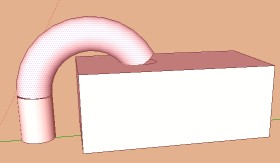
                            noo.jpg

                            Frenchy Pilou
                            Is beautiful that please without concept!
                            My Little site :)

                            1 Reply Last reply Reply Quote 0
                            • L Offline
                              lionrock
                              last edited by

                              Thank You Jean.

                              The skp file you provided was very helpful. I have the concepts cleared now. Thanks a lot!
                              I made one pole using the regular follow me tool.
                              Another one I made using the Lines2Tubes plugin.

                              The 'Hide Rest of the Model' option is awesome! Just what I was looking for. This is one option I'm going to keep using from now on.

                              Thanks Gaieus. The weld plugin seems interesting. I will check it out.

                              Yes, Dave. I'm making one pole and then I will copy it and flip it to create the mirror copy.

                              Pilou: I understand what you're saying. In your screenshot, to remove the gap between the end of the pole and the top of the box, you'd have to extend the path into the box, yes?

                              In my case, I merged the pole with the handle bars on the dive board.

                              Thanks everyone for your prompt replies 😄
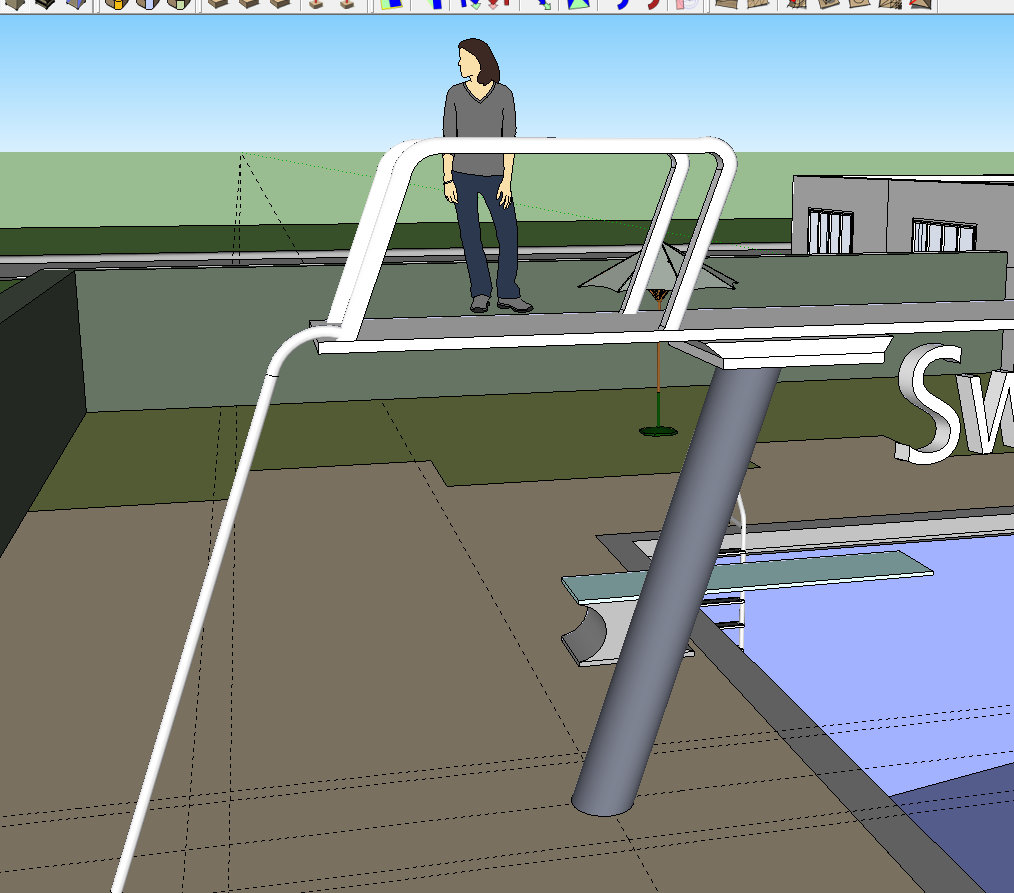

                              The curved pole

                              1 Reply Last reply Reply Quote 0
                              • jeff hammondJ Offline
                                jeff hammond
                                last edited by

                                [off:2dowdugd]you know… just trying out this off thing… carry on..[/off:2dowdugd]

                                dotdotdot

                                1 Reply Last reply Reply Quote 0
                                • pilouP Offline
                                  pilou
                                  last edited by

                                  @unknownuser said:

                                  you'd have to extend the path into the box, yes?

                                  Yes and intersect... erase... etc or Boolean Diff if V8 pro...

                                  Frenchy Pilou
                                  Is beautiful that please without concept!
                                  My Little site :)

                                  1 Reply Last reply Reply Quote 0
                                  • 1 / 1
                                  • First post
                                    Last post
                                  Buy SketchPlus
                                  Buy SUbD
                                  Buy WrapR
                                  Buy eBook
                                  Buy Modelur
                                  Buy Vertex Tools
                                  Buy SketchCuisine
                                  Buy FormFonts

                                  Advertisement