HELP with Sketchup Hypernurbs? soften corners?
-
Hello,
I am attaching the files, on the right is a photo of what I am trying to achieve and the left is my attempt in sketchup...
[xxl-img:24j1hnhb]http://oi40.tinypic.com/2zqdiye.jpg[/xxl-img:24j1hnhb]
Trying to model a wheel for a tank, however as you can see on the photo it has a really smooth curved look. I know if I was going to use software like Cinema 4d I could make simple geometry add add hypernurbs to get the desired look.
However in Sketchup I was thinking that if I used RoundCorner plugin http://sketchupdate.blogspot.co.uk/2010/07/take-edge-off-roundcorners.html I could get the effect I want but it wont work.
I wanted to ask is there any alternative to what I want to achieve. The wheel is just a starter as I am trying to model M103 Tank which will have a lot of curved faces.

Thank you,
Milo
-
have you tried artisan?
-
Or fredo6 Round Corner?
-
Wow that looks amazing and could really help but unfortunately I am a poor student hence why I am using sketchup

Is there any alternative?
-
@unknownuser said:
Or fredo6 Round Corner?
Well I do use Fredo round corner right now as mentioned before.
-
the first version is not as expensive.
-
@unknownuser said:
but unfortunately I am a poor student
If you want a free solution try 123D

(but it's real Nurbs, not "hyper Nurbs" of a polygon modeler
It has a very powerlful fillet engine!
[flash=560,315:352n9v5s]http://www.youtube.com/v/THH9alBotK4[/flash:352n9v5s]
[flash=560,315:352n9v5s]http://www.youtube.com/v/rtzDS9_VYSY[/flash:352n9v5s]
[flash=560,315:352n9v5s]http://www.youtube.com/v/XfJM2z_tw0I[/flash:352n9v5s] -
What is your end product, a drawing or are you going to 3D printing? If the end product is physical how large will it be? If you are only doing a render, then just soften the line. There tools (already mentioned) to create the fillet but are you going to be able to see the result in your end product? Does it matter enough that you really need to acquire the tools.
-
Its not ment to be 3d Printed, its a personal project that I wanted practice the organic shapes in sketchup. Tanks are my interest and this M103 has a lot of curved faces that would be a challenge. I only wish to engage in this project and do my best to get a really good and well detailed 3D model.
I did a T-34 tank in sketchup before (rendered in cinema 4D) but that did not have that many curved/organic surfaces as you can see in the attachment.

-
The choices I see are soften the line, create a quarter tube and tilt to fit and patch it in carefully, drag a fillet profile down that valley with the follow me tool and patch the ends, or use some specialty plugins that may or may not be expensive.
-
By the way, nice models.
-
Else you have The Sand Box with the Smoove Tool who can make more oganic form
But you must subdivide a little the Tin surface with the Add Detail tool! -
@roger said:
The choices I see are soften the line, create a quarter tube and tilt to fit and patch it in carefully, drag a fillet profile down that valley with the follow me tool and patch the ends, or use some specialty plugins that may or may not be expensive.
I see what you are saying, I done it many times but for the wheel I was working on it might work, or I could just leave it but for the front of the tank and the turret itself it will not.
Would seem like I finally managed to find a limit of what you can do in sketchup.
-
.
try this one … SDS BLEND.rb
[flash=853,480:336pv2l9]http://www.youtube.com/v/iTrbh0pAv64?version=3&hl=en_US&rel=0[/flash:336pv2l9]
*note- this is not a real tool in sketchup.. it's a mockup video for a feature request i made a couple of years ago.. it hasn't been made yet.. (and my fingers aren't crossed on it ever being made
 )
) -
Post that little segment of the wheel as a small model. I would like to see what I could do with it.
-
Not quite but a quick attempt with Artisan....
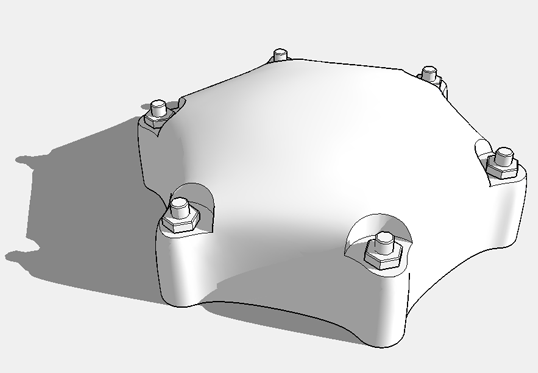
-
@unknownuser said:
.
try this one … SDS BLEND.rb
[flash=853,480:3af25c5m]http://www.youtube.com/v/iTrbh0pAv64?version=3&hl=en_US&rel=0[/flash:3af25c5m]
*note- this is not a real tool in sketchup.. it's a mockup video for a feature request i made a couple of years ago.. it hasn't been made yet.. (and my fingers aren't crossed on it ever being made
)Nice tool but why would you recommend it when it is not released?
Roger I am attaching the file for you here.
-
@unknownuser said:
Not quite but a quick attempt with Artisan....
[attachment=0:1rcz6zdu]<!-- ia0 -->Tank_Cap_Example.png<!-- ia0 -->[/attachment:1rcz6zdu]
Wow now that is pretty sweet looking. Seems like that software is quite useful
-
You have also the free Ferrari who can make the same !
Just find the structure who can generate the tensile structure of your piece -
@mspisz said:
Nice tool but why would you recommend it when it is not released?
i apologize.. i thought it was pretty obvious the manner in which my post was made but maybe not..
won't happen again, sir..




Hello! It looks like you're interested in this conversation, but you don't have an account yet.
Getting fed up of having to scroll through the same posts each visit? When you register for an account, you'll always come back to exactly where you were before, and choose to be notified of new replies (either via email, or push notification). You'll also be able to save bookmarks and upvote posts to show your appreciation to other community members.
With your input, this post could be even better 💗
Register Login


Advertisement