sketchucation logo sketchucation
    • Login
    Oops, your profile's looking a bit empty! To help us tailor your experience, please fill in key details like your SketchUp version, skill level, operating system, and more. Update and save your info on your profile page today!
    ⚠️ Important | Libfredo 15.6b introduces important bugfixes for Fredo's Extensions Update

    Axes Widget?

    Scheduled Pinned Locked Moved SketchUp Feature Requests
    sketchup
    26 Posts 7 Posters 1.9k Views 7 Watching
    Loading More Posts
    • Oldest to Newest
    • Newest to Oldest
    • Most Votes
    Reply
    • Reply as topic
    Log in to reply
    This topic has been deleted. Only users with topic management privileges can see it.
    • thomthomT Offline
      thomthom
      last edited by

      @gaieus said:

      and it can also tax your system/video card

      Really? But it's just three extra lines to draw... ?

      Thomas Thomassen — SketchUp Monkey & Coding addict
      List of my plugins and link to the CookieWare fund

      1 Reply Last reply Reply Quote 0
      • GaieusG Offline
        Gaieus
        last edited by

        @thomthom said:

        Really? But it's just three extra lines to draw... ?

        That's what I experienced with my older machine back 5 years ago. It had a video card that was just on the limit...

        Gai...

        1 Reply Last reply Reply Quote 0
        • C Offline
          chrisjk
          last edited by

          You could also set a shortcut key for View/Rendering/Edge/By Axis then you can toggle it on and off as needed.

          Chris

          1 Reply Last reply Reply Quote 0
          • N Offline
            nickchun
            last edited by

            @chrisjk said:

            You could also set a shortcut key for View/Rendering/Edge/By Axis then you can toggle it on and off as needed.

            I don't have that option on my version( 8 free). Which version are you using?

            1 Reply Last reply Reply Quote 0
            • thomthomT Offline
              thomthom
              last edited by

              I don't have it either - Pro version. I think he refers to a plugin.

              Thomas Thomassen — SketchUp Monkey & Coding addict
              List of my plugins and link to the CookieWare fund

              1 Reply Last reply Reply Quote 0
              • TIGT Offline
                TIG Moderator
                last edited by

                Strangely it's not in the Pro version menu.
                This is a display-mode set under a Style only...
                ???

                TIG

                1 Reply Last reply Reply Quote 0
                • C Offline
                  chrisjk
                  last edited by

                  This is from the Pro version for the Mac

                  http://i463.photobucket.com/albums/qq360/datukcjk/Screen20Shot202012-02-0920at2010-1.png

                  and this fropm the Free version for the PC

                  http://i463.photobucket.com/albums/qq360/datukcjk/Screen20Shot202012-02-0920at2010.png

                  Chris

                  1 Reply Last reply Reply Quote 0
                  • C Offline
                    chrisjk
                    last edited by

                    This is not a Plugin and it is available in the Free version of 8 for both Windows and Mac; I normally use a Mac but downloaded the Windows version to try it and it is basically identical.

                    Go to Window>Preferences>Shortcuts and then enter View for the filter criterion. Scroll down a bit to find the color by axis command. Set a shortcut and there you go.

                    Chris

                    1 Reply Last reply Reply Quote 0
                    • thomthomT Offline
                      thomthom
                      last edited by

                      How strange.

                      It's not a menu item. Nor is it a toolbar item. There is no toolbar named "Rendering", nor is there any toolbar that offer that feature.
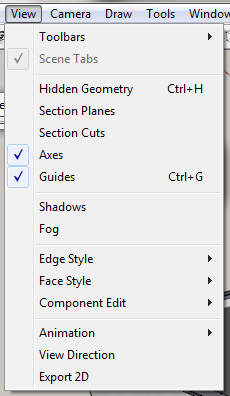
                      2012-02-09 11h16_48.png

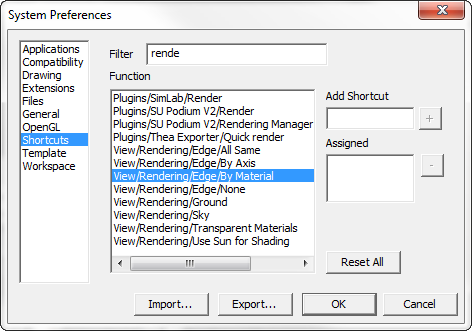
                      But I do see it in Preferences > Shortcuts
                      2012-02-09 11h17_32.png

                      It's odd, because I thought one could only assign shortcuts to menus and toolbar commands. If you want to assign a shortcut to a context menu item one need to ensure that you have a valid selection before it will be visible in the shortcut list.

                      Thomas Thomassen — SketchUp Monkey & Coding addict
                      List of my plugins and link to the CookieWare fund

                      1 Reply Last reply Reply Quote 0
                      • TIGT Offline
                        TIG Moderator
                        last edited by

                        I see it too !
                        There's no menu entries to match, but there are shortcut listings for various Rendering options - it IS plain weird...
                        😕

                        TIG

                        1 Reply Last reply Reply Quote 0
                        • C Offline
                          chrisjk
                          last edited by

                          I'm stunned I knew something you guys didn't! Do I get a medal? 😄

                          I am sure I learnt about it somewhere here though. I owe all I know about SU to this forum..

                          Chris

                          1 Reply Last reply Reply Quote 0
                          • TIGT Offline
                            TIG Moderator
                            last edited by

                            Congratulations!
                            Want a job 😉
                            You see there's always something hiding inside Sketchup...

                            TIG

                            1 Reply Last reply Reply Quote 0
                            • TIGT Offline
                              TIG Moderator
                              last edited by

                              It came up almost 4 years ago http://forums.sketchucation.com/viewtopic.php?p=56068#p56068
                              and surprised Jim that time !
                              Dave_R http://forums.sketchucation.com/viewtopic.php?p=56131#p56131 had his finger on the pulse - they used to be in another similar [sub]menu items in v6... but looks like they were removed from the menus in v7/8, but Google left them in the shortcuts list !
                              No one told me 😒

                              TIG

                              1 Reply Last reply Reply Quote 0
                              • thomthomT Offline
                                thomthom
                                last edited by

                                So now the question arises; why do we need to ensure something relevant is selected in order to assign a command that only exists in the context menu? If the list isn't entirely dynamic based on UI element....

                                Thomas Thomassen — SketchUp Monkey & Coding addict
                                List of my plugins and link to the CookieWare fund

                                1 Reply Last reply Reply Quote 0
                                • GaieusG Offline
                                  Gaieus
                                  last edited by

                                  I do not use this function often enough to assign a shortcut (either because I would not remember due to the infrequency of use or because there are not too many shortcuts one would like to "waste" - or maybe solely because my memory is short?).

                                  Anyway, I do have it in the shortcut list and also in Jim's custom toolbar plugin (maybe that's when Jim got surprised). I put it there however because sometimes it is indeed useful and then I do not have to dig into the styles settings.
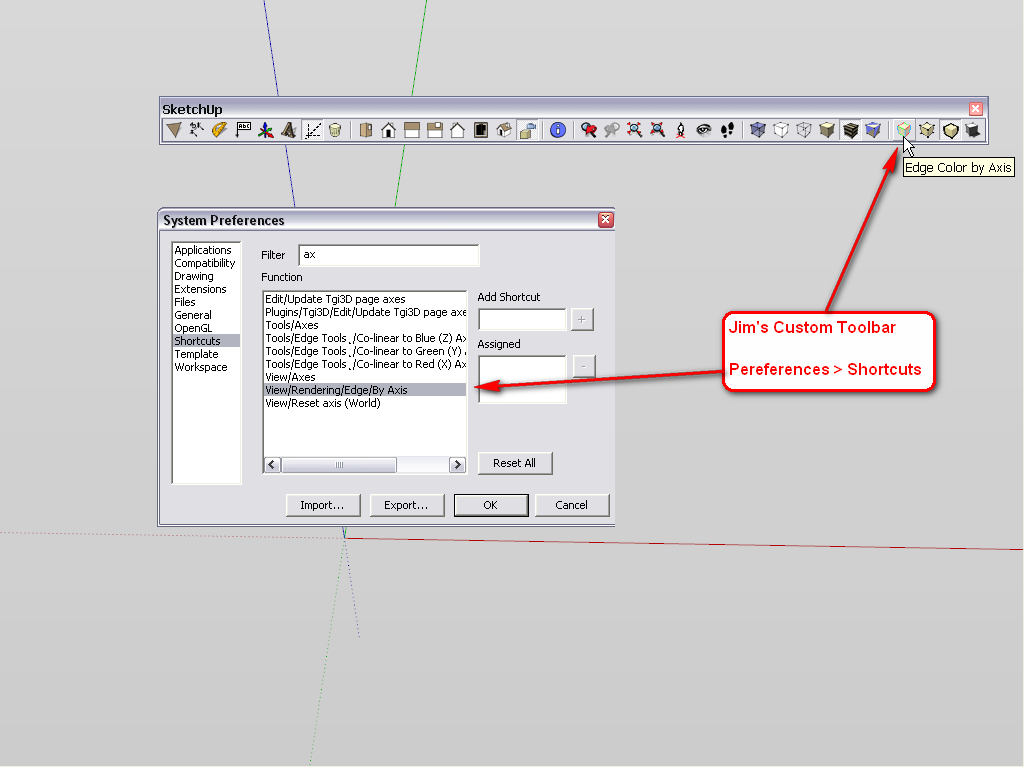
                                  ByAxis.png
                                  There are a couple of more buttons there that I like like display endpoints - also useful when you are hunting for them but otherwise do not have them on by default in your template. Also display profiles although I usually have profiles set to 1 px so that would not make much difference but I use it for trouble shooting models from the forums and displaying thicker profiles can be useful when searching for edges that do not merge.

                                  Gai...

                                  1 Reply Last reply Reply Quote 0
                                  • TIGT Offline
                                    TIG Moderator
                                    last edited by

                                    But the list is dynamic BUT Google wedge in these extra 'non-existent' items anyway - the oddity is that they list as if they are menu-items, but they are not - or if they are then those menu items are somehow 'hidden' from the users ? Which begs the question, why?

                                    TIG

                                    1 Reply Last reply Reply Quote 0
                                    • GaieusG Offline
                                      Gaieus
                                      last edited by

                                      Not to clutter your menu? 😒 😕 😲 😮 (all relevant smileys)

                                      Gai...

                                      1 Reply Last reply Reply Quote 0
                                      • TIGT Offline
                                        TIG Moderator
                                        last edited by

                                        OK, but what other 'hidden' gems do we have to find ?
                                        The secret-menu item for ray_trace_rendering... etc... 😆

                                        TIG

                                        1 Reply Last reply Reply Quote 0
                                        • C Offline
                                          chrisjk
                                          last edited by

                                          http://content.screencast.com/users/chrisjk/folders/Jing/media/da7f38a1-cb41-413d-a9fd-b59edeebdf09/00000011.png

                                          Only on a Mac though... 😄

                                          Chris

                                          1 Reply Last reply Reply Quote 0
                                          • N Offline
                                            nickchun
                                            last edited by

                                            @tig said:

                                            OK, but what other 'hidden' gems do we have to find ?

                                            Holy cow! Just came back from work and caught up with the post. will have to have a look in the menus.

                                            1 Reply Last reply Reply Quote 0
                                            • 1
                                            • 2
                                            • 1 / 2
                                            • First post
                                              Last post
                                            Buy SketchPlus
                                            Buy SUbD
                                            Buy WrapR
                                            Buy eBook
                                            Buy Modelur
                                            Buy Vertex Tools
                                            Buy SketchCuisine
                                            Buy FormFonts

                                            Advertisement