90 degree bends
-
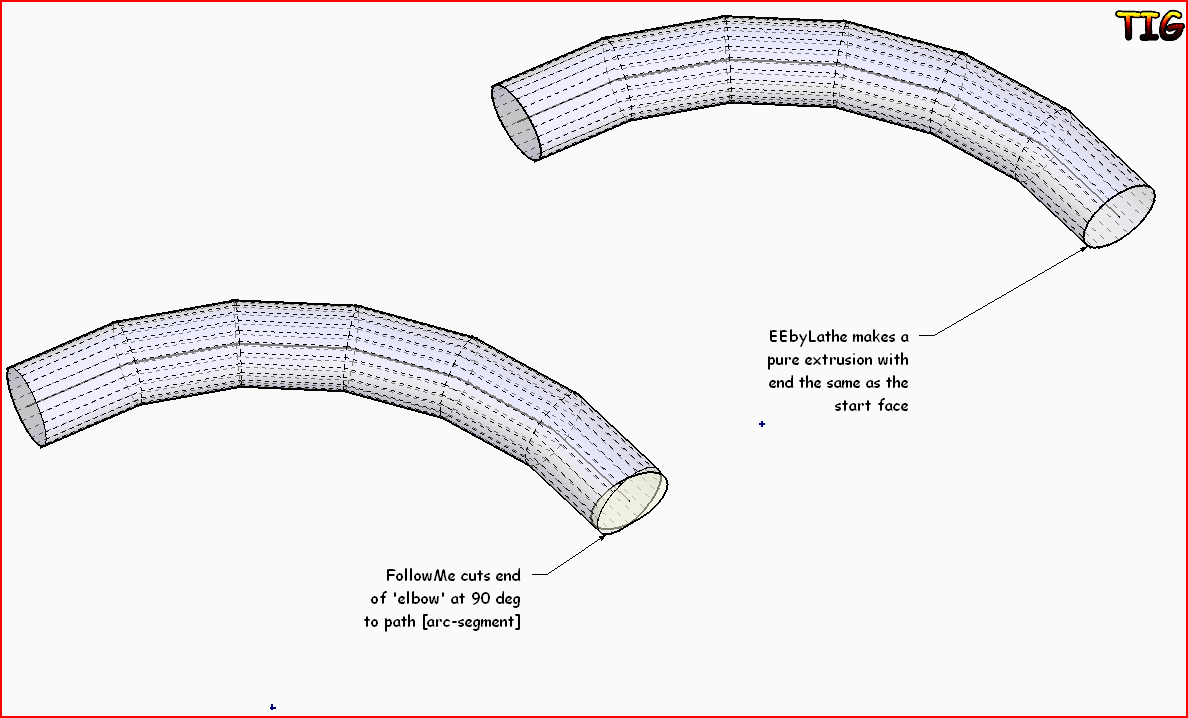
Looking for some quick advice on creating a precise tubular 90 degree bend. What I've noticed is if you use follow-me with an arc of say 12 segments the ends aren't at 90 degrees because they are perpendicular to the last segment of the arc.
Without creating a path with an infinite number of segments what is the best way to get the ends square to a fixed radius?
-
ExtrudeEdgesByLathe lets you specify a 90 degree swept arc and that's what you get without the FollowMe distortion...
-
Many thanks TIG, just what I needed. It was already in my toolbox but now I know what it can do!
-
TIG's plugin makes quick work of it but it can be done manually and it is useful to know how. I use this same method for complex turnings to help keep file size down. Splitting it as I do also makes it possible to hide the seam lines.

Start with a circle instead of an arc. Split the circle at the midpoints of sides to create the arc of the desired angle. In the example above I split out an arc of 45° but if you use a 90° arc, the half-segments at the end will be at 90° from each other. To make it easy I drag out the circle on axis and then rotate it half the angle between vertices. So if a 24 sided circle is used, rotate it 7.5°.


Hello! It looks like you're interested in this conversation, but you don't have an account yet.
Getting fed up of having to scroll through the same posts each visit? When you register for an account, you'll always come back to exactly where you were before, and choose to be notified of new replies (either via email, or push notification). You'll also be able to save bookmarks and upvote posts to show your appreciation to other community members.
With your input, this post could be even better 💗
Register Login


Advertisement