Strange lines on tires
-
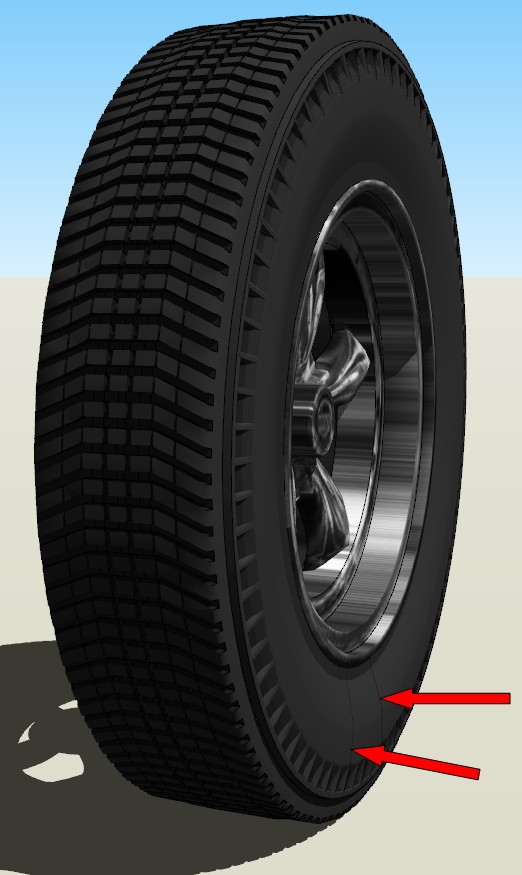
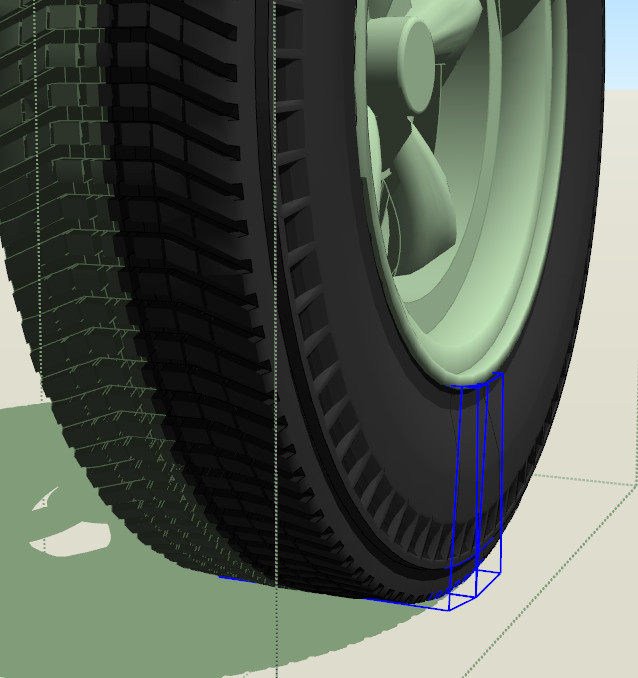
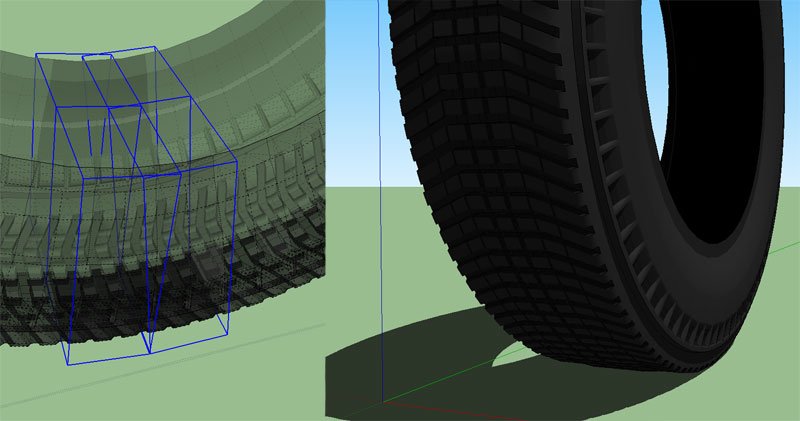
Many times I get two strange lines on my tires, as shown. Always at the bottom of the tire, never anywhere else, and only when shadows are turned on. As the bottom photo shows, they aren't at the sides of a single component, but rather at opposite sides of two components. Any ideas? (and please please please don't tell me it's just another SU quaint quirk. I don't think I can handle another one
 )
)
-
you have to post the .skp.. otherwise you're going to get a thread full of guesses when someone could easily see what's up if they had the model to look at.
-
-
You have two extra components on top of each other.
Remove them and your problem is solved.
-
Well I'll be danged. This explains why it's also happened with some of my other tires, sometimes I use a master "blank" tire model to make my tires, and sure nuff, that model has the extra components. Thanks, I knew someone would solve it
-
@unknownuser said:
You have two extra components on top of each other.
Remove them and your problem is solved.
New issue to me . As point of education what metric can one use to make that determination

-
I'm curious, why wasn't there any "face fighting" with this situation?
-
@mac1 said:
@unknownuser said:
You have two extra components on top of each other.
Remove them and your problem is solved.
New issue to me . As point of education what metric can one use to make that determination
X-Ray
(or just get in there and dig around )
)@hellnbak said:
I'm curious, why wasn't there any "face fighting" with this situation?
there is z fighting going on.. it's just that both sets of faces are the same color with the normals pointing in the same directions so you can't see it.. reverse the faces on one of the components and you'll see it..
-
@unknownuser said:
@mac1 said:
@unknownuser said:
You have two extra components on top of each other.
Remove them and your problem is solved.
New issue to me . As point of education what metric can one use to make that determination
X-Ray
(or just get in there and dig around )What he said.
I opened up the file and the first thing I did was turn on x-ray and hidden lines. I also opened the Outliner and then started "opening" the components until I got down to the problem area (again like Jeff said). I then selected everything in the problem area and noticed in the Outliner that there were too many components highlighted. "There should only be two of those, not four" I said to myself (cheesy I know, sorry).Cheers.
-
And a highly under used tool is outliner. It is really worth getting to know.
-
Thank you!
I'll have to spend more time with your suggestions. BTW I am using SU8 free w/o M2
My outliner ( or I should say by interruption of it )shows the same report irrespective of where I click either the problem area or not. Two components show one for the selected side and one for the mirrored side. The only difference I see is the report of the number of components in the entity info box is not consistent with the number it should be based on the radial array extent. I would never of thought to check that in any trouble shooting I would normally do. Of course the only indication I could get and reason for question was a deletion of a component in the suspect area but still have one left. -
Eric
Sorry did not read your post close enough. I was not " selecting everything in the problem area"




Hello! It looks like you're interested in this conversation, but you don't have an account yet.
Getting fed up of having to scroll through the same posts each visit? When you register for an account, you'll always come back to exactly where you were before, and choose to be notified of new replies (either via email, or push notification). You'll also be able to save bookmarks and upvote posts to show your appreciation to other community members.
With your input, this post could be even better 💗
Register Login


Advertisement