[Plugin] TT_Lib²
-
@bitslapped said:
I do love this plugin and use it a lot in complex models.
I assume you are referring to the CleanUp plugin? (This is the TT_Lib thread...)
@bitslapped said:
What I would love is for the 'smooth angle' feature to have an 'ignore materials' checkbox, so that coplanar faces of different materials do not merge.
That would make it smooth the edge.
@bitslapped said:
E.g I have an organic surface with paths, lawn and garden beds on it. It would be great if the plugin smoothed the surface but left the edges between surface finishes.
It's a good idea. I'll write it up for The List!
-
Sorry, yes I was talking about Cleanup3.
Thanks for considering ThomThom, and yeah the 'ignore materials' was just using your existing terminology to add the feature.
Ideally it would be something like a "maintain material edges" checkbox.Cheers mate, look forward to it

-
ThomThom I am running 8 Pro and am trying to install "solid inspector." I have TT_Lib2 installed in the plugins folder and "tt_solid_inspector" installed in the "plug ins" folder.
When I start 8 I can not find any indciation of the programs existence. Any ieas of where I can begin looking for the problem?
Thanks.
-
@roger said:
ThomThom I am running 8 Pro and am trying to install "solid inspector." I have TT_Lib2 installed in the plugins folder and "tt_solid_inspector" installed in the "plug ins" folder.
When I start 8 I can not find any indciation of the programs existence. Any ieas of where I can begin looking for the problem?
Thanks.
It saids the following, in the description. Did you check there?
@unknownuser said:
Access
Tools > Solid Inspector -
@kyyu said:
@roger said:
ThomThom I am running 8 Pro and am trying to install "solid inspector." I have TT_Lib2 installed in the plugins folder and "tt_solid_inspector" installed in the "plug ins" folder.
When I start 8 I can not find any indciation of the programs existence. Any ieas of where I can begin looking for the problem?
Thanks.
It saids the following, in the description. Did you check there?
@unknownuser said:
Access
Tools > Solid InspectorI had to do a complete system restart before it appeared. Thanks Kwok
-
Gracias TT.
Ya tenía caducada la versión anterior. -
Version 2.5.5
Update for OSX users with Safari 5.0.6 or higher.Not needed for Windows users.
Highly recommended for OSX users as Safari 5.0.6 will break some plugins with webdialogs.
-
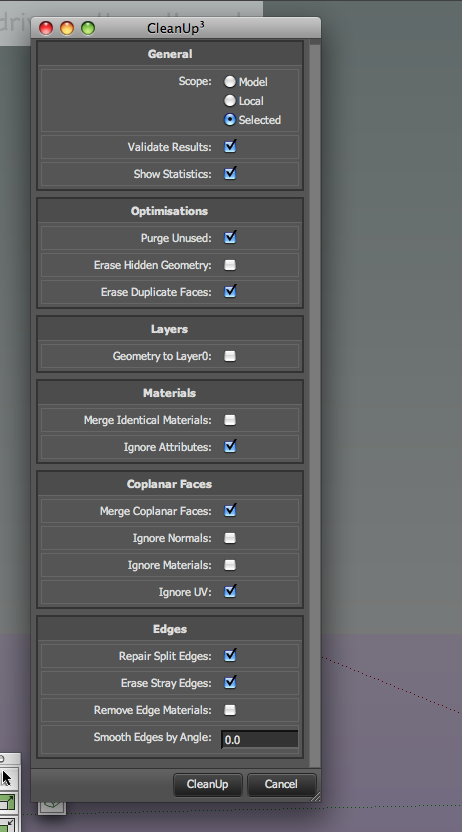
that seems to do the trick for cleanup [image with added css for scrollbar]
john
-
-
Version 2.5.6
Update that hopefully fixes what appear to be a regression from 2.5.4 to 2.5.5 for some Windows users. -
Version 2.5.7
Fixes the fix for the OSX fix that broke WebDialogs for some Windows users.
( I really hope everything is fixed now... )
) -
Version 2.5.8
- Fixed some regression bugs in Inpubox
Recommended update!
-
You'll be happy to know it works here...
I did tweek the height to 790 to stop the 'auto scrollbar' and added, ::-webkit-scrollbar to ui.css
cheers
john -
@driven said:
I did tweek the height to 790 to stop the 'auto scrollbar' and added, ::-webkit-scrollbar to ui.css
Cheers. I've been too busy fixing the bugs to add this yet.
-
-
thank's so much for the update
-
@angelorea_arq said:
look
What settings did you use for that?
Also, could you post the reply in the CleanUp thread as the error is related to CleanUp and not TT_Lib?
-
@angelorea_arq said:
look
Your profile says you use SU8, but exactly what version. The error was triggered in a part for SketchUp prior to SU8M1. Can you post your exact SketchUp version number in addition to the settings you used when you got the error?
-
Version 2.6.0
- LibFredo Update Checker support.
- Lots of new features and fixes.
Important!
QuadFace Tools users need to update to this version! -
Hello
Can you tell me please how can i install the TT lib on the sketchup ?Thank you and sorry for my english


Hello! It looks like you're interested in this conversation, but you don't have an account yet.
Getting fed up of having to scroll through the same posts each visit? When you register for an account, you'll always come back to exactly where you were before, and choose to be notified of new replies (either via email, or push notification). You'll also be able to save bookmarks and upvote posts to show your appreciation to other community members.
With your input, this post could be even better 💗
Register Login


Advertisement