Components Favorites
-
How does one clear the favorites list in the components menu?
Ken
-
Ken,
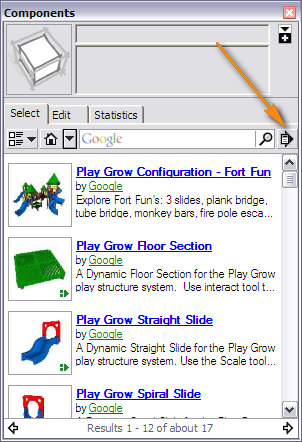
When viewing a favorite, there is a "Remove from favorites" option on the Components dialog's fly-out menu.
-
BUT it'll stay on the recent list... until it 'drops off the end' as more are added to the list...
-
I was having trouble with my component access. I could only access the components one time before the list wouldn't change. So I eliminated all the components directories that I did not use, however, they are still in the favorites. Note, if I started out with a list of 30 entries and end up with only 5 directories/entries, than I can only remove those 5 entries, the other favorites are still there and apparently will not be removed. You can not click on a favorite and say remove this entry.
Darn foiled again.
Thanks for your help.
en
-
I do not even use the component browser since they screwed it up with this online browsing crap. Only for the "In model" components.
-
+1 on that




Hello! It looks like you're interested in this conversation, but you don't have an account yet.
Getting fed up of having to scroll through the same posts each visit? When you register for an account, you'll always come back to exactly where you were before, and choose to be notified of new replies (either via email, or push notification). You'll also be able to save bookmarks and upvote posts to show your appreciation to other community members.
With your input, this post could be even better 💗
Register Login


Advertisement